
WP Tools Debug Log, Repair, Javascript errors, Jquery errors, Increase Maximum Limits, File Permissions, Transients, Error Log
by Bill Minozzi on WordPress.org
50 Tools, Increase Max upload file size limit, Maximum Execution Time, Folder Permissions, show PHP Version, Server Stats, Server Benchmark, PHP Info
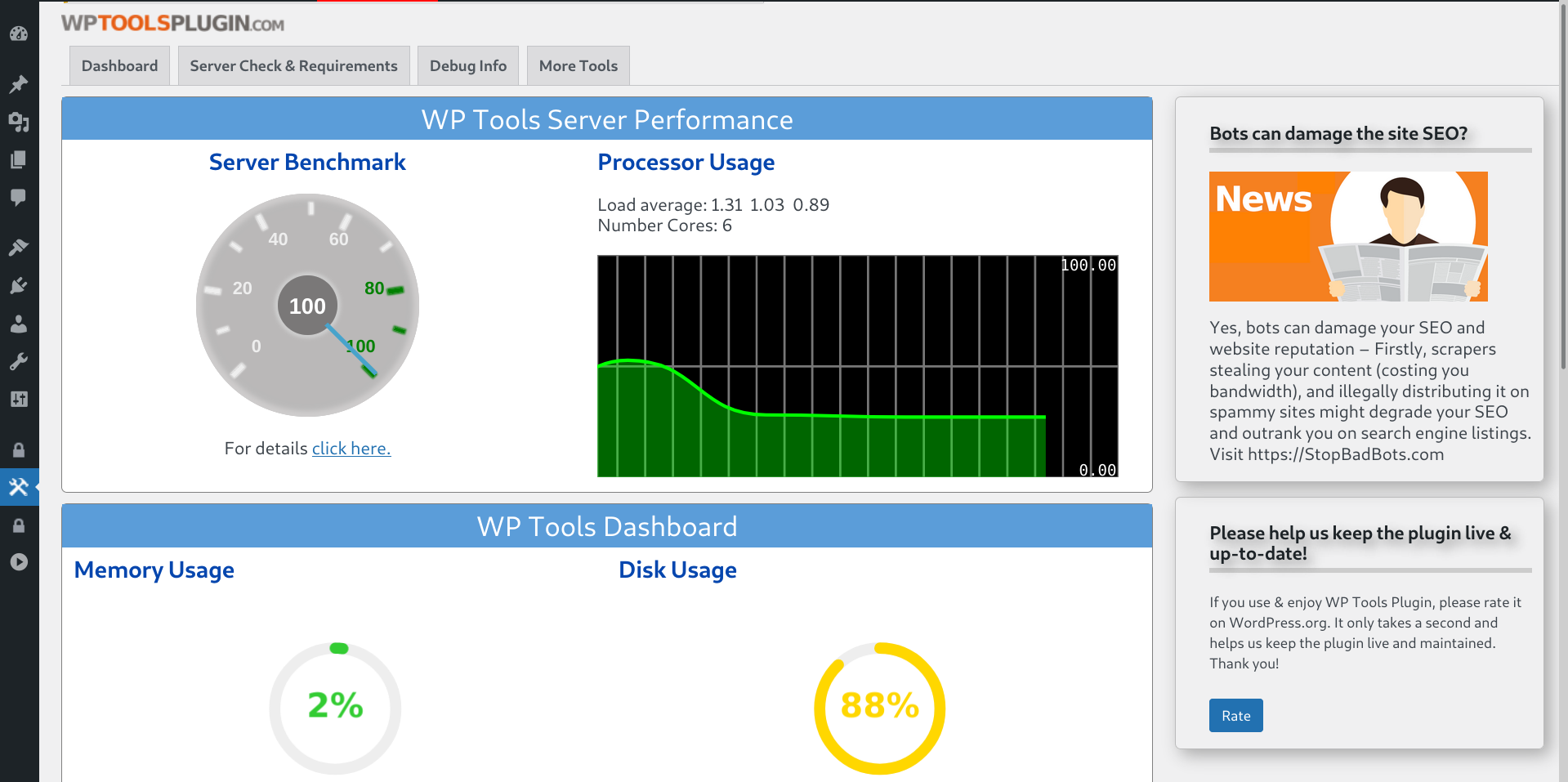
Dashboard Charts
🚀 Short on Time? Here’s Your WordPress Swiss Army Knife!
What it does:
WP-Tools is the ultimate all-in-one WordPress utilities plugin that replaces dozens of separate tools. While others focus on just one function, we give you complete server monitoring, error tracking (debug log), and optimization in a single lightweight package.
Why it matters:
Why install multiple plugins when one does it all? Your time is valuable—stop plugin hopping and start managing.
Most WordPress problems are interconnected: a PHP error causes slow performance, which leads to security vulnerabilities. Unlike single-purpose tools, WP Tools solves the root causes, not just the symptoms.
Why Choose Us Over Single-Function Plugins:
* More Comprehensive: 50+ tools vs. competitors’ limited feature sets
* Better Integrated: All tools work seamlessly together in one dashboard
* Lightweight Performance: Consolidated codebase uses fewer resources than multiple plugins
* Unified Support: One team for all your needs, not scattered support channels
Key Advantages Over Competitors:
* Real-time Error Detection: Catch PHP, MySQL, AND JavaScript errors simultaneously
* Complete Server Insights: From disk space to load averages – see everything that matters
* Proactive Security: File permission checks + security hardening + maintenance controls
* Cloud-Optimized: Specifically engineered for AWS, Digital Ocean, Azure environments
Most Popular Tools:
* Unified Error Console: PHP, JavaScript, and database errors in one place
* Live Server Metrics: Real-time load monitoring directly in your admin bar
* Smart Cleanup: Remove unnecessary files and optimize database with one click
* Safe Configuration Editor: Modify critical settings without touching code files
🔎 Want to Explore All 50+ Tools? Continue Reading Below
The WP Tools plugin (wp-tools) features a comprehensive dashboard showcasing server statistics, including a chart of errors, page load time also by page and boasts over 50 tools designed to simplify your WordPress management tasks. It serves as a versatile Swiss army knife for your WordPress needs.
Catch and alert about Javascript Errors (also jquery errors, javascript errors, jquery migrate) and PHP/MYSQL errors. Block notification email of updates, Hide Admin Bar, Disable Lazy Load, Displays the folders that are taking up more disk space and a lot more…
Translation ready. Files included: Dutch, English, French, Italian, Portuguese, Spanish, and German.
A must have plugin also by cloud hosting as AWS Amazon Lightsail, EC2 instance, Bitnami, Contabo, Azure, Google Cloud, Digital Ocean and others.
“Exploring the Key Features of Our Plugin”:
- Increase the PHP memory limit, Increase Maximum Execution Time limit, and Increase maximum upload file size limit without editing any WordPress or PHP files.
- Show the WordPress errors (PHP errors error_log, error log or error reporting), limited to 200 last WordPress errors to Help you fix issues.
- Show the PHPINFO with a lot of info about your PHP server configuration, also server IP.
- Disable WordPress Native Sitemap Automatic Creation or only user’s sitemap.
- Disables the default notification email sent by a site after an automatic core, theme or plugin update.
- Add Google Search Central HTML TAG.
- Add Google Analytics GA4 Tracking ID.
- Alert on Top Admin Bar if WordPress Debug is active.
- Hide Admin Bar from non Administrators.
- Deactivate Lazy Load functionality.
- Deactivate Emojis functionality.
- Page Load Info: Number of SQL queries per page and page load time.
- Record and send email notifications when PHP notices, warnings and errors happen.
- Show and edit the file robots.txt.
- Show and check MySQL tables and database usage and MySQL details.
- Bypass WordPress debug and show errors and warnings on screen.
- Show Cron Jobs table and delete Cron Jobs without functionality.
- Show file .htaccess.
- Show file wp-config.php.
- Show Cookies.
- Restores the previous classic widgets settings UI screens and disables the gutenberg block editor from managing widgets.
- Disable the WP Admin Bar / Toolbar on the frontend of sites.
- Show Button with WordPress Errors on Admin Toolbar.
- Show Files and Folders Permissions.
- Show Table only with Javascript errors and jQuery Version.
- Replace WordPress logo at login screen.
- Remove WordPress icon from the admin bar.
- Erase readme.html and license.txt files at root folder.
- Show disk total space, disk used and disk free.
- Show Server Benchmark Server Check-Up or Server Checkup.
- Show MySQL Info and database information.
- Disable javascript console log for non administrators.
- Show and check file permissions.
- Enables the WordPress database tools to optimize and repair InnoDB and MyISAM database tables.
- Show and delete Transients.
- Disable Self PingBack.
- Show Search Engine Visibility WordPress Setup.
- Show Server Root Path.
- Site Health Alert.
- Show PHP Extensions Loaded.
- Show PHP Disabled Functions.
- Show MYSQL Table Prefix.
- Show Database charset.
- Show Robots.txt.
- Erase file .maintenance.
- Improve Dashboard Performance by prevent WordPress from fetching news and Clean up WordPress admin dashboard.
- Resolve ‘Incompatible Archive’ issue when installing plugins from zip files by using PclZip instead of ZipArchive. Consider using this option only for new plugin installations.
- Show Server Load Average percentage for the last minute at top admin bar. **
With the last tool, now you can monitor your server load (CPU Usage), in real time, from your wordpress admin panel.
* Show MU Plugins (Must-Use Plugins or Must Use Plugins)
- Allows you to reinstall plugins (force reinstall plugins) without having to delete them or modify the database.(Premium feature)
- Allows you to reinstall WordPress core files (force reinstall) without modifying the database.(Premium feature)
Requirements for use Show Server Load Tool and Dashboard
- Linux Server (not Windows server)
- shell_exec enabled on your PHP (ask for your hosting to enable it if necessary)
- Server Files Readable: /proc/cpuinfo and /proc/stat
- php functions enabled: sys_getloadavg(), disk_total_space(), disk_free_space()
Effortlessly log jQuery Migrate warnings directly to your WordPress error log.
This WordPress plugin intercepts the jQuery Migrate warnings that WordPress outputs (usually in the browser console) and captures them, writing the details to your error_log file.
Why is this useful? It helps administrators find and identify problematic outdated or deprecated jQuery code used by WordPress themes or other plugins.
Instead of hunting through the browser console, you get a centralized jQuery Migrate log on your server. This makes it much easier to debug jQuery issues, locate the source of JavaScript errors flagged by Migrate, and ensure smoother updates or transitions if you plan to disable jQuery Migrate in the future. Use this tool to proactively manage WordPress jQuery Migrate compatibility.
Capturing and handling JavaScript errors
Silent JavaScript errors can break essential site features, such as sections, menus, forms, or sliders, leading to a poor user experience. These errors can also destroy your SEO, as they slow down page loading times and cause parts of the front page to become invisible to search engine crawlers. The WPTools plugin is a jQuery helper and logs these errors directly to the error log, enabling site owners and developers to quickly identify and fix issues. By addressing JavaScript errors, you ensure functionality, enhance user experience, maintain SEO performance, and safeguard compatibility with modern browsers and WordPress updates.
Understanding and resolving WordPress jQuery errors(as jQuery is not defined or $ is not a function or jQuery error after update) is crucial. Our plugin provides a significant advantage in tackling jQuery migrate WordPress issues and WordPress jQuery compatibility. By capturing jQuery warnings and errors and logging them centrally, WPTools helps you pinpoint the source of jQuery update issues and effectively fix jQuery errors from themes or plugins. This proactive approach to managing WordPress plugin jQuery migrate compatibility ensures a more stable site and smoother transitions. WPTools can illuminate potential problems that could impact your site’s performance and SEO.
Lifetime license with premium enhancements: One-time payment of just $17.99!
PHP INFO DETAILS
On PHP INFO page, you can get, for example:
* Server PHP Inf
* Display PHP Version
* Operating System details
* PHP.INI path (Configuration File (php.ini) Path )
* Log Errors on or off
* FTP (FTP Support)
* GD
* MySql and MySqli version
* Session
* Soap
* XML
* ZIP
* ZLIB
* Timezone
* Cookies
* Modules
* PHP Variables
* Post Max Size (Post Max Size, Post Maximum Size)
* max_execution_time (set_time_limit, max execution time, (maximum execution time exceeded))
* max_file_uploads, upload_max_filesize (max file uploads, maximum file uploads)
* max_input_nesting_level (max input nesting level)
* max_input_time (max input time, maximum input time)
* max_input_vars (max input vars, maximum input vars)
* memory_limit (Memory Limit)
* smtp_port (smtp port)
* A lot more …
mySQL info
On database details page, you can get, for example:
- MySQL (or Maria Database) version
- Database size (Database Usage)
- Index size (Index Disk Usage)
- max_allowed_packet (max allowed packet, maximum allowed packet)
- default_storage_engine (default storage engine)
- max_connections (max_connections, maximum connections)
- max_user_connections (max user connections, maximum user connections)
- thread_cache_size (thread cache size)
- query_cache_type (query cache type)
- query_cache_size (query cache size)
- sort_buffer_size (sort buffer size)
- read_buffer_size (read buffer size)
- port (mysql Port)
- tmp_table_size (tmp table size)
- read_rnd_buffer_size (read rnd buffer size)
- join_buffer_size (join buffer size)
- table_definition_cache (table definition cache)
- table_open_cache (table open cache)
- character_set_system (character set system)
- default_storage_engine (default storage engine)
- A lot more …
Multisite
Not tested on Multisite.
3rd party as a service
The WP Tools plugin offers an a optional free Community Server Performance service.
To participate, you must enable the feature within the plugin by checking
the box labeled “Participate in Community Server Performance.” on plugin Settings page.
Enabling this feature allows your site to share only server performance data with the WP Tools Plugin.
In return, your WordPress site receives updated aggregated industry average data.
The data collect are:
Time
PHP and MYSQL Version
Platform is Linux?
Server ip address
Benchmark (only time): Math, String, Loops, Conditionals
MYSQL (only time): Connect, Select DB, Query Version, Benchmark
We will create an aggregated industry average data and let you see in your dashboard.
The WPTools plugin will retrieve tips and news from our site BillMinozzi.com. This information will be displayed in the plugin dashboard, in the right-hand column under the title “Tips and News.” No data is sent to our server.
These are the terms of use for our plugins.
To learn more details about the wptools plugin, visit the plugin site.
External service (1)
When using our chat, only some information about issues, such as your language and data from the Diagnose tab, may be sent to our server. We do not share, publish, or disclose any information with third parties.
domain: https://BillMinozzi.com/chat/api/api.php
External service (2)
The plugin will retrieve tips and news from our site BillMinozzi.com. This information will be displayed in the plugin dashboard, in the right-hand column under the title “Tips and News.” No data is sent to our server.
domain: https://billminozzi.com/API/bill-api.php
Advanced Site Health
WordPresss built-in Site Health feature provides a great baseline for your sites well-being. However, in todays digital landscape, true health goes beyond server configuration. A site can have a perfect score and still be slow, vulnerable, or plagued by critical errors.
Our plugin extends the core Site Health concept to provide a truly holistic analysis of what keeps your site fast, stable, and secure. We dont just check the basics; we diagnose critical issues that directly impact your visitors experience and your sites operational integrity.
Our enhanced checks include:Performance & Memory Analysis, Proactive Error Detection, Modern Security Monitoring.
That involves querying public, authoritative services like rdap.db.ripe.net with visitor IP addresses for security analysis.
domain: https://rdap.db.ripe.net/ip/
For a complete overview of all features, our data handling practices, and the full terms governing our software, please visit our official website:
https://siterightaway.net/terms-of-use-of-our-plugins-and-themes/