
Library Viewer
by Pexle Chris on WordPress.org
A File & Folder Viewer for FTP folders, enabling the display of library contents (folders & files) on the front-end.
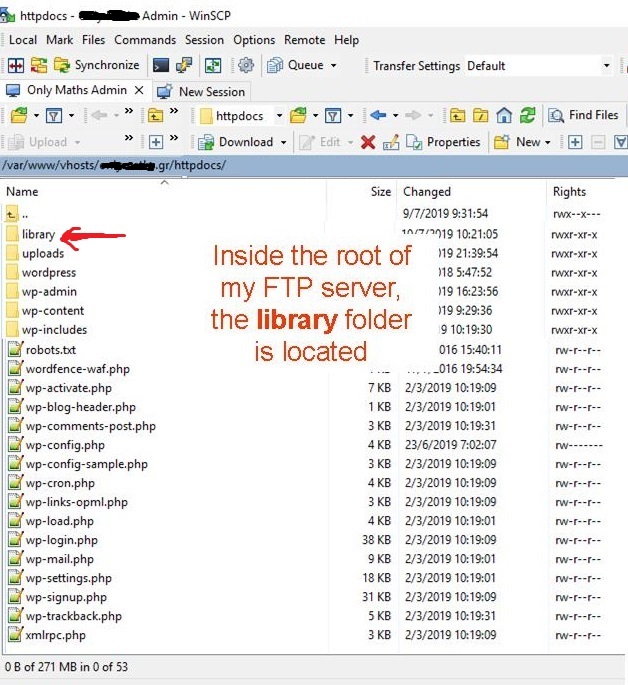
library folder must be located in the root of your FTP server
Spoiler:
LIBRARY VIEWER FOR WOOCOMMERCE ADD-ON has been released! Check it 😉
With Library Viewer, you can display the containing files and the containing folders of a “specific folder” of your (FTP) server to your users in the front-end.
The significant difference from other similar plugins is that:
1. You can allow users to view that the files exist, but cannot open them if they are not logged in (or if they are not administrators, or authors etc…).
2. You can allow users to view files in a custom viewer or redirect them through a RESTful web service of your choice(examples exists below).
For this plugin (the free version), the “specific folder” is the folder
“library” of your httpdocs(yoursite.com/library).
If you want to display other folder (and its files) that isn’t contained in yoursite.com/library , you need to use the path parameter of Library Viewer Pro.
This plugin adds the [library-viewer] shortcode in your WordPress site!
So the only thing that you must do to display the folders and files in the front-end is to add this shortcode in a post, page, widget etc.
The [library-viewer] shortcode get optional parameters that extend the functionality of plugin:
Parameters Documentation
PARAMETERS DOCUMENTATION AND USE CASES
PARAMETERS OF LIBRARY VIEWER
- have_file_access (have_file_access parameter determines which user have access to view the files.)
- my_doc_viewer (my_doc_viewer parameter determines in which viewer the file will be opened.)
- login_page (login_page parameter defines the login page that user will be redirected -if need it-, to log in.)
PARAMETERS OF LIBRARY VIEWER FOR WOOCOMMERCE
- have_file_access=”customer_with_folder_access” (The
customer_with_folder_accessvalue for thehave_file_accessparameter grants access to users who have purchased a product with folder access.) - sold_on (sold_on parameter specifies which product must be purchased in order to gain folder access.)
PARAMETERS OF LIBRARY VIEWER PRO
- path (path determines which folder to display in the Library on the front end. When we refer to a “folder,” we mean the folder’s contents, including any subfolders and files within it.)
- guest_view_access (guest_view_access determines if guest users can view folder contents. By default, all users can see folder contents, but they cannot open files.)
- waiting_seconds (waiting_seconds parameter sets the seconds of user is waiting the redirection to login and see the file (0: for instant redirect).)
- breadcrumb (breadcrumb parameter determines if breadcrumb will be displayed in the Library in front-end or not.)
- hidden_folders (hidden_folders determines which folders will not be displayed and will not be accessible by Library in the front-end.)
- shown_folders (shown_folders parameter determines which folders will be displayed and will be accessible by Library in the front-end.)
- hidden_files (hidden_files determines which files will not be displayed and will not be accessible by Library in the front-end.)
- shown_files (shown_files parameter determines which files will be displayed and will be accessible by Library in the front-end.)
- url_suffix (url_suffix allow you to add a suffix in the URL, so you can use the [library-viewer] shortcode more than one time in the same page.)
PARAMETERS OF LIBRARY VIEWER FILE MANAGER ADD-ON
- delete_folder (delete_folder parameter determines which user can delete a folder.)
- delete_file (delete_file parameter determines which user can delete a file.)
- rename_folder (rename_folder parameter determines which user can rename a folder.)
- rename_file (rename_folder parameter determines which user can rename a file.)
- create_folder (create_folder parameter determines which user can create a folder.)
- upload_file (upload_file parameter determines which user can upload a file.)
- unzip_file (unzip_file parameter determines which user can unzip a zip file.)
- download_folder (download_folder parameter determines which user can download a folder as a zip file.)
- download_file (download_file parameter determines which user can download a file.)
PARAMETERS DOCUMENTATION AND USE CASES
Hooks Documentation
From 2.0.0 version and then, there are many hooks that you can customize the functionality of this plugin.
You can read more in HOOKS DOCUMENTATION
Read also how to add PHP hooks in your WordPress Site in my blog
Other Details
- The algorithm does not show in the front-end folders that contains in their name the string “hidden-folder”.
Also does not show .php , .ini files and files that contains in their name the string “hidden-file”.
So if you don’t want to display an existing folder or file, you can rename it appropriately!
In addition, With Library Viewer Pro, you can set the names that you don’t (and you do) want to be displayed in the front-end using appropriate shortcode parameters. - If you want to add text above the front-end folders or below the front-end files, view more in the FAQ below.
- In addition, with the LIBRARY VIEWER PRO you can,
- customize the URLs of library viewer, with the hooks and the parameters.
- you can display folders & files of a directory (in FTP) of your choice, not only library directory (yoursite.com/library)
- you can hide the breadcrumb with just a shortcode parameter.
- you can show/hide the folders and files of your choice.
- Also, with the LIBRARY VIEWER FOR WOOCOMMERCE ADD-ON you can,
- give the ability to you users to gain folder access to a Library (to a page with the Library Viewer shortcode installed), just buying a virtual/with-folder-access product.
- Finally, with the LIBRARY VIEWER FILE MANAGER ADD-ON you can,
- give the ability to your users to have their own library and to upload and edit files.
- use the library as file manager for your admins (you may need also Library Viewer Pro, and to restrict the WP page from other users)