
Document Library Lite
by Barn2 Plugins on WordPress.org
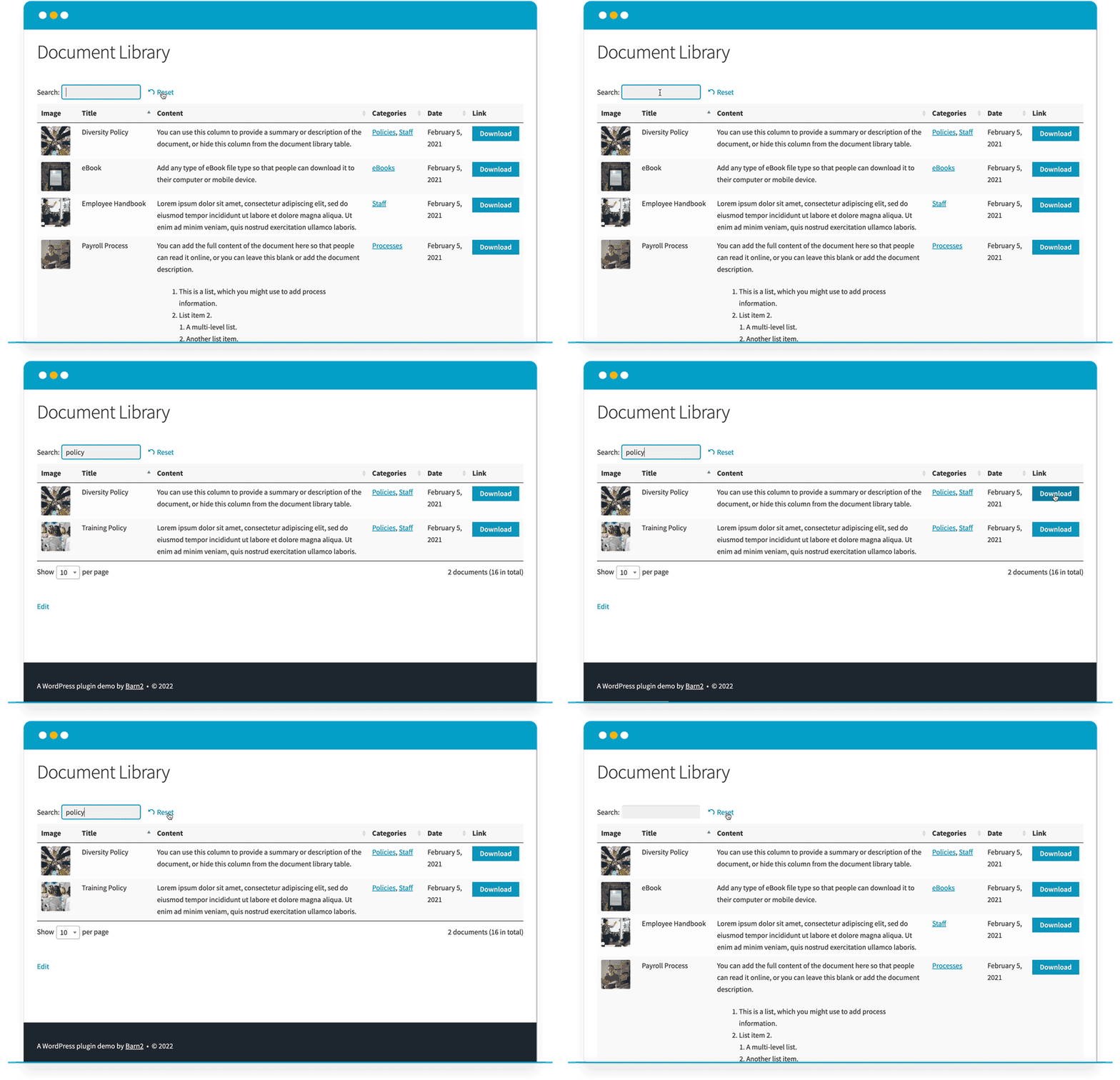
Searching a WordPress document library.
Document Library Lite creates a WordPress document library/download manager. It displays documents in a table layout and allows users to quickly search for, sort and download documents.
View the plugin demo to see it in action.
Features
- Easy document management – add documents of any file type, plus all the document data you want to display.
- List documents in searchable, sortable tables.
- Choose any or all of the following columns: ID, image, title, content, date, categories, plus download button.
- List all files in your document library, or list them by category or status.
- 100% responsive – works on any screen size or mobile device.
Supports the following file types:
- DOC, DOCX (Microsoft Word)
- XLS, XLSX (Microsoft Excel)
- PPT, PPTX, PPS, PPSX (Microsoft PowerPoint)
- ODT, ODS, ODP (OpenDocument Format)
- JPG, JPEG, PNG, SVG (image files)
- MP4, MOV (video files)
- .numbers, .pages, .key (Apple document formats)
- And many more
The plugin adds a dedicated ‘Documents’ section to the Media Library where you can manage documents separately from images and other media types. If you’ve ever wanted Media Library categories then you can filter the media library to view document files only.
The document library makes things easier for your users. Instead of having to read through a long list of document links, they can use the instant search box, sortable columns and category filters to find exactly what they’re looking for. They can click to download documents of any file type straight to their device.
To get started with the WordPress download manager plugin, simply install the plugin, start adding documents and they will instantly appear on the ‘Document Library’ page. You can also use the [doc_library] shortcode to insert document libraries anywhere.
Document Library Pro
Our Pro version adds lots more functionality to take your WordPress document management to the next level.
View free & pro comparison table
- Bulk upload – Add files using drag and drop file upload, CSV import, or import Media Library files to the download manager.
- Extra layout options – Display documents in a beautiful grid layout, and optionally structure the WordPress document library into collapsible folders.
- Add extra columns – File size, file type, document excerpt, status, last modified date, author, plus custom fields and custom taxonomies. You can also rename the column headings of the document library. Advanced Custom Fields and ACF Pro support.
- Individual document pages – Create a separate page for each document.
- Host documents on third party sites – As well as displaying files from the Media Library, your WordPress download manager can include documents hosted on third party sites such as Dropbox, Google Drive, and Office 365.
- Private document libraries – Restrict access to any or all of your document libraries either through simple password protection, or to specific roles or use accounts. Either protect the library globally or via category or individual document.
- Version control – Manage multiple versions of the same document, keeping your library organized and up to date.
- Control which downloads to list – Display documents based on additional factors including author, post type, taxonomy term, custom field, year, month, day, or ID. You can also exclude documents from the file manager by ID or category.
- Filter dropdowns – Make it easier for people to find specific documents by adding filter dropdowns for categories, tags and taxonomies.
- Standalone document search – As well as the AJAX search box above the document library, you can use the ‘Document search’ widget or [doc_search] shortcode to add a search box anywhere on your site. For example, you can use this to display a ‘Find Downloads’ search box to the homepage, site header, or sidebar.
- Flexible document links – Control the links in your WordPress document library including choosing which columns are clickable and opening links in a new tab.
- Multiple document download – Allow users to select multiple documents and download them together in a handy zip file.
- Instant document preview – Display ‘Preview’ buttons so that users can view documents without downloading them.
- Display audio and video – As well as downloadable documents, display embedded audio and video players directly in the WordPress document library.
- Caching – Speed up load times with built-in caching.
- Compatibility with third party plugins – Tested with dozens of other plugins.
- And much more – PLUS get dozens of extra features for added flexibility, such as the ability to show and hide each part of the WordPress download manager, customize the colors, and more.
How to Create a WordPress File Manager
You can use Document Library Lite to create a download manager which lists documents of any file type. It’s perfect for creating a WordPress document library, resource library, download management, file manager, audio library, video gallery, and much more.
First, install the plugin and choose your settings at Documents > Settings. This page gives you full control over the WordPress file manager including which columns to display, and the text of the document download button.
Next, you can start adding documents at Documents > Add New. The plugin automatically adds a ‘Document Library’ page to your WordPress site. This page lists all your documents in a searchable, sortable table. Each file in the download manager appears as a separate row of the table, complete with helpful information such as the filename and summary description. This helps users to learn more about each document before downloading the file to their computer.
For more flexibility, you can use the [doc_library] shortcode to list different downloads on different parts of your site. Use the shortcode options to override the global settings and apply different options to each document library. And don’t forget, you can get dozens more shortcode options with our premium Document Library Pro plugin!
Full List of Features
- Add documents, document data, and upload a file for each document.
- Supports all file types.
- Built-in ‘Document Library’ page which automatically lists all your downloads.
[doc_library]shortcode for added flexibility.- List documents in a table with sortable columns.
- Choice of 6 styles for your document download links including buttons, download icons, file type icons, and text.
- Instant AJAX search box to find documents more quickly.
- ‘Search on click’ feature to filter the WordPress file manager by clicking on a document category.
- Display the number of documents in the table, and allow users to change this number.
- For easier WordPress document management, you can filter the Media Library to view document files only.
- Structure the download manager into categories.
- Choose the number of downloads per page in the document library.
- Optional lazy load setting to list unlimited documents with no performance limitations.
- Change how the WordPress document library is sorted, and customize the sort order for your file manager.
- Display the document featured image and allow users to open the image and view it in a lightbox.
- Configure your file manager centrally on the plugin settings page, and instantly update all your document lists (except where you have overridden specific options in the shortcode).
- Developed, maintained and supported by Barn2 Plugins.
View the plugin documentation for full details.
Shortcode options
Options for the [doc_library] shortcode:
- content – The columns to display in the document library. This can be any combination of the following (comma-separated): id, image, title, content, categories, or date.
- doc_category – List downloads from a specific category only.
- status – List documents based on their status (e.g. published/draft/private).
- lightbox – Enable or disable the feature which opens document featured images in a lightbox modal window.
- docs_per_page – Change the number of documents on each page of the library.
- link_style – Choose the style of the document download links. This can be any of the following: button, button_icon_text, button_icon, icon_only, icon, or text.
- lazy_load – List unlimited documents with no performance limitations.
- sort_by – Override the sort order of the WordPress download manager library.
- sort_order – Choose whether files are ordered alphabetically in ascending or descending order.
- scroll_offset – If your theme has a sticky header then you can use this option to ensure that users are jumped to the correct point of the page when they use the pagination buttons at the bottom of the WordPress document library.
- wrap – By default, if the document library contains too much text to fit on one row then it wraps onto multiple rows. If you prefer, then you can truncate the text and ensure that each download only takes up 1 row of the library. This helps to save space if you have a large download manager table.
- search_on_click – Allow users to click on a category in the ‘Document categories’ column in order to filter the download library by that column.
For example: [doc_library doc_category="meetings" content="title,content,link" sort_by="date"]
View the full documentation, check out the demo, and if you need more features then have a look at Document Library Pro.
Thank you for using our WordPress document library plugin 🙂