Popup for Contact Form 7.
Live Demo | Documentation | Upgrade to Pro!
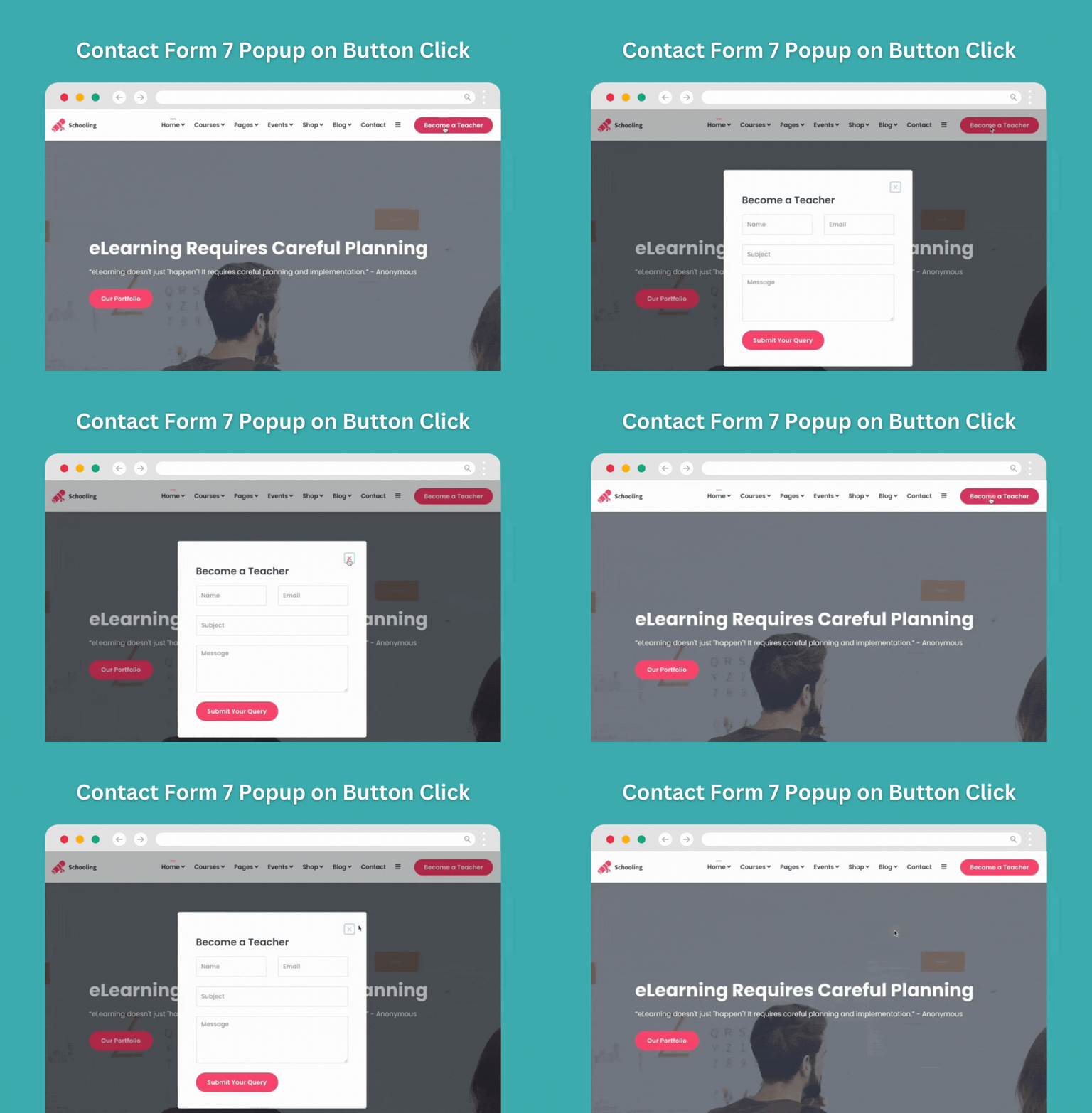
Contact Form 7 popup is a powerful and flexible solution for displaying Contact Form 7 forms in an attractive popup window on your WordPress website. It allows you to open a Contact Form 7 popup instantly when a user clicks a button, improving engagement without redirecting visitors to a separate page.
If you’re looking for an easy way to show a contact form in a popup on button click, Contact Form 7 popup is the ideal plugin for your site. Using a custom shortcode, you can add the popup button anywhere on your website, including posts, pages, widgets, or custom layouts.
The plugin is built on top of the popular Contact Form 7 plugin, ensuring compatibility and reliability. You can assign different Contact Form 7 forms to different popup buttons and display them in multiple locations across your site. Each popup button can be fully customized, including button text, color, and size, directly from the plugin settings.
It also includes WooCommerce-specific options, allowing you to display the Contact Form 7 popup button on WooCommerce product pages. This makes it easy for customers to submit product inquiries, pre-sales questions, or custom requests directly from the product page.
Contact Form 7 in Popup
You might need to get feedback from users or create leads from site visitors. And you need to add a popup form for this on a certain page. And you want the popup button to be in the middle of the page text. In this case, this is the best option for you. Create contact form 7 popup form quickly and show it smartly.
Looking for other contact form popup?
WPB Contact Form Popup is our new plugin. It is compatible with all of the other popular contact form plugins. Examples include WPForms, Mailchimp, Forminator, Ninja Forms, Formidable, Form Maker by 10Web, weForms, Fluent Forms, HappyForms, WS Form, WPEverest User Registration, WP User Frontend, Bookly, Everest Forms, Kali Forms, and Bit Form. More integrations are on the way.
Popup for Contact Form 7 Key Features
- Showing the Contact Form 7 popup on a button click.
- Ajax-powered Contact Form 7 modal popup.
- Advanced Contact Form 7 popup Elementor widget.
- Show the button using ShortCode, PHP function, and action hook.
- Show different popup buttons on different pages with different forms.
- Advanced settings for button and popup style configuration.
- Very easy to use.
- RTL and multi-language ready.
Premium Key Features
- Popup buttons for the Contact Form 7 forms.
- Show the buttons using ShortCodes and action hooks.
- Show different popup buttons on different locations with different forms.
- Including a link to the popup in the navigation menu.
- Initiate the popup form automatically on chosen pages based on a variety of conditions. There is no need to push any buttons.
- Automatic pop-ups can be set to appear in response to various events, such as page load, tab close, scroll down, or hovering over an element.
- Specific URLs or page/post type IDs can trigger an automated popup.
- Advanced settings for button and popup style configuration.
- Configurable options for the open and close animations of popups.
- Settings for closing the popup on successfully submitting the form.
- Elementor widget for easy use with the Elementor page builder.
- Use the popup as a standalone widget or integrate it into other Elementor widgets.
- Advanced popup buttons generator, for adding multiple different customized popup buttons.
- The popup buttons can be shown to any action hooks.
- Beautiful design for the forms that show in the popup.
- RTL Support and mobile responsive.
- Easy to use and customize.
- Online documentation and video tutorials.
- Quality support, and free installation if required.
- Tested with hundreds of popular themes and plugins.
- Tested with the Gutenberg Editor.
- Regular updates.
Video Credit: WP Design Lab.
Addons Support
- Conditional Fields for Contact Form 7 By Jules Colle.
- ReCaptcha v2 for Contact Form 7 By IQComputing.
- Drag and Drop Multiple File Upload – Contact Form 7 By Glen Don L. Mongaya.
Support and Documentation
Using this plugin is super easy as we have details online documentation for this. If you are having any issue with this plugin our expert support team always ready for you. Just open a support ticket on our support forum.
Tested with the Following Themes
- Astra
- Ocean WP
- Hestia
- Kadence
- Neve
- Blocksy
- GeneratePress
- StudioPress
- Hello Elementor
- Divi
- Storefront
- Flatsome
- Avada
- Tove
- Raft
- Neve FSE
- The7
- and Many More.
Tested with the Following Page Builders
- Gutenberg
- Elementor & Elementor Pro
- Divi
- WPBakery
- Visual Composer
- Beaver Builder
- Oxygen
- GeneratePress