
WP Simple HTML Sitemap
by Ashish Ajani on WordPress.org
Using Simple HTML Sitemap plugin, you can add HTML Sitemap anywhere on the website using Shortcode.
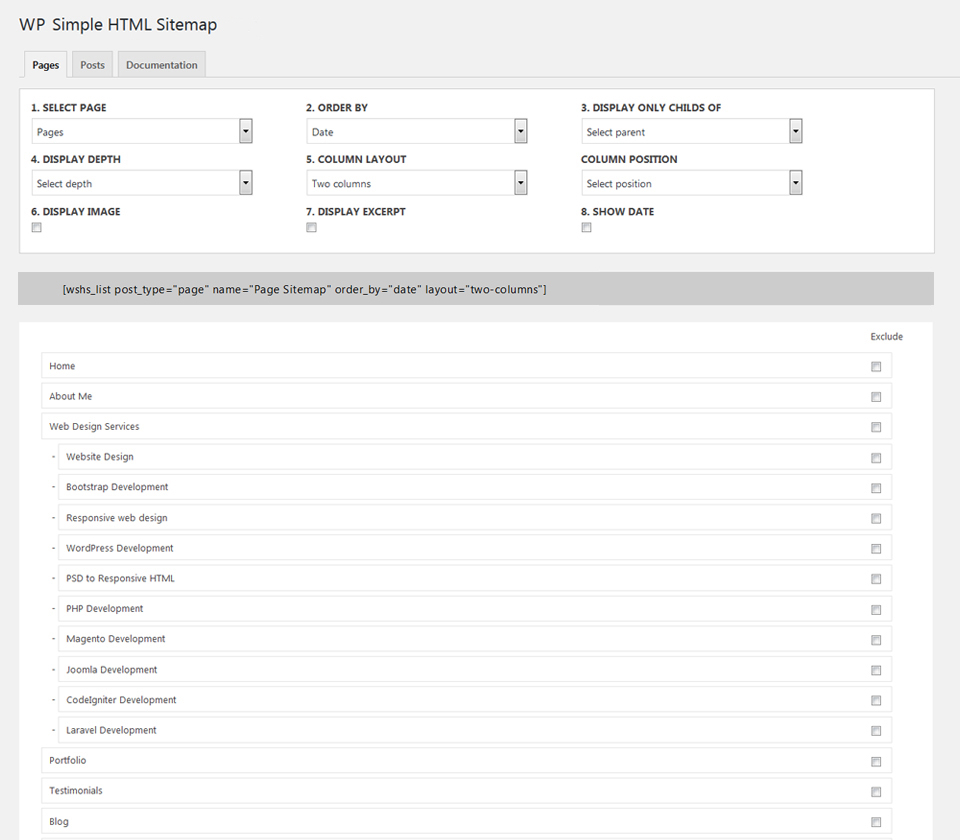
Page Sitemap Configuration Options
HTML sitemap helps website visitors navigating through a website. Simple HTML Sitemap plugin provides facility to generate shortcode and show HTML sitemap using generated shortcode. If you are running WordPress website having large number of CMS pages and blogs, this plugin can be really useful for you. This plugin is very simple and easy to use, yet it provides various configuration options to generate sitemap shortcode and place it anywhere on the website.
Features Overview
- Easy to install and configure
- Offers wide variety of settings for pages and posts
- Helpful in SEO as Google still values the HTML sitemap
- Provides options to generate shortcode and use on any page or post
- Allows interlinking pages and post easily
- Allows saving generated short code for the reuse
Page shortcode example and parameters
Here is an example of shortcode to generate HTML Sitemap for pages
[wshs_list post_type="page" name="Page Sitemap" order_by="title" show_image="true" image_width="30" image_height="30" content_limit="140" show_date="true" date="created" date_format="F j, Y" depth="4" layout="single-column" position="left"]
Explanation of parameters:
- post_type=”page” – This shortcode will generate HTML sitemap of pages
- name=”Page Sitemap” – You can specify sitemap heading (title)
- order_by=”title” – Pages will be ordered by title alphabetically in ascending order
- order=”asc” – Values can be asc or desc
- child_of=”” – To specify the parent page by adding parent page ID
- show_image=”true” – A small image of all pages will be included, if it is not available then placeholder image will be shown
- image_width=”30″ – Images will be 30 pixels wider
- image_height=”30″ – Height of the image will be 30 pixels
- content_limit=”140″ – Excerpt will be included under the post title with maximum 140 characters
- show_date=”true” – The date will appear for all items in the sitemap
- date=”created” – Date when the page was created
- date_format=”F j, Y” – How the date will appear (in this case it will be like June 29, 2018)
- layout=”single-column” – To show the sitemap in single column or in two columns
- position=”left” – For two-columns, you can choose to show sitemap in left or right column
- horizontal=”true” – This will generate sitemap having horizontal view
- separator=” |” – Allows to add separator like ‘|’ or ‘/’ or ‘\’
- exclude=”100,122,155″ – Comma separated list of post IDs to exclude from the sitemap.
Post shortcode example and parameters
Here is an example of shortcode to generate HTML Sitemap for posts
[wshs_list post_type="post" name="Post Sitemap" order_by="title" show_image="true" image_width="30" image_height="30" content_limit="140" show_date="true" date="created" date_format="F j, Y" layout="single-column" taxonomy="category" terms="wordpress-plugins"]
Explanation of parameters:
- post_type=”post” – This shortcode will generate HTML sitemap of posts
- name=”Post Sitemap” – You can specify sitemap heading (title)
- order_by=”title” – Posts will be ordered by title alphabetically in ascending order
- show_image=”true” – A small image of all pages will be included, if it is not
- image_width=”30″ – Images will be 30 pixels wider
- image_height=”30″ – Height of the image will be 30 pixels
- content_limit=”140″ – Excerpt will be included under the post title with maximum 140 characters
- show_date=”true” – The date will appear for all items in the sitemap
- date=”created” – Date when the page was created
- date_format=”F j, Y” – How the date will appear (in this case it will be like June 29, 2018)
- layout=”full” – To show the sitemap in full page or in half view
- position=”left” – For half layout, you can choose to show sitemap in left or right column
- taxonomy=”category” – To include custom taxonomy
- terms=”wordpress-plugins” – To include term of the custom taxonomy
- horizontal=”true” – This will generate sitemap having horizontal view
- separator=” |” – Allows to add separator like ‘|’ or ‘/’ or ‘\’
- exclude=”100,122,155″ – Comma separated list of post IDs to exclude from the sitemap.
Important note: If you like to generate a sitemap having both posts and pages, you need to use two shortcodes. One for the pages and another for the posts.
If you like learn more about shortcode parameters and other configuration options available at admin area, please take a look at here Simple HTML Sitemap Plugin
Please feel free to connect with me in case if you find any difficulties using this plugin, I’ll remain attentive to comments. You can use this form to connect with me https://freelancer-coder.com/contact-wordpress-developer/