WP Crontrol
by John Blackbourn on WordPress.org
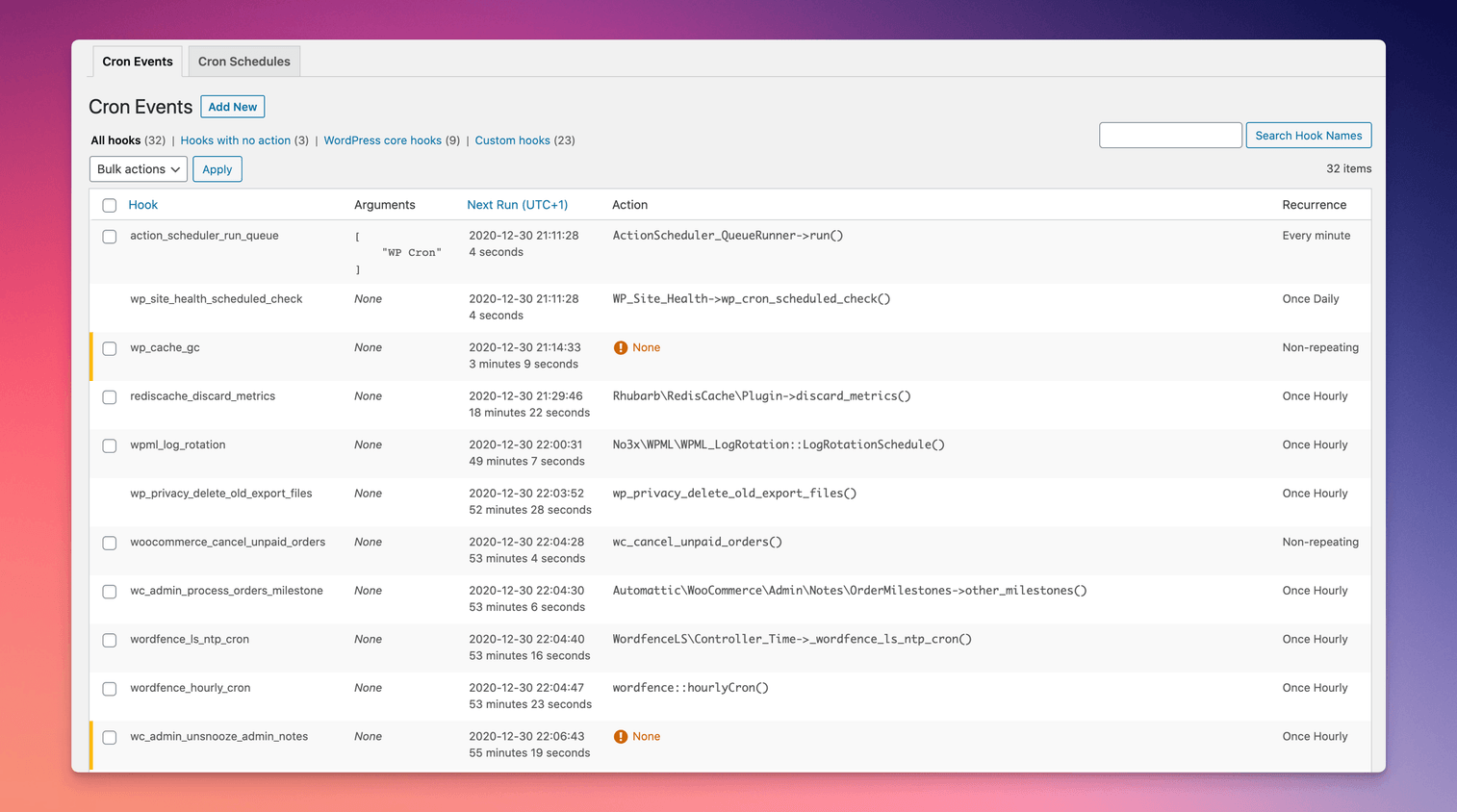
Cron events can be modified, deleted, and executed
WP Crontrol enables you to take control of the scheduled cron events on your WordPress website or WooCommerce store. From the admin screens you can:
- View all scheduled cron events along with their arguments, schedule, callback functions, and when they are next due.
- Edit, delete, pause, resume, and immediately run cron events.
- Add new cron events.
- Bulk delete cron events.
- Add and remove custom cron schedules.
- Export and download cron event lists as a CSV file.
WP Crontrol is aware of timezones, will alert you to events that have no actions or that have missed their schedule, and will show you a helpful warning message if it detects any problems with your cron system.
Usage
- Go to the
Tools Cron Eventsmenu to manage cron events. - Go to the
Settings Cron Schedulesmenu to manage cron schedules.
Documentation
For site owners
Owners of WordPress websites and WooCommerce stores use WP Crontrol to ensure that scheduled cron events run correctly and efficiently. By providing complete control over cron events, WP Crontrol helps you:
- Improve reliability: Address missed or failed cron events, ensuring your website or WooCommerce store continues to function as expected.
- Enhance security: Monitor and control cron events to ensure automatic update checks are performed as they should.
- Simplify management: Add, edit, delete, and pause cron events from a user-friendly interface, without needing to write any code.
- Gain insights: Export cron event data for analysis or reporting.
- Action Scheduler compatibility: Full support for the Action Scheduler system in WooCommerce, which is used to process recurring payments, subscriptions, and background orders.
- Clarity of times and timezones: All times are shown with a clear and accurate indication of which timezone applies. No more guesswork!
For developers
Developers use WP Crontrol to streamline and debug their WordPress development process:
- Enhanced debugging: Identify and troubleshoot issues with scheduled tasks, ensuring your scheduled events and their callbacks run as expected.
- Custom schedules: Create and manage custom cron schedules to fit the specific needs of your website, plugins, or themes, providing greater flexibility than just the core schedules.
- Efficient workflow: Add, edit, and delete cron events directly from the WordPress admin interface, saving time and reducing the need for manual coding.
- Insightful monitoring: Get insight into the performance and behavior of your scheduled tasks, allowing for optimization and better resource management.
- Accurate debugging: WP Crontrol goes to great lengths to ensure that running an event manually does so in a manner which exactly matches how WordPress core runs schdeuled events. This ensures that you can debug events accurately and with confidence.
Other Plugins
I maintain several other plugins for developers. Check them out:
- Query Monitor is the developer tools panel for WordPress.
- User Switching provides instant switching between user accounts in WordPress.
Privacy Statement
WP Crontrol is private by default and always will be. It does not send data to any third party, nor does it include any third party resources. WP Crontrol’s full privacy statement can be found here.
Accessibility Statement
WP Crontrol aims to be fully accessible to all of its users. WP Crontrol’s full accessibility statement can be found here.