Category Show
by chackal_sjc on WordPress.org
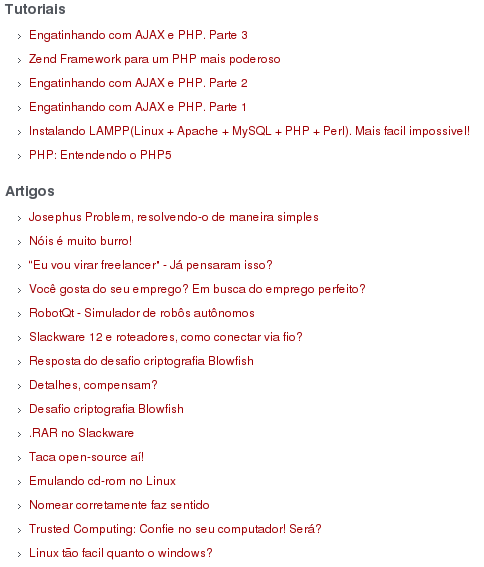
Plugin in action executing 2 times in the same post.
It’s an easy way to show and order all posts from category/tag into a page/post. Really handy for showing your tutorials, articles, etcetera.
It shows as a list(
- ) so it will apply your blog style-sheet as you wish.
Note: If the selected term(category or tag) has a description, it will be shown in a
tag.
To see it in action click here.
Usage:
-
Go to Category Show’s options page and generate the tag.
-
Insert your new tag into your post.
Tags to know:
If you want to apply some CSS, those are the tags you should know: ,
Output example:
Category
Category description, if exists
That’s it!
TODO
- Each topic content preview.
- Page support.
- A RSS edition of Category Show.
- Add widget support.
- Select user’s own category in options page. (DONE)
- Make it possible to get a date in front of each link.
- Create a definitely Category Show tag for the posts.
If you want to suggest some feature, please contact me here.
Changes
- 0.4.2: Date ordering bug fix.
- 0.4.1: Added support to show category description if exists. Now the tag generation uses term_id as the expression, not the tag slug anymore.
- 0.4: Now the user can generate his tag from the Category Show’s options page. No more writing your tag!
- 0.3.2: Deleted debug messages that was been printed on 0.3.1.
- 0.3.1: Fixed bug that the content was been all replaced by the list, not just the tag. Added Brazilian Portuguese translation.
- 0.3: Added support to change the ordering by title or date. Added options page to generate neat tags for the post. Even more optimized!
- 0.2.3: Fixing
- end tag bug. Updating readme.txt file nicely.
- 0.2.2: Adding screenshot showing how it works and adding pt_BR .mo translation file.
-
Active installations100+
Weekly downloads
13-13.33%
Version0.4.2
Last updated3/11/2011
WordPress version2.7
Tested up to3.1.4
Tags
categorylistpostshowtag