Asset CleanUp: Page Speed Booster
by Gabe Livan on WordPress.org
Make your website load FASTER by stopping specific styles (.CSS) & scripts (.JS) from loading. It works best with a page caching plugin / service.
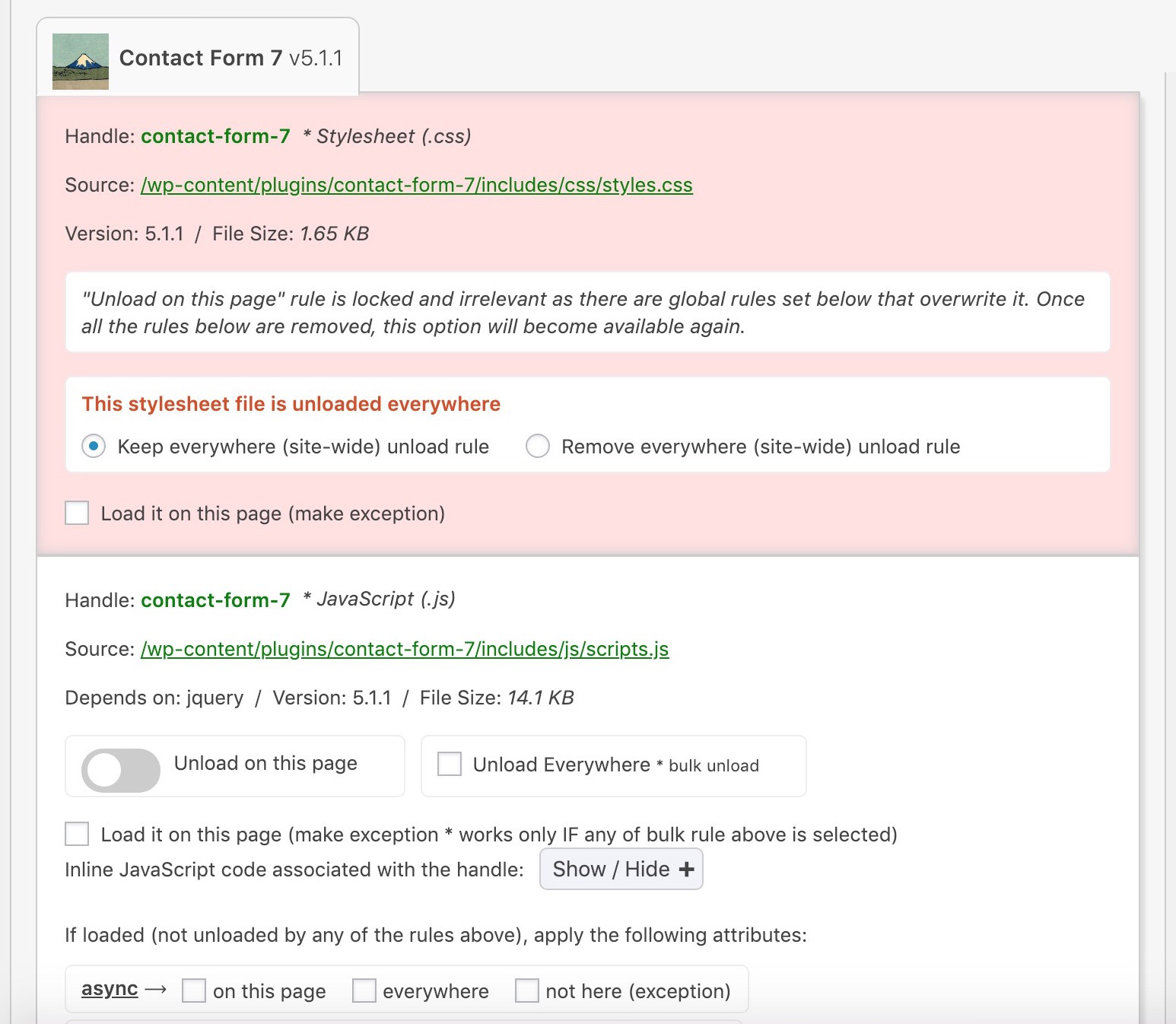
When editing a page, a meta box will load with the list of loaded CSS & JS files from the active theme & plugins
Don’t just minify & combine CSS/JavaScript files ending up with large, bloated and slow loading pages: Strip the “fat” first and get a faster website 🙂
Faster page load = Happier Visitors = More Conversions = More Revenue
There are often times when you are using a theme and a number of plugins which are enabled and run on the same page. However, you don’t need to use all of them and to improve the speed of your website and make the HTML source code cleaner (convenient for debugging purposes), it’s better to prevent those styles and scripts from loading.
For instance, you might use a plugin that generates contact forms and it loads its assets (.CSS and .JS files) in every page of your website instead of doing it only in the /contact page (if that’s the only place where you need it).
“Asset CleanUp” scans your page and detects all the assets that are loaded. All you have to do when editing a page/post is just to select the CSS/JS that are not necessary to load, this way reducing the bloat.
The plugin works best in combination with a cache plugin (e.g. WP Rocket, WP Fastest Cache, W3 Total Cache), a hosting company that offers packages with server-level caching available (e.g. WP Engine, Kinsta) or a service like Cloudflare that has page caching enabled.
Main plugin’s benefits include
- Decreases the number of HTTP requests loaded and eliminate render-blocking resources (important for faster page load) by unloading useless CSS/JS
- Preload CSS/JS, Local Fonts & Google Fonts files to instruct the browser to download the chosen assets as soon as possible
- Minify CSS files (including inline code within STYLE tags)
- Minify JavaScript files (including inline code within SCRIPT tags)
- Combine remaining loaded CSS & JavaScript files
- Inline CSS Files (automatically & by specifying the path to the stylesheets)
- Defer combined JavaScript files by applying “defer” attribute to the SCRIPT tags
- Site-wide removal for Emojis, Dashicons for guest users and Comment Reply if they are not used
- Disable RSS Feeds
- Reduces the HTML code of the actual page (that’s even better if GZIP compression is enabled)
- Makes source code easier to scan in case you’re a developer and want to search for something
- Remove possible conflicts between plugins/theme (e.g. 2 JavaScript files that are loading from different plugins and they interfere one with another)
- Better performance score if you test your URL on websites such as GTmetrix, PageSpeed Insights, Pingdom Website Speed Test
- Google will love your website more as it would be faster and fast page load is nowadays a factor in search ranking
- Your server access log files (e.g the Apache ones) will be easier to scan and would take less space on your server
Google Fonts Optimization / Removal
- Combine all Google Font requests into fewer (usually one) requests, saving one round trip to the server for each additional font requested
- Choose between three methods of delivery: Render-blocking, Asynchronous via Web Font Loader (webfont.js) or Asynchronous by preloading the CSS stylesheet
- Option to preload Google Font Files from fonts.gstatic.com (e.g. ending in .woff2)
- Apply “font-display” CSS property to all loaded Google Font requests
- Enable preconnect resource hint for fonts.gstatic.com in case you use Google Fonts; don’t let the browser wait until it fetches the CSS for loading the font files before it begins DNS/TCP/TLS
- Remove all Google Font requests including link/font preloads, @import/@font-face from CSS files & STYLE tags, resource hints
Local Fonts Optimization
- Preload local font files (ending in .woff, .woff2, .ttf, etc.)
- Apply “font-display:” CSS property to @font-face from existing to LINK / STYLE tags to improve the PageSpeed score for “Ensure text remains visible during webfont load”
Critical CSS
- You can add already generated critical CSS (e.g. via tools such as Advanced Critical CSS Generator customly for the homepage, posts, pages, taxonomy pages (e.g. category), archive pages (e.g. date, author), search, 404 not found
- The critical CSS can be added within the Dashboard as well as via code / Read More
Remove useless links, meta tags and HTML comments within the HEAD and BODY (footer) tags of the website
- Really Simple Discovery (RSD) link tag
- REST API link tag
- Pages/Posts Shortlink tag
- WordPress version meta tag (also good for security reasons)
- All “generator” meta tags (also good for security reasons)
- RSS Feed Link Tags (usually they are not needed if your website is not used for blogging purposes)
- oEmbeds, if you do not need to embed videos (e.g. YouTube), tweets and audios
- Valid HTML Comments (exceptions from stripping can be added and Internet Explorer conditional comments are preserved)
Each option can be turned on/off depending on your needs. Instructions about each of them are given in the plugin’s settings page.
Disable partially or completely XML-RPC protocol
This is an API service used by WordPress for 3rd party applications, such as mobile apps, communication between blogs and plugins such as Jetpack. If you use or are planning to use a remote system to post content to your website, you can keep this feature enabled (which it is by default). Many users do not use this function at all and if you’re one of them, you can disable it.
Plugin works with WordPress Multisite Network enabled!
Asset CleanUp Pro
This plugin is the lite version of Asset CleanUp Pro that comes with more benefits including managing assets (CSS & JS files) on all WordPress pages, unloading plugins site-wide or via Regex(es), apply “async” and “defer” attributes on loaded JavaScript files which would boost the speed score even higher, move the loading location of CSS/JS files (from HEAD to BODY to reduce render-blocking or vice-versa if you need specific files to trigger earlier) and premium support. Click here to purchase Asset CleanUp Pro!
NOTES
People that have tested the plugin are so far happy with it and I want to keep a good reputation for it. In case something is not working for you or have any suggestions, please write to me on the forum and I will be happy to assist you. BEFORE rating this plugin, please check the following post http://chrislema.com/theres-wrong-way-give-plugin-feedback-wordpress-org/ and then use your common sense when writing the feedback 🙂
GO PRO
- Unload CSS/JS files on all WordPress pages including Categories, Tags, Custom Taxonomy (e.g. WooCommerce product category), 404 Not Found, Date & Author Archives, Search Results)
- Unload plugins in the frontend view (for guest visitors) * This will not just unload the CSS/JS files loaded from the plugins, but everything else related to them (e.g. slow database queries)
- Unload plugins within the Dashboard /wp-admin/ * Do you have any slow pages that are loading within the Dashboard? You can reduce seconds in page load for some bulky ones or fix plugin conflicts
- Instruct the browser to download a CSS/JS file based on the visitor’s screen size (e.g. avoid downloading assets in mobile view when they are not needed, if the screen size is smaller than 768px)
- Defer CSS by appending it to the BODY to load it asynchronously (Render blocking CSS delays a web page from being visible in a timely manner)
- Move JavaScript files from HEAD to BODY and vice-versa (CSS files moved to the BODY are automatically deferred)
- Defer JavaScript loaded files (by applying “defer” attribute to any enqueued JS file)
- Async JavaScript loaded files (by applying “async” attribute to any enqueued JS file)
- Inline JavaScript files (automatically & by specifying the path to the stylesheets)
- Priority in releasing new features & other improvements (updates that are meant for both Lite and Pro plugins are first released to the Pro users)
- Premium support and updates within the Dashboard
Give Asset CleanUp a try! If you want to unlock all features, you can Upgrade to the Pro version.