Quick View for WooCommerce
by ShapedPlugin LLC on WordPress.org
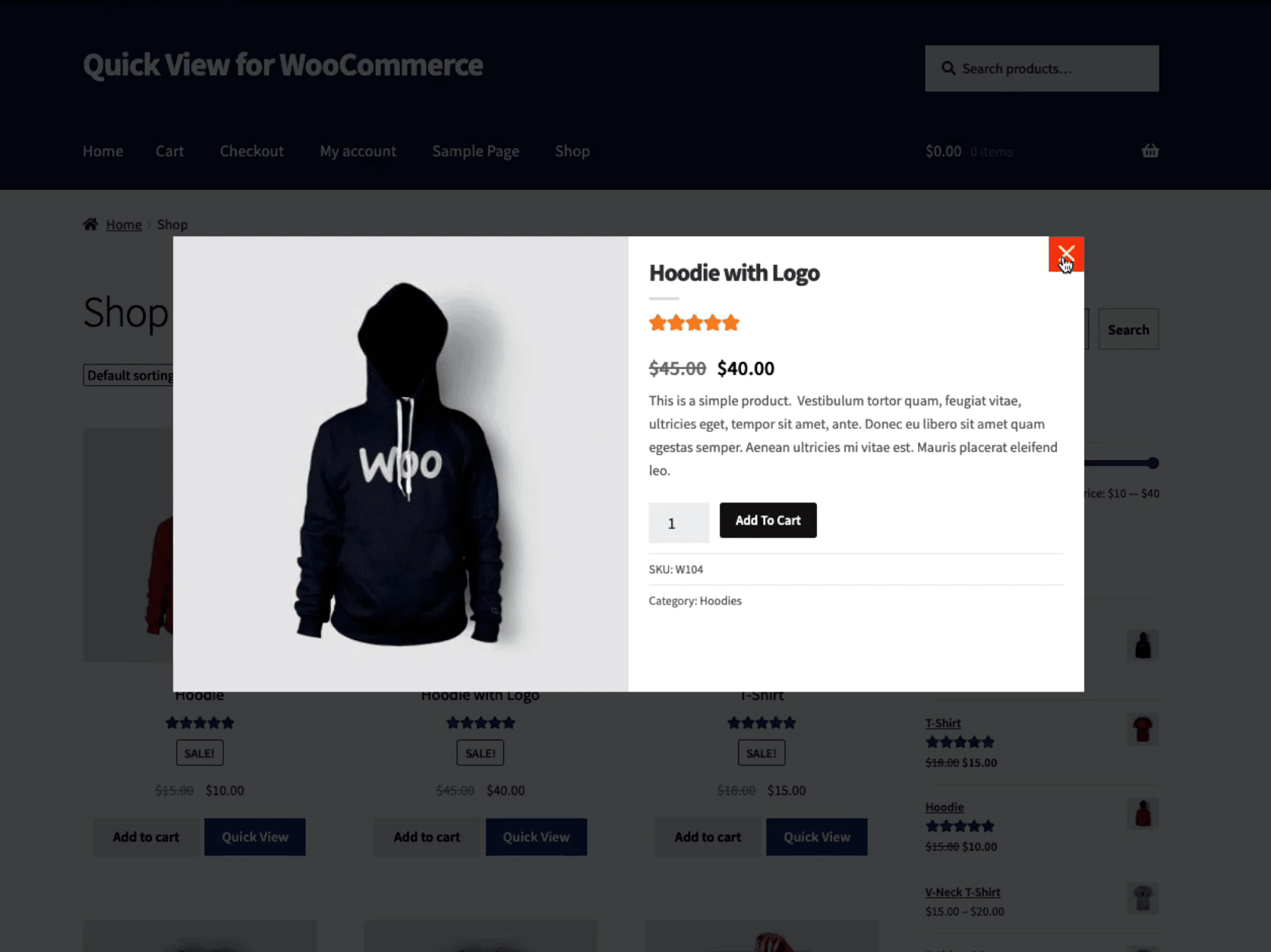
Add a quick view button in the product loop so visitors can quickly view product information in a nice modal without opening the product page.
Live Demo
Live Demo | Video Tutorials | Documentation | PRO Features »
Overview
Quick View for WooCommerce allows you to add a quick view button in the product loop so that visitors to quickly view product information (using AJAX) in a nice modal without opening the product page. Products can easily be added to the cart from modal. You can simply customize the style of the quick view button and modal through several settings.
Why Quick View for WooCommerce?
Imagine you have customers who need to quickly view your products in the online shop. How bad experience would it be if every customer has to open them in a new tab or window? Your customers will be free to look in a better way your products, reading also a small description with all the most important features. With the product quick view button, they will be more focused on what they really want and they will proceed easily to the purchase step.
We believe that you shouldn’t be a programmer or hire a developer to add a quick view button in the product loop for your WooCommerce shop/site. That’s why we built the Quick View for WooCommerce plugin that’s both EASY and POWERFUL.
Quick View for WooCommerce 2.0.0
Quick View for WooCommerce 2.0.0 has completely been rebuilt and this provides you now many improvements and new amazing powerful features.
Key Features
- Lightweight, easy to use, and powerful.
- Enable/Disable quick view button.
- 8 Beautiful modal effects.
- Modal overlay background color.
- 2 Quick view button positions:
-Before add to cart button
-After add to cart button - Quick view button color, border, padding, etc.
- Editable & translatable button label text.
- Show/Hide the product fields you want to show on the modal.
- Background color and padding for modal content.
- Add to cart button color.
- Product star rating color on the modal.
- Show/hide close button.
- Color and sizing option for the close (cross) icon.
- Enable/Disable the preloader on the modal.
- Preloading label text and color options.
- Clean-up plugin settings data on deletion.
- Quick view button on mobile devices and iPad.
- Custom CSS and JS fields to overwrite styles.
- WPML integration for building multilingual sites.
- RTL and translation ready.
- Compatible with any theme & WooCommerce plugins.
- SEO friendly & optimized for speed.
- Support all modern browsers.
- Dedicated support if you need any help.
- Regular update and bug fixing.
- And much more options.
For fast support, features request, and bug reporting
Ask us at Support
Quick View for WooCommerce – Pro
Quick View for WooCommerce – Pro is a lightweight and powerful plugin that allows your customers to quickly view product information with smooth animation via AJAX in a nice Modal without opening the product page. Your probable customers can navigate from one product to another using the next and previous product buttons. Products can easily be added to cart from Modal.
3 notable reasons to use this plugin
- Let your prospective customers quickly view products and ajax add to cart through a modal easily.
- Supports all types of products including variable products, and external or affiliate.
- Boost your sales and conversion rate: probable customers can quickly return to product listings and continue shopping.
Premium Features You’ll Love
- Lightweight, easy to use, and powerful.
- 4 Quick view layouts.
- 10 Quick view button positions:
-Before add to cart button
-Above add to cart button
-After add to cart button
-Below add to cart button
-Below product image
-Above product image
-Below product title
-Below product price
-Over product container on Hover
-Over product image on Hover - Quick view button style, color, border, radius, padding, transition, hover color, etc.
- Apply Google fonts/typography for quick view button text and product title, price, excerpt, add to cart, meta, etc.
- Modal custom width & height options.
- Image and content area width(allocate the area reciprocally).
- 9 Quick view button designs and add custom icon images.
- Quick view button custom text and ability to hide text.
- Ability to assign quick view on click product name or image.
- Show/Hide sale flash on the modal.
- Ability to show/hide modal product content(Title, rating, price, excerpt, add to cart, meta, socials).
- Product description, tabs, and related products.
- Custom product image size for the modal.
- Modal area background, and border color.
- Content Padding for the modal product content.
- Enable/Disable ajax add to cart on the modal.
- Add to cart button custom label and color.
- Close the Modal after add to cart option.
- Add view details button on the Modal and change label, color, border, padding, etc.
- Redirect the checkout page after add to cart.
- Enable/Disable quick view on the wishlist.
- Several options for the modal close button.
- Close the modal when clicking on the background overlay.
- 12+ Product images gallery slider options.
- Choose among three types of thumbnails(Slider mode, Classic mode, and Do not show).
- Product thumbnails grayscale effect on the modal.
- Enable/Disable zoom for gallery image mouseover.
- Enable/Disable lightbox on click image.
- Previous/Next navigation arrows to quickly preview products.
- 6+ Product quick view modal navigation options.
- Enable/Disable the preloader on the modal with several options.
- Quick view button on mobile devices and tablets.
- Custom CSS and JS to overwrite styles.
- Multilingual (WPML too) ready.
- RTL and Translation ready.
- Page builders ready.
- Standard WooCommerce theme and plugins Compatible.
- Developer-friendly & easy to customize.
- License activation system with an update notification.
- Top-notch customer support.
- All features of the lite version.
- And much more options.
- Full list of PRO features.
Quick View for WooCommerce Pro – Getting started
Premium Support and Documentation
The premium version of the plugin entitles you to get fast, friendly, and priority support with replies posted within 24 hours (without holidays). If you submit a support ticket by filling up this form, this will create a one-to-one email support thread.
For documentation and tutorials go to our Documentation.
Author
Designed and Developed by ShapedPlugin