
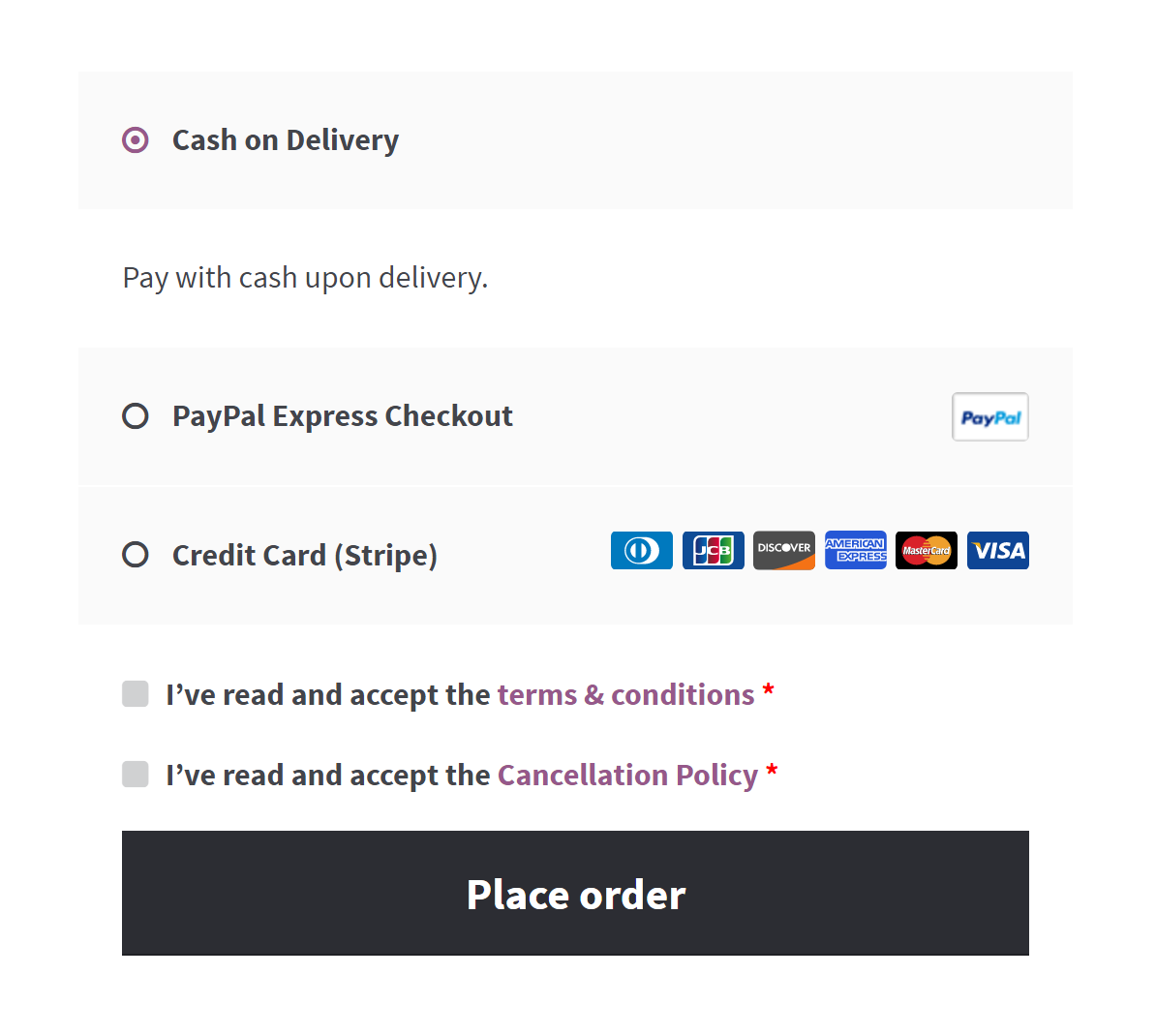
Additional terms and condition checkbox on the WooCommerce checkout page.
The Additional Terms for WooCommerce plugin is a crucial tool for any WooCommerce store as it allows you to add custom terms and conditions that customers must accept prior to checking out on your store. The additional terms and conditions checkbox serves as a valuable resource for tailoring your store’s policies, safeguarding your business, and promoting transparency with your clients. This feature enables you to provide your customers with more comprehensive details about your policies, procedures, or any additional terms that they must agree to before making a purchase. By doing so, you can cultivate a trusting relationship with your customers and minimize the likelihood of conflicts or misunderstandings.
With the plugin’s user-friendly settings, you can effortlessly link your terms page to the checkbox text and select how you want your customers to view the terms content. Whether you prefer directing them to a new tab, embedding the content above the checkbox, or showing it in a modal pop-up, the choice is yours.
Also, you have the freedom to decide whether the terms checkbox should be optional or required, giving you full control over the checkout process. This smooth and stress-free approach ensures a seamless shopping experience while also safeguarding your business and building trust with your customers, all with just a few simple clicks.
Whether you’re using the WooCommerce checkout shortcode or the Checkout block, the plugin offers a straightforward approach to integrate the Additional Terms and Conditions checkbox into your store’s checkout process. If you’re using the shortcode, the plugin effortlessly adds the “I agree” checkbox below the WooCommerce terms and conditions. For those using the Checkout block, the Additional Terms block allows you to position the checkbox anywhere within the checkout block, streamlining the process and enhancing the overall customer experience.
Furthermore, the plugin saves the acceptance of the additional terms and conditions in the order notes, providing you with crucial evidence in case of any disputes with customers. You can refer to the acceptance of the terms as evidence that the customer agreed to your policies and procedures before making the purchase. This can be useful for internal purposes such as auditing, analysis, and reporting.
Moreover, this plugin effortlessly handles multilingual sites and is fully compatible with popular plugins like WPML and Polylang. With a built-in configuration file, it’s easy to translate and use for websites targeting a global audience.
To ensure that you have covered all the necessary bases, here are some examples of additional terms that you may want to consider including in your store:
- Refund Policy: If you have a unique refund policy for your store, you may want to include additional terms that customers must agree to before making a purchase.
- Subscription Agreement: If you offer subscription products or services, you may want to include additional terms related to subscriptions. This could include information about subscription renewal and cancellation policies.
- Product Warranties: If you offer product warranties or guarantees, you may want to include additional terms related to these warranties. This could include information about the duration of the warranty, what is covered under the warranty, and any exclusions or limitations.
- Terms of Service: If you have unique terms of service for your store, you may want to include additional terms that customers must agree to before making a purchase. This could include information about prohibited uses of your site or products, liability limitations, and dispute resolution procedures.
- Age Verification: If you sell age-restricted products, such as tobacco or alcohol, you may want to include additional terms related to age verification.
- Intellectual Property: If you have unique policies related to intellectual property, such as copyright or trademark infringement policies, you may want to include additional terms that customers must agree to before making a purchase.
- Liability Waiver: If you have products or services that carry a risk of injury or harm, you may want to include additional terms related to liability waivers.
- Sales Tax: If you are required to collect sales tax for your products, you may want to include additional terms related to this requirement. This could include information about how sales tax is calculated, which products are subject to sales tax, and any exemptions or exceptions.
- Privacy Policy and GDPR: If you collect and process personal data from your customers, you are required to have a privacy policy that complies with the General Data Protection Regulation (GDPR) if you are based in the European Union or offer products or services to EU customers. You may want to include additional terms related to your privacy policy, such as information about how you collect, use, and protect personal data, as well as any rights that customers have under the GDPR.
- Return Policy: If you have a return policy for your products or services, you may want to include additional terms related to this policy. This could include information about how returns are processed, any fees or penalties that may apply, and any restrictions on refunds.
By including these additional terms, you can provide your customers with a clear understanding of your store’s policies and procedures, ultimately enhancing their shopping experience and building trust in your brand.
For more information and setup instructions, visit the Additional Terms for WooCommerce Plugin Documentation. Elevate your customer experience and solidify your store’s policies!
Unlock Advanced Features for Your WooCommerce Store
If you are looking for more advanced features to customize your WooCommerce store’s checkout process, Additional Terms for WooCommerce PRO is the solution for you. With the Pro version, you get all the benefits of the free version, plus many additional features that allow you to take control of your store’s policies and improve customer trust.
With the PRO version, you can enjoy an abundance of functionalities, including:
- Unlimited Custom Terms and Conditions Checkboxes: With the PRO version, you can add unlimited custom terms and conditions checkboxes to your store’s checkout process. That means you can create special terms and conditions for different products or services and require customers to agree to them before purchasing.
- Default Checked Checkbox: You can choose whether or not the checkbox is checked by default on checkout. That allows you to set the default value of the checkbox to either checked or unchecked, depending on your preference.
- Flexible Display Options: You can select which action displays the entire page content after clicking on a linked terms page. You can choose to embed the content above the checkbox, open the page content in a modal, or open the linked page in a new tab. This gives you more control over how your terms and conditions are displayed to customers.
- Advanced Conditional Logic: With Additional Terms PRO, you can set rules and conditions that alter terms and conditions checkboxes based on the cart and checkout details. You can create complex logic to display a terms checkbox by adding multiple conditional rules. You can restrict terms checkboxes by Products, Tags, Categories, Types of products, Shipping classes, WooCommerce brands, and Locations. This feature enables you to tailor your terms and conditions to specific products, locations, or customer group.
Why settle for the basic version when you can have the advanced features of Additional Terms Pro? Upgrade to the PRO version now and take your store to the next level.