Websync Builder for Contact Form 7
by Whistleblowing Form Team on WordPress.org
Create Contact Form 7 forms visually with drag-and-drop, add conditional logic, and store all submissions in your database.
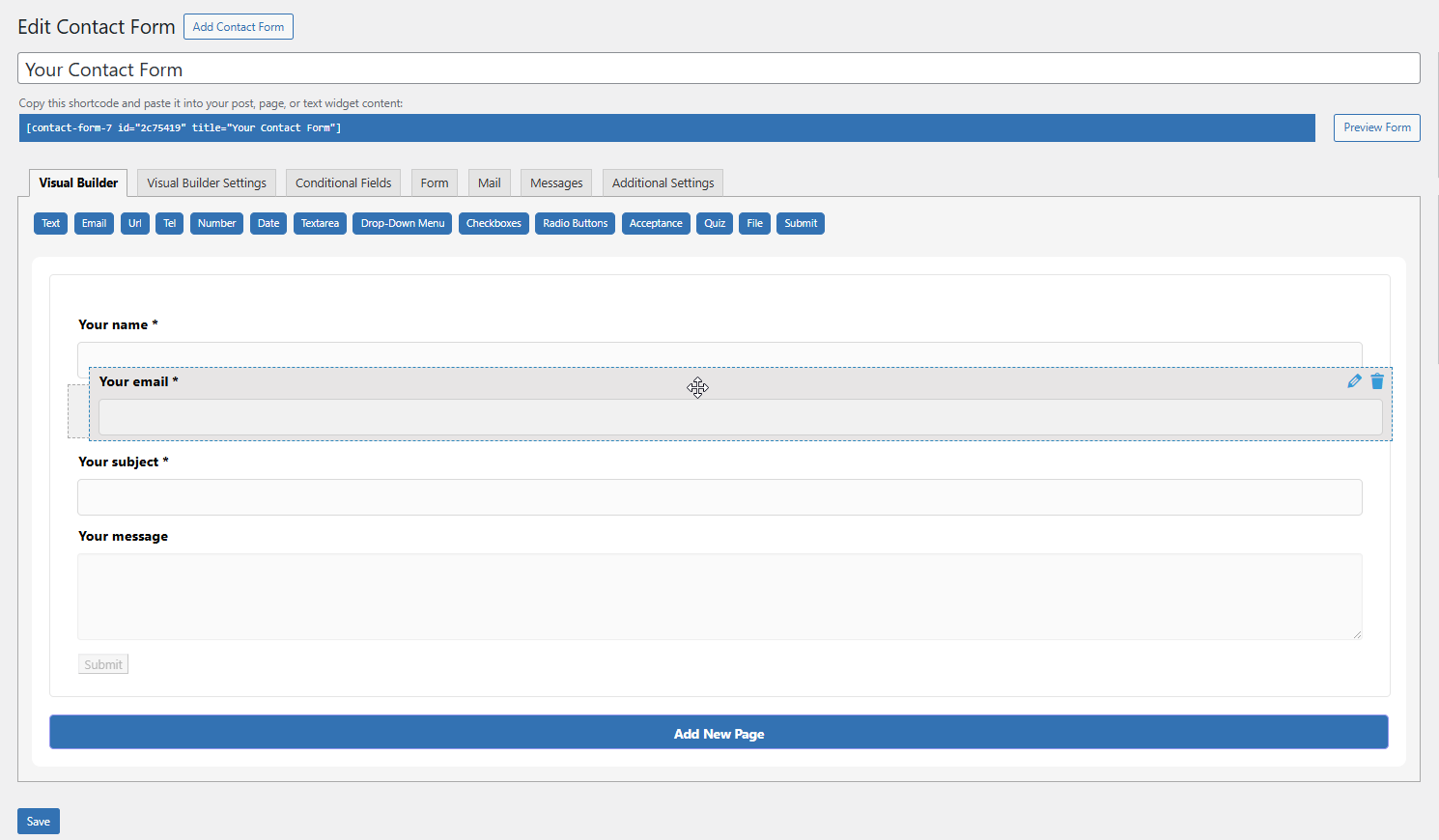
The drag-and-drop visual builder interface with live preview.
Tired of the tedious shortcode editor in Contact Form 7? Websync Builder replaces it with a modern, intuitive drag-and-drop visual form builder featuring a live preview.
Build complex, powerful forms in minutes. Add conditional fields to show or hide questions, and most importantly, save all form submissions to your database so you never lose a lead again. Manage entries right from your WordPress dashboard—all while maintaining 100% compatibility with the lightweight Contact Form 7 plugin.
Key Features
Visual Drag & Drop Builder
- Build forms visually with a live preview. What you see is what you get.
- Full support for all standard CF7 fields: text, email, dropdown, checkbox, file upload, and more.
- Easily reorder, edit, and configure fields without touching code.
Save All Form Submissions
- Submissions page: Never lose a lead. Save every CF7 form entry directly to your WordPress database.
- View, manage, and search all submissions from a dedicated admin area.
- Export: Unlock the ability to export entries to CSV or XLSX for reporting.
Conditional Logic (Show/Hide Fields)
- Create smart forms that show or hide fields based on user selections.
- Unleash unlimited conditional rules and groups for complex forms.
Multi-Step Forms
- Break long forms into beautiful, manageable steps to improve user experience.
- Perfect for surveys, applications, and lengthy contact forms.
Seamless Integration
- Works with your existing Contact Form 7 forms and most CF7 add-ons.
- Styled to look great with any modern WordPress theme.
Note: This plugin requires the free Contact Form 7 plugin to be installed and active.
External Services
Deactivation Feedback Endpoint
This plugin optionally sends deactivation feedback when the user chooses to submit it during plugin deactivation.
-Domain: https://whistleblowing-form.de/
-Purpose: To receive voluntary plugin deactivation feedback from the admin user.
-Data Sent:
Admin email (or custom email provided in the feedback form)
Selected deactivation reason
Optional message entered by the user
Site URL
-Conditions:
Data is sent only if the user submits the feedback form.
No data is sent when the user clicks “Skip”.
Credits
Built by the team at Websync. Contact us for support.