AI Chatbot & Live Chat with ChatGPT Support by WebChatAgent
by WebChatAgent on WordPress.org
Add an AI chatbot and live chat to your WordPress site. Answer visitors 24/7, capture leads, book appointments and hand over chats to humans when it m …
Free AI-Powered Chatbot Platform with support for OpenAI ChatGPT, Google Gemini, and more. Create intelligent AI assistants – 100% FREE!
🤖 Description
Free AI Chatbot Agent for WordPress with ChatGPT Support by WebChatAgent is a completely free AI-powered chatbot platform that enables you to create intelligent AI assistants for your WordPress website. Utilize advanced features like RAG (Retrieval Augmented Generation) with support for OpenAI ChatGPT, Google Gemini, and other top AI models to provide your visitors with a personalized chat experience.
Key integrations and tools:
- WhatsApp Business Integration – engage users via your business number
- Zapier Integration – automate workflows and connect to thousands of apps
- AI Team Wiki – publish a team knowledge base on your subdomain (AI-assisted)
- Custom MCP (Model Context Protocol) Server Support
✨ Key Features
- 100% FREE – No hidden costs or premium plans required
- Smart Contextual Answers – Uses RAG (Retrieval Augmented Generation) to provide answers based on your website content and documents
- Multi-LLM Support – Switch between leading cloud models like Google Gemini and OpenAI
- Custom MCP Server Support – Connect to your own model-control-protocol servers
- Tool Integration – Connect your chatbot with external services and systems to perform actions
- Lead Management – Collect and manage potential customer information automatically
- Feedback Management – Gather and analyze user feedback to improve your service
- Questions Management – Track and categorize all questions asked to your chatbot
- Multilingual Support – Automatically responds in the user’s language
- WCAG 2.2 AA Accessibility – Ensures accessible use for all visitors regardless of disabilities
- Spam Protection – Prevents chatbot abuse and protects against unexpected costs
- Complete Customization – Customize appearance, persona, colors, fonts, and more
- Live Preview – See changes in real-time in the admin area
- Responsive Design – Works perfectly on all devices and screen sizes
- Simple Embedding – Easy integration with your WordPress site
🚀 Installation
- Upload the
webchatagentfolder to the/wp-content/plugins/directory of your WordPress installation. - Activate the plugin in the WordPress admin area under “Plugins”.
- Navigate to “WebChatAgent” in the admin menu to configure the widget.
- Enter your chatbot ID and adjust the settings according to your preferences.
- Enable the widget to display it on your website.
⚙️ Frequently Asked Questions
Do I need an API key to use this plugin?
Yes, you need to register at WebChatAgent.com to get a chatbot ID, which you’ll enter in the plugin settings.
Is this plugin completely free?
Yes! There are no hidden costs or premium plans. All features are available in the free version.
Can I customize the appearance of the chat widget?
Absolutely! You can customize the color scheme, avatar, font, and welcome message directly from the WordPress admin area.
Is the chat widget mobile-friendly?
Yes, the chat widget is fully responsive and works well on all devices, including mobile phones and tablets.
How does the AI chatbot understand my website content?
The WebChatAgent – AI Chatbot for WordPress uses RAG (Retrieval Augmented Generation) technology to understand and reference your website content when answering visitor questions.
Which AI models are supported?
The chatbot supports multiple large language models including Google Gemini and OpenAI. You can choose which model to use in your chatbot settings. Additionally, you can connect to custom MCP (Model Control Protocol) servers for self-hosted or specialized AI models.
Does the chatbot support multiple languages?
Yes, the chatbot automatically detects and responds in the user’s language, making it ideal for multilingual websites.
Is the chat widget accessible for people with disabilities?
Yes, the chat widget meets WCAG 2.2 AA accessibility standards, ensuring it’s usable for all visitors regardless of disabilities or assistive technologies.
Can the chatbot perform actions beyond just answering questions?
Yes, with Tool Integration, your chatbot can connect to external services and systems to perform actions like submitting forms, booking appointments, or querying databases.
What analytics and management tools are included?
The plugin includes three powerful dashboard tools accessible from your WebChatAgent account:
1. Lead Management – Collect, categorize, and follow up with leads generated through your chatbot
2. Feedback Management – Review and analyze user feedback to improve your chatbot’s performance
3. Questions Management – View all questions asked to your chatbot, identify common topics, and improve your knowledge base
How does the spam protection work?
The built-in spam protection prevents chatbot abuse and protects against unexpected additional costs from excessive or malicious usage.
📷 Screenshots
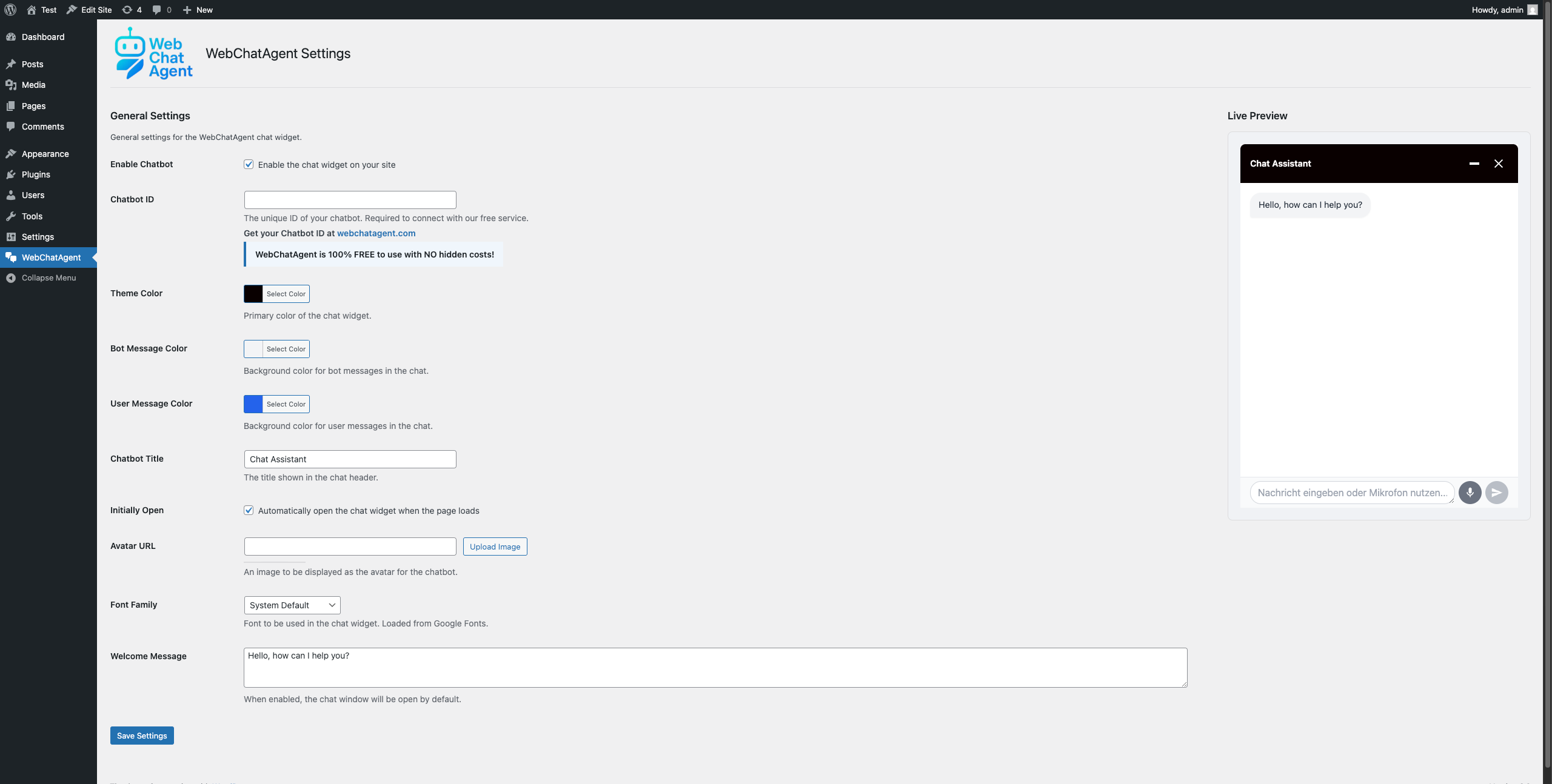
- WebChatAgent – AI Chatbot for WordPress settings page in WordPress admin.
- Live chat widget on your website – desktop view.
- Mobile view of the chat widget.
📝 Changelog
1.0.3
- Changed: Admin shows read-only values loaded from public endpoint
- Changed: Only Chatbot ID and Enable are editable in WP; other settings managed in WebChatAgent dashboard
- Added: Color swatches for theme and message colors in admin
- Improved: Preview iframe sets html lang to current WP language
1.0.2
- Added: Hide branding option in General tab
- Added: Speech bubble text option in Messages tab
- Added: Chat button image URL option in Appearance tab
- Added: Live preview support for new options
- Added: Documentation for dashboard tools (Leads, Feedback, Questions)
- Added: Documentation for custom MCP server support
- Improved: Widget rendering to include new attributes
1.0.0
- Initial release
🔄 Upgrade Notice
1.0.3
Adds admin read-only values, color swatches, and language-aware preview. Also updates integrations in documentation (WhatsApp Business, Zapier, AI Team Wiki, MCP).
1.0.2
Initial release of WebChatAgent – AI Chatbot for WordPress WordPress plugin.
🔒 Privacy Policy
WebChatAgent – AI Chatbot for WordPress processes user chat messages to provide AI-powered responses. When visitors interact with the chat widget, their messages are sent to WebChatAgent’s servers for processing. The chat widget also collects basic browser information and IP addresses for abuse prevention and geographical customization of services. For more details, please check the privacy policy section added to your WordPress privacy policy page after plugin activation.
Chat conversations are typically stored for up to 30 days to maintain context and provide follow-up support. After this period, conversation data may be anonymized and retained for service improvement purposes.
For privacy inquiries, please contact privacy@webchatagent.com.
🌐 External services
This plugin connects to the WebChatAgent service (https://webchatagent.com) to provide chat functionality.
The service loads an external JavaScript file (https://webchatagent.com/widget/web-chat-agent.js) to render the chat widget on your website. This script is required for the widget to function properly.
When using custom fonts, external resources will be loaded from Google Fonts (https://fonts.googleapis.com). This means that data may be shared with Google when a visitor views your website with the chat widget enabled.
The service receives the following data when visitors use the chat:
– Chat messages and queries submitted through the chat widget
– Basic browser information (user agent, device type)
– Session information for conversation context preservation
– IP addresses are only stored in anonymized form for abuse prevention and geographical service customization
Data is only sent when a visitor interacts with the chat widget. No data is collected or transmitted until the visitor actively engages with the chat.
Terms of Service: https://webchatagent.com/terms
Privacy Policy: https://webchatagent.com/privacy-policy