
WeatherBot Weather Widget
by RoxxiStudios on WordPress.org
Live weather for any location using Google Weather API. Add an ADA enhanced Weather Block, Widget, or Shortcode. Precision-crafted for simplicity.
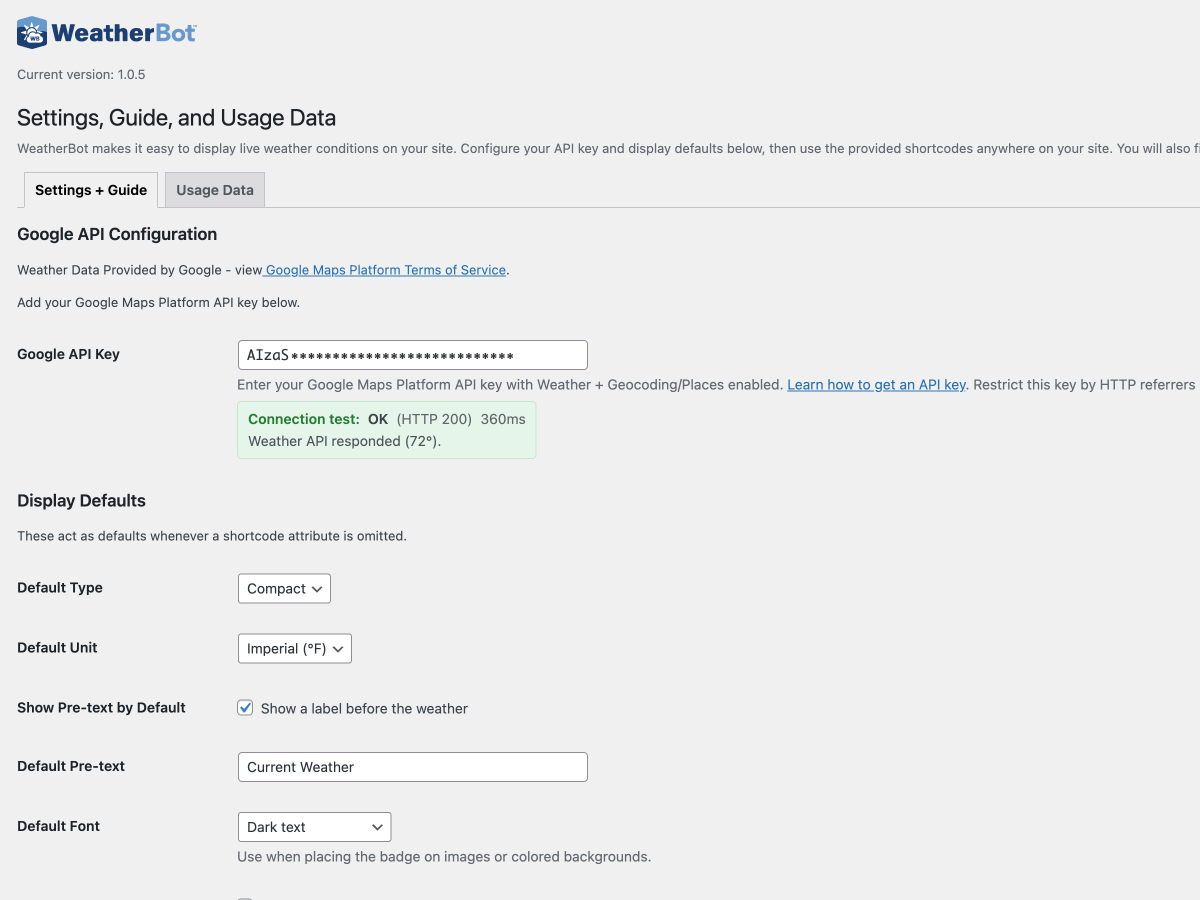
WeatherBot displays live weather for any location in the world using Google’s Weather API, with city/place resolution via Google Maps Geocoding/Places. Use with a Classic Widget, a Gutenberg block (with live preview), or with a shortcode anywhere shortcodes are supported. Outputs a clean, accessible UI that works in any theme or builder.
Features
- Automatic WeatherForecast Schema.org (JSON-LD) structured data generation for SEO and Google rich results.
- Live local current weather via Google Weather API
- Google Maps Geocoding/Places for accurate city/place lookups
- WordPress weather block with live server preview and full controls
- WordPress weather shortcode that works anywhere shortcodes are supported
- Control the title’s HTML tag (H2-H6, P) for SEO hierarchy
- Three display layouts — badge (card), compact (mini), inline (text-flow)
- Optional title with on/off toggle via show_pre_text (shortcode & block)
- Intuitive Theme Selection (Light Theme / Dark Theme) for readability on any background
- Units — Fahrenheit (°F) or Celsius (°C); can inherit from Settings
- Classic Widget support (with Align and Heading Tag options)
- Semantic and Accessible HTML5 Markup (aside, headings) for improved SEO and screen reader support.
- Builder-friendly output — guards against unwanted p wrappers and extra spacing
- Caching tuned for freshness — weather (~2 minutes per location/unit); geocoding (long-lived)
- Manual cache purge from Settings
- Optional uninstall cleanup — delete plugin data on uninstall if enabled
- CSS variables for easy theming (–wb-primary, –wb-secondary, –wb-neutral, etc.)
- No jQuery on the front end — built with modern WordPress packages and vanilla JS
- COMING SOON: Our Pro version with weather forecast and other powerful features like detailed style controls.
Who Should Use WeatherBot?
The WeatherBot plugin is a versatile tool that adds real-time weather insights to your WordPress site. Any site that relies on location-based services, visitor engagement, or timely environmental data can gain measurable benefits by engaging visitors longer and improving conversions.
- Real Estate Websites – Showcase current conditions for specific cities or neighborhoods to highlight lifestyle and property appeal.
- Travel & Tourism Agencies – Display live weather for destinations like ski resorts, beach hotels, and outdoor adventure guides to help travelers plan trips and activities.
- Hospitality & Lodging – Hotels, resorts, and vacation rentals can reassure guests and improve conversion rates with up-to-date forecasts directly on booking pages.
- Outdoor Recreation & Services – Ski resorts, hiking trails, marinas, golf courses, and contractors can highlight ideal activity conditions or set expectations for weather-dependent services.
- Event Venues & Organizers – Provide attendees with accurate, live weather at the event location.
- Local News & Community Sites – Add relevant, constantly updating content that keeps visitors returning.
- E-commerce Stores – Influence buying decisions for seasonal goods—like clothing or outdoor gear—by tying products to live weather data in key markets.
- Education & Nonprofits – Enhance engagement on school or community sites with practical information for families and visitors.
Whether you’re running a real estate agency site in Lake Arrowhead, a tourism portal for Big Bear, or a global e-commerce store selling outdoor gear, WeatherBot helps you deliver accurate, branded weather displays that align perfectly with your content and audience.
For search visibility, WeatherBot is one of the best weather plugins for real estate, tourism, hospitality, outdoor recreation, local businesses, and e-commerce sites.
How to Use
Gutenberg Block + Classic Widget
Insert the WeatherBot block from the add widget panel (search “WeatherBot”). The block renders a live server preview and includes these controls:
- Title (
pre_text) — optional heading above the widget - Show Title (
show_pre_text) —1(show) or0(hide) - Position (
align) —left,center,right - Theme (
font_color) —light,darkcontrast - Unit (
unit) —IMPERIAL(°F),METRIC(°C), or inherit from Settings - Type (
type) —badge,compact,inline - City (
city) — type a city and press Enter to preview
The block supports Dimensions Margin for per-instance spacing. Theme alignment (e.g., wide/full) is supported where available.
Shortcode
Use [weatherbot]. Examples below are code-formatted so they render correctly.
Basic:
[weatherbot city=”Lake Arrowhead, CA”]
Badge type with °F:
[weatherbot city=”Lake Arrowhead, CA” unit=”IMPERIAL” type=”badge”]
Title + right aligned:
[weatherbot city=”Lake Arrowhead, CA” type=”badge” pre_text=”Current Weather” align=”right”]
Hide the title (show_pre_text=0):
[weatherbot city=”Lake Arrowhead, CA” pre_text=”Current Weather” show_pre_text=”0″]
High-contrast for dark backgrounds:
[weatherbot city=”Lake Arrowhead, CA” type=”badge” font_color=”light”]
Compact layout (°C):
[weatherbot city=”Lake Arrowhead, CA” type=”compact” unit=”METRIC”]
Inline layout (flows with text; omit align):
[weatherbot city=”Lake Arrowhead, CA” type=”inline” pre_text=”Now:”]
All options:
[weatherbot city=”Lake Arrowhead, CA” unit=”IMPERIAL” type=”badge” pre_text=”Current Weather” show_pre_text=”1″ align=”center” font_color=”dark”]
Attributes
- city — string (e.g.,
"Lake Arrowhead, CA") - unit —
IMPERIAL|METRIC| empty to inherit from Settings - type —
badge|compact|inline| empty to inherit - pre_text — string (optional title above the widget)
- show_pre_text —
1|0(default1) — show/hide the title above the widget - align — left | center | right
- font_color — light | dark
Styling & Customization
WeatherBot is designed to inherit your theme’s fonts and typography by default, so it blends seamlessly into your site. But if you want more control, you can fully customize the display with CSS variables and custom CSS rules.
CSS Variables for Quick Theming
You can override the built-in design system using global CSS variables. Add them to Appearance Customize Additional CSS or your child theme stylesheet:
:root {
    --wb-primary: #0055aa;      /* link and highlight color */
    --wb-secondary: #3399ff;    /* hover color */
    --wb-neutral: #666666;      /* neutral text */
    --wb-light: #e0e0e0;        /* light gray */
    --wb-dark: #111111;         /* dark text */
}
Common Customizations
-
Change the temperature color:
.roxxi-weather span.wb-temp {
color: #cc0000;
font-weight: 700;
} -
Make the unit lighter:
.roxxi-weather span.wb-unit {
color: #555555;
font-weight: 300;
} -
Style the description (conditions):
.roxxi-weather span.wb-desc {
font-style: italic;
color: #444444;
} -
Adjust the powered-by line:
.roxxi-weather span.wb-powered {
font-size: 11px;
color: #999999;
}
Layout Variants
WeatherBot supports three display layouts that can be styled independently:
- Badge –
.wb-type-badgeCard-style block with border and padding - Compact –
.wb-type-compactSlimmed-down block for sidebars or tight spaces - Inline –
.wb-type-inlineFlows naturally with surrounding text
Alignment Utilities
You can also control horizontal positioning:
.wb-leftAlign left.wb-centerCentered.wb-rightAlign right
Contrast Themes
For accessibility and readability, WeatherBot supports dark text on light backgrounds (font_color="dark") or light text on dark backgrounds (font_color="light"). This ensures your widget maintains strong contrast in any design.
With these options, WeatherBot can be styled to match any WordPress theme—from minimal blogs to complex builder-driven layouts.
Advanced Information
Performance & Caching
WeatherBot is engineered to be fast, lightweight, and API-efficient, so it won’t slow down your WordPress site. All requests to Google’s Weather and Geocoding APIs are cached in your database to reduce load times and minimize API usage.
How Caching Works
- Weather Data — Cached for about 2 minutes per location/unit combination. This ensures users see nearly live conditions without hammering the API unnecessarily.
- Geocoding Data — Cached long-term. Once a city or place name has been resolved into coordinates, it is stored and re-used to speed up future lookups.
- Automatic Expiration — Old or stale cache entries are purged automatically so your database stays clean.
Manual Cache Control
From the Settings WeatherBot page you can manually clear caches at any time:
- Purge Weather Cache — Forces a fresh request to the Google Weather API on next load.
- Purge Geocoding Cache — Clears stored location lookups, useful if you change how you want places to be resolved.
Performance Advantages
- No jQuery on the front end — WeatherBot uses vanilla JavaScript and modern WordPress packages for faster rendering.
- Minimal Database Calls — Cached data is indexed, and each widget instance reuses cached responses where possible.
- Smart Asset Loading — Styles and scripts are only enqueued on pages where the widget or block is actually used.
- Builder & Theme Friendly — CSS variables and scoped class names reduce conflicts and keep styling isolated.
- Optimized for PHP 8+ — Fully compatible and tested for modern hosting environments.
API Usage & Quotas
Because WeatherBot caches aggressively, each site can serve thousands of widget views while making only a handful of API calls. This keeps your Google Maps Platform quota usage low, even on high-traffic sites.
In short, WeatherBot is tuned to balance real-time accuracy with performance efficiency, ensuring your site stays fast while your visitors always see up-to-date weather conditions.
SEO & Local Search Benefits
WeatherBot isn’t just a utility widget—it can also help strengthen your site’s SEO and local search visibility. By embedding live weather conditions tied to a city, town, or region, you’re providing fresh, location-based content that search engines value.
How WeatherBot Helps SEO
- Fresh Content Signals — Weather data updates every few minutes, giving search engines a reason to crawl your pages more often.
- Local Relevance — Embedding city-specific weather reinforces geo-targeted keywords (e.g., “Lake Arrowhead weather”) and strengthens your topical authority for that area.
- Semantic Richness — Shortcodes and blocks can be paired with surrounding text, FAQs, or schema markup to enhance your page relevance.
- Lower Bounce Rates — Visitors often engage longer with pages that show timely, useful information like weather, which can indirectly boost rankings.
Ideal Use Cases for SEO
- Real Estate Websites — Add the current weather to property listings or community pages to increase local keyword density and improve engagement.
- Tourism & Travel Blogs — Show live conditions for destinations, resorts, or attractions to strengthen relevance for location-based queries.
- Hospitality Websites — Hotels, B&Bs, and vacation rentals can enhance booking pages with local conditions for guest reassurance.
- Outdoor Services — Contractors, landscapers, guides, or event venues can add live weather data to improve trust and capture long-tail queries.
- Community Portals — Local organizations and nonprofits can feature weather alongside news and events to serve their audience better.
Best Practices
1. Pair WeatherBot with Content — Don’t just drop in the widget. Surround it with location-rich text like community info, property highlights, or travel guides.
2. Use Internal Links — Link weather-enhanced pages to related content (e.g., “See all Lake Arrowhead homes for sale”) to strengthen site architecture.
3. Combine with Schema — Add FAQ or LocalBusiness schema to the same page to maximize structured data signals.
4. Target Seasonal Keywords — Weather pages can support seasonal searches like “ski conditions” or “summer vacation weather” when paired with relevant content.
By strategically placing WeatherBot on city landing pages, property spotlights, tourism blogs, or service areas, you create ever-fresh, locally relevant content that boosts both SEO performance and user engagement.
Compatibility
WeatherBot integrates seamlessly with the WordPress Block Editor (Gutenberg) with full support for the Classic Widget system and shortcodes, making it highly flexible across different site setups.
WordPress Block Editor (Gutenberg)
Insert the WeatherBot block from the editor sidebar (search for “WeatherBot”). The block includes a live preview that updates instantly as you configure options like city, unit, layout, and alignment. Works with both standard content blocks and full-site editing (FSE) templates.
Classic Widgets
WeatherBot registers as a Classic Widget, so it can be placed into traditional sidebars or widget areas. All shortcode attributes (city, unit, type, align, etc.) are supported inside the widget interface.
Shortcodes in Page Builders
WeatherBot’s shortcode works in all major page builders:
- Elementor – add via Shortcode widget.
- Beaver Builder – add via HTML or Text module.
- Divi – paste shortcode into a Code block.
- WPBakery – insert with Text Block or Raw HTML.
Shortcodes also render correctly in headers, footers, popups, and theme hooks.
Theme-Agnostic Styling
The plugin’s design system uses CSS variables (e.g., --wb-primary, --wb-dark, --wb-light), so it inherits your theme’s fonts and colors while remaining customizable. This makes WeatherBot compatible with nearly all modern themes without manual overrides.
Browser & Device Support
WeatherBot is fully responsive and works across desktop, tablet, and mobile devices. The UI automatically adjusts layouts for smaller screens (badge, compact, and inline types).
WeatherBot is built with vanilla JavaScript (no jQuery) and standard WordPress packages, ensuring long-term compatibility with WordPress core updates.
Pro Version (Coming Soon)
We are actively developing WeatherBot Pro, an upgraded version of the plugin designed for websites that need more advanced weather features, deeper integrations, and expanded customization. Pro will include powerful enhancements that go beyond the current free version:
Multi-Day Weather Forecasts (Pro Version)
Display not only current conditions but also hourly and multi-day forecasts. Perfect for tourism sites, hotels, resorts, outdoor recreation, and real estate listings where future weather is a deciding factor.
Extended Layout & Style Controls (Pro Version)
Gain full control over fonts, colors, and card designs with a point-and-click style editor. Choose from additional layouts (carousel, grid, stacked) and apply them per widget, block, or shortcode instance.
Builder & Theme Integrations (Pro Version)
Pro will offer deeper compatibility with Elementor, Beaver Builder, Divi, and WPBakery, allowing you to configure weather blocks visually inside your page builder without relying only on shortcodes.
Advanced Caching & Performance Tools (Pro Version)
Control caching intervals, purge rules, and fallback states for high-traffic environments. Optimize for SEO and speed without sacrificing live data accuracy.
Business & Location Features (Pro Version)
Associate multiple cities or service areas and display them in maps, lists, or comparison tables. Ideal for businesses with multiple offices, retail stores, or event venues.
More API Options (Pro Version)
Expanded support for alternative weather APIs will be explored, providing flexibility in data sources and resilience if usage quotas are reached.
WeatherBot Pro will ensure you stay ahead with forecast-ready features, enterprise-level styling options, and robust performance tools. Stay tuned for updates, and watch for announcements in the plugin dashboard and on the WeatherBot project page.
External services
This plugin connects to third-party services to fetch weather and/or geocoding data.
Google Weather / Google Maps Platform
- Usage: retrieves current conditions and converts place names to coordinates.
- Data sent: the query you provide (e.g., “Lake Arrowhead, CA”) or latitude/longitude.
- Provider terms: https://cloud.google.com/maps-platform/terms
- Google APIs Terms: https://developers.google.com/terms
- Privacy policy: https://policies.google.com/privacy
- Notes: Site owners provide their own API keys. No data is sent to RoxxiStudios servers. Geolocation is not used.
Caching
The plugin may cache API responses (weather lookups and reverse-geocoded place names) in your WordPress database to reduce network calls and improve performance. Cache lifetimes are limited and can be cleared by site admins at any time.


