Two Factor
by WordPress.org on WordPress.org
Enable Two-Factor Authentication (2FA) using time-based one-time passwords (TOTP), Universal 2nd Factor (U2F), email, and backup verification codes.
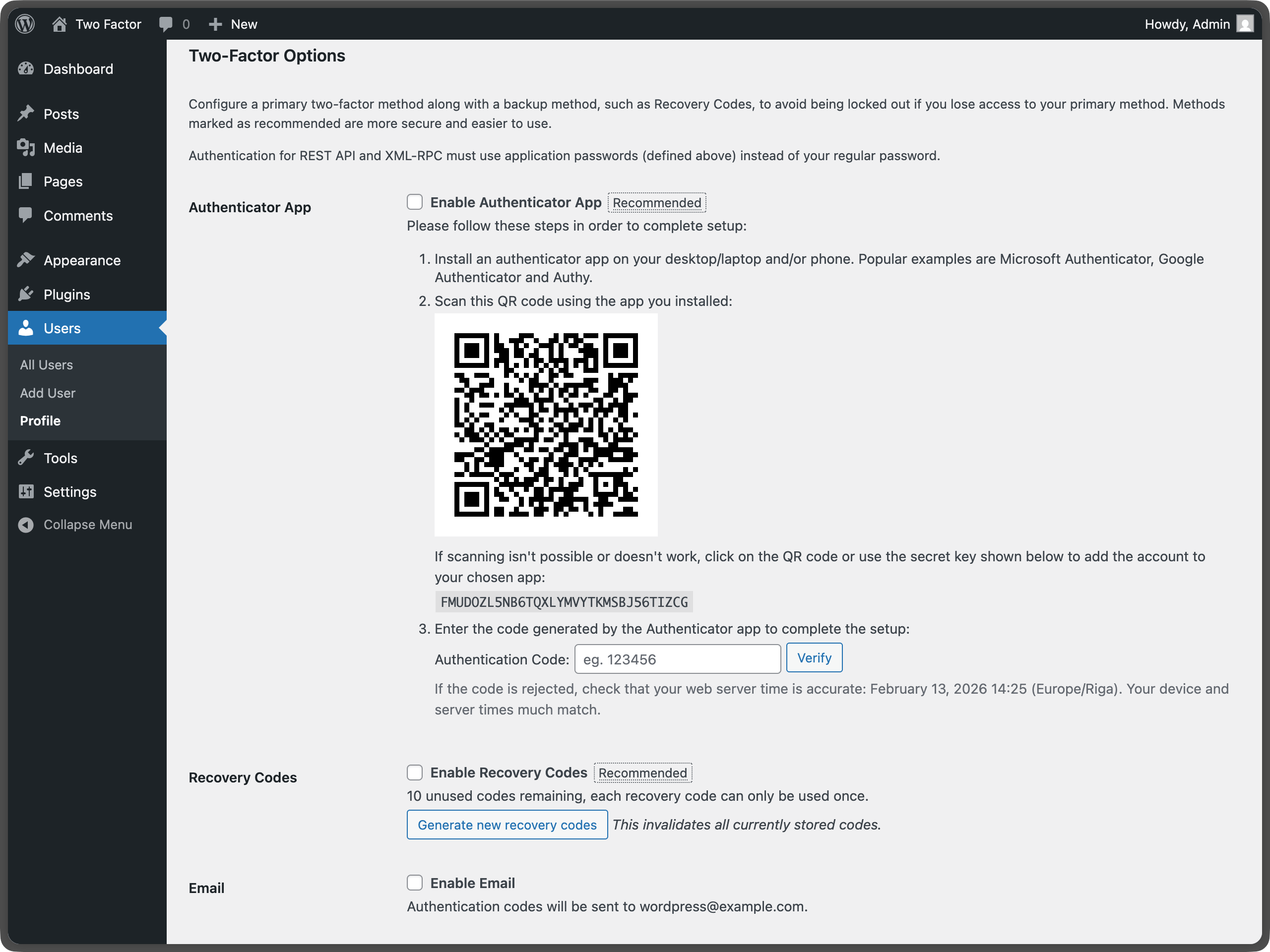
Two-factor options under User Profile - Shows the main configuration area where users can enable different authentication methods.
The Two-Factor plugin adds an extra layer of security to your WordPress login by requiring users to provide a second form of authentication in addition to their password. This helps protect against unauthorized access even if passwords are compromised.
Setup Instructions
Important: Each user must individually configure their two-factor authentication settings. There are no site-wide settings for this plugin.
For Individual Users
- Navigate to your profile: Go to “Users” “Your Profile” in the WordPress admin
- Find Two-Factor Options: Scroll down to the “Two-Factor Options” section
- Choose your methods: Enable one or more authentication providers (noting a site admin may have hidden one or more so what is available could vary):
- Authenticator App (TOTP) – Use apps like Google Authenticator, Authy, or 1Password
- Email Codes – Receive one-time codes via email
- FIDO U2F Security Keys – Use physical security keys (requires HTTPS)
- Backup Codes – Generate one-time backup codes for emergencies
- Dummy Method – For testing purposes only (requires WP_DEBUG)
- Configure each method: Follow the setup instructions for each enabled provider
- Set primary method: Choose which method to use as your default authentication
- Save changes: Click “Update Profile” to save your settings
For Site Administrators
- No global settings: This plugin operates on a per-user basis only. For more, see GH#249.
- User management: Administrators can configure 2FA for other users by editing their profiles
- Security recommendations: Encourage users to enable backup methods to prevent account lockouts
Available Authentication Methods
Authenticator App (TOTP) – Recommended
- Security: High – Time-based one-time passwords
- Setup: Scan QR code with authenticator app
- Compatibility: Works with Google Authenticator, Authy, 1Password, and other TOTP apps
- Best for: Most users, provides excellent security with good usability
Backup Codes – Recommended
- Security: Medium – One-time use codes
- Setup: Generate 10 backup codes for emergency access
- Compatibility: Works everywhere, no special hardware needed
- Best for: Emergency access when other methods are unavailable
Email Codes
- Security: Medium – One-time codes sent via email
- Setup: Automatic – uses your WordPress email address
- Compatibility: Works with any email-capable device
- Best for: Users who prefer email-based authentication
FIDO U2F Security Keys
- Security: High – Hardware-based authentication
- Setup: Register physical security keys (USB, NFC, or Bluetooth)
- Requirements: HTTPS connection required, compatible browser needed
- Browser Support: Chrome, Firefox, Edge (varies by key type)
- Best for: Users with security keys who want maximum security
Dummy Method
- Security: None – Always succeeds
- Setup: Only available when WP_DEBUG is enabled
- Purpose: Testing and development only
- Best for: Developers testing the plugin
Important Notes
HTTPS Requirement
- FIDO U2F Security Keys require an HTTPS connection to function
- Other methods work on both HTTP and HTTPS sites
Browser Compatibility
- FIDO U2F requires a compatible browser and may not work on all devices
- TOTP and email methods work on all devices and browsers
Account Recovery
- Always enable backup codes to prevent being locked out of your account
- If you lose access to all authentication methods, contact your site administrator
Security Best Practices
- Use multiple authentication methods when possible
- Keep backup codes in a secure location
- Regularly review and update your authentication settings
For more information about two-factor authentication in WordPress, see the WordPress Advanced Administration Security Guide.
For more history, see this post.
Actions & Filters
Here is a list of action and filter hooks provided by the plugin:
two_factor_providersfilter overrides the available two-factor providers such as email and time-based one-time passwords. Array values are PHP classnames of the two-factor providers.two_factor_providers_for_userfilter overrides the available two-factor providers for a specific user. Array values are instances of provider classes and the user objectWP_Useris available as the second argument.two_factor_enabled_providers_for_userfilter overrides the list of two-factor providers enabled for a user. First argument is an array of enabled provider classnames as values, the second argument is the user ID.two_factor_user_authenticatedaction which receives the logged inWP_Userobject as the first argument for determining the logged in user right after the authentication workflow.two_factor_user_api_login_enablefilter restricts authentication for REST API and XML-RPC to application passwords only. Provides the user ID as the second argument.two_factor_email_token_ttlfilter overrides the time interval in seconds that an email token is considered after generation. Accepts the time in seconds as the first argument and the ID of theWP_Userobject being authenticated.two_factor_email_token_lengthfilter overrides the default 8 character count for email tokens.two_factor_backup_code_lengthfilter overrides the default 8 character count for backup codes. Provides theWP_Userof the associated user as the second argument.two_factor_rest_api_can_edit_userfilter overrides whether a user’s Two-Factor settings can be edited via the REST API. First argument is the current$can_editboolean, the second argument is the user ID.two_factor_before_authentication_promptaction which receives the provider object and fires prior to the prompt shown on the authentication input form.two_factor_after_authentication_promptaction which receives the provider object and fires after the prompt shown on the authentication input form.two_factor_after_authentication_inputaction which receives the provider object and fires after the input shown on the authentication input form (if form contains no input, action fires immediately aftertwo_factor_after_authentication_prompt).