
Trust Badges
by Convers Lab on WordPress.org
Trust Badges adds customizable trust icons and badges to WooCommerce and EDD, boosting customer confidence and sales.
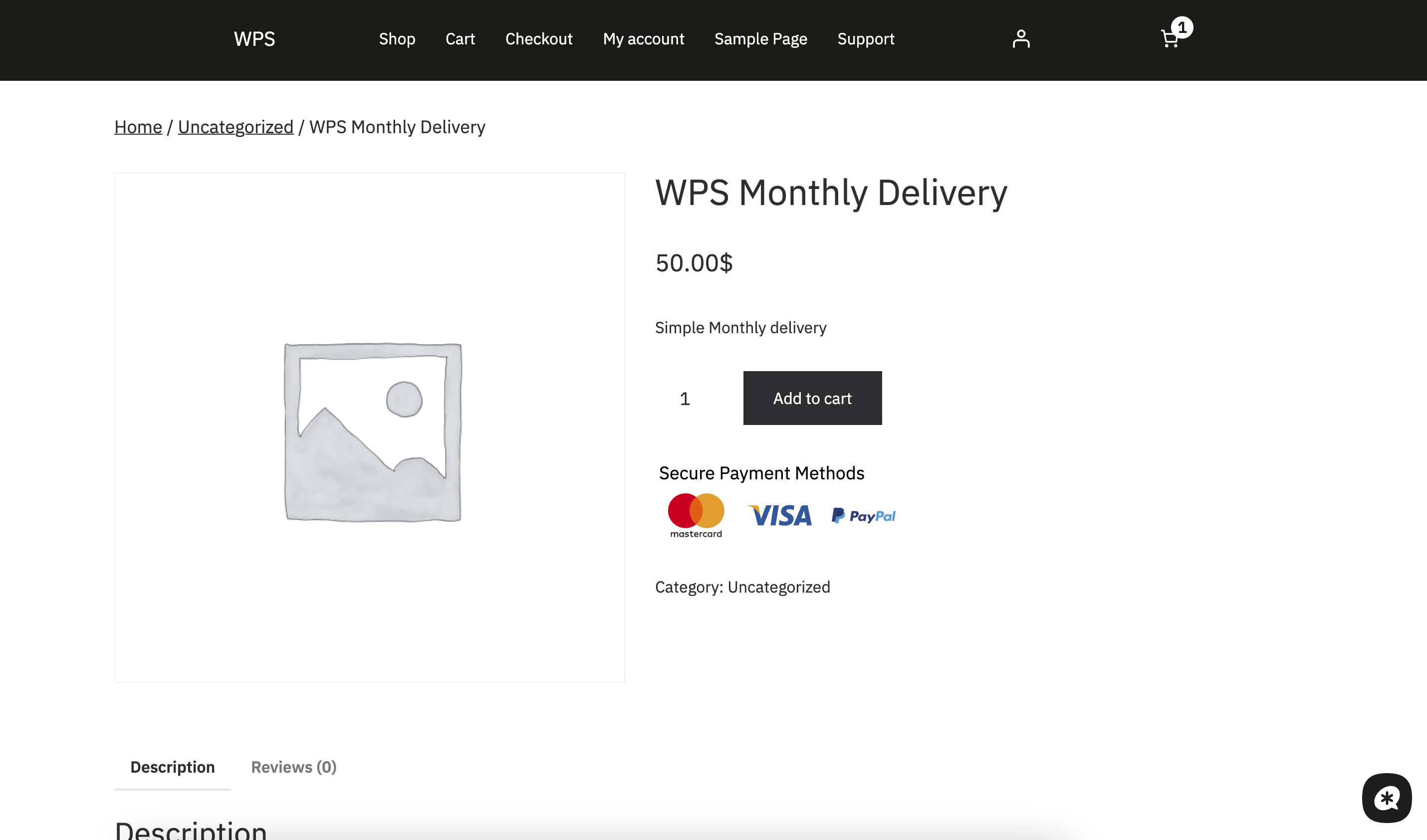
Trust Badge Product Page Display
Trust Badges is a WordPress plugin designed to increase customer trust and boost conversions by displaying customizable trust badges on your e-commerce store. Whether you’re using WooCommerce or Easy Digital Downloads (EDD), this plugin allows you to add, customize, and manage badges with ease.
Badges such as secure payment icons, money-back guarantees, free delivery, and other trust signals help reassure customers during the purchase process. You can also use shortcodes to place badges anywhere on your site, including product pages, checkout, and cart pages.
Key Features
- Add and Manage Trust Badges: Easily add, edit, and remove trust badges to build customer confidence.
- Customizable Badges: Adjust badge appearance, size, and position to match your store’s branding.
- Shortcode Support: Display badges anywhere on your site using simple shortcodes.
- Mobile-Responsive Design: Badges look great on all devices.
- Works with WooCommerce and EDD: Fully compatible with WooCommerce and Easy Digital Downloads.
- Settings Panel: Manage all settings under Settings -> Trust Badges in the WordPress admin panel.
- Pre-built Badge Library: Choose from hundreds of pre-designed trust badges including payment icons, security badges, and delivery guarantees.
- Custom Badge Upload: Upload your own custom badges and integrate them seamlessly.
Why Use Trust Badges?
Increase customer trust by displaying secure payment icons, money-back guarantees, delivery badges, and other trust signals that reassure customers during the buying process. Studies show that trust badges can increase conversion rates by up to 15%.
Badge Categories
- Payment Methods: Visa, Mastercard, PayPal, Apple Pay, Stripe, Amazon Pay, and many more
- Security Badges: SSL certificates, secure checkout, and data protection
- Delivery & Shipping: Free delivery, fast shipping, and tracking options
- Guarantees: Money-back guarantee, satisfaction guarantee, and warranty
- Certifications: Industry certifications and compliance badges
- Custom Badges: Upload your own promotional or brand-specific badges
Usage
After activation, go to the Settings -> Trust Badges section in the WordPress admin menu to manage your badges:
- Add New Badges: Upload images or select from pre-designed badges.
- Customize Badges: Change sizes, colors, and positions.
- Shortcodes: Use shortcodes to display badges anywhere on your site.
Shortcode Usage
The plugin uses badge groups to organize different sets of badges. Each group can have different settings, selected badges, and display options.
Display badges by group ID:
[trust_badges id=”1″]
Display badges from different groups:
[trust_badges id=”2″]
Display badges without specifying ID (defaults to group 1):
[trust_badges]
Available Badge Groups:
* Group 1 (Product Page): Badges for product pages with payment methods
* Group 2 (Footer): Badges for footer display with trust signals
* Group 3 (Cart Page): Badges for cart pages with checkout assurance
You can create and manage badge groups in the plugin settings under Settings -> Trust Badges.
WooCommerce Integration
The plugin automatically integrates with WooCommerce and displays badges on:
* Product pages
* Cart page
* Checkout page
* Shop page
Easy Digital Downloads Integration
For EDD users, badges can be displayed on:
* Download pages
* Checkout page
* Purchase confirmation page
Requirements
- WordPress Version: 4.7 or higher
- WooCommerce or Easy Digital Downloads (Optional but recommended)
- PHP Version: 7.4 or higher
Support
For support, please visit the plugin support page or create an issue on our GitHub repository.


