
theFinancials Market Widgets
by theFinancials.com on WordPress.org
Embed free interest rate widgets, market data widgets, financial tickers and charts in WordPress. 50+ free, live-updating widgets from theFinancials.
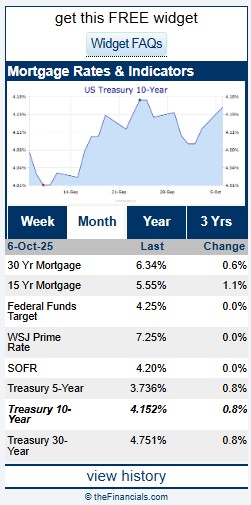
Compact Commercial Mortgage Market Widget
This plugin from theFinancials.com lets you embed free, live-updating, financial market data widgets into your WordPress pages. Choose 50+ popular financial widgets including:
– Interest rate widgets | Featuring U.S. Treasury Rates, SOFR Rates, Prime Rate, Canadian CMB Rates, GOC Rates, CORRA, and other capital markets rates
– Exchange rate widgets | Featuring Spot rates for major currency pairs – USD/EUR, USD/GBP, USD/JPY, USD/CAD, EUR/GBP, EUR/JPY
– Indexes widgets | Featuring Dow, S&P 500, NASDAQ
– Energy prices widgets | Featuring Crude Prices, Natural Gas Prices, Rig Counts
– Grain prices widgets | Featuring Corn Prices, Wheat Prices, Soy Prices
– Metals prices widgets | Featuring Gold Prices, Silver Prices, Platinum Prices
And many more rates, quotes and prices across financial markets and industries.
The plugin uses the widget catalog from theFinancials.com — a trusted financial data provider since 1996. You choose the Market, Widget Type, Size/Shape, and preferred embed Method (JavaScript or iframe). Perfect if you need a market data widget, ticker widget, or financial charts for your website.
Open theFinancials from the WordPress admin menu to configure global settings, or use the theFinancials Embed block to edit directly in the block sidebar.
Key Features
- Daily updates for hundreds of popular financial instruments in web-ready widgets.
- Catalog-driven: Markets, Widgets, and Sizes come directly from theFinancials catalog (no manual updates).
- Two embed methods: JavaScript or iframe (Ticker always JavaScript).
- Block editor support with live preview.
- Global or per-block configuration — your most recent save becomes current.
- Shortcode generator with copy-and-paste ready code.
- Security-first: fetches data only from theFinancials.com subdomains.
- All widgets are free. (For Custom Widgets contact info@mail.thefinancials.com)
External Services
This plugin connects to a third-party service operated by theFinancials.com LLC to retrieve widget catalog data, generate the embed code used to display selected widgets on your site, and (once per site) send a minimal, anonymous install signal for compatibility and adoption tracking.
Service owner: theFinancials.com LLC
Service purpose:
– Provide the list of available market-data widgets
– Return the HTML/JS embed code for the widgets you choose
– Receive a one-time, anonymous install ping so the provider can understand adoption and maintain compatibility
Service endpoints: Hosted by theFinancials.com over HTTPS, including (but not limited to):
– Catalog and widget endpoints under https://thefinancials.com and its subdomains
– Install ping endpoint at: https://thefinancials.com/wordpress-widgets/installs.php
Terms: https://thefinancials.com/terms-and-conditions/
Privacy Policy: https://thefinancials.com/privacy-policy/
What Data Is Sent and When
The plugin makes requests to theFinancials.com in three situations:
-
In the WordPress admin (catalog & settings UI):
When you open the plugin’s pages to browse or configure widgets, the plugin requests the latest widget catalog.
The request may include:- Your site URL (as HTTP Referer)
- The plugin’s user agent (which includes the plugin version)
- Your current plugin settings necessary to filter the catalog (e.g., selected markets or widget IDs)
-
On the front end (rendering a widget):
When a page loads a widget, the plugin requests the corresponding embed/snippet.
The request includes:- The widget identifier(s) you selected in the admin
- Minimal context required to return the correct embed (e.g., size/variant flags)
-
One-time install ping (after activation/update):
When the plugin is first activated on a site, or after updating to a version that includes this feature, it schedules a one-time, background “install ping” to theFinancials.com.
This ping is sent asynchronously and does not block page loads. It includes:- Site URL and hostname
- Plugin slug and plugin version
- WordPress version
- PHP version
- Timestamp of the ping
This install ping is used solely to understand adoption and environment compatibility (e.g., which WP/PHP versions are in use with this plugin).
Not sent by the plugin:
End-user names, emails, or other directly identifying visitor information.
The plugin does not send WordPress user account details.
No cookies are set by the plugin for this purpose.
Network metadata (e.g., IP address) may be visible to the service as part of normal HTTPS requests.
Why This Data Is Sent
- To show you an up-to-date widget catalog in the admin UI
- To return the correct widget code so the widget can be displayed on the front end
- To help the provider maintain compatibility and troubleshoot version-specific issues (using WordPress/PHP/plugin version signals)
- To measure anonymous adoption (how many sites use the plugin and which environments they run)
How Data Is Transmitted and Stored
- Transport: All requests use HTTPS.
- Retention: Operational logs may be retained by the service provider for security and reliability (e.g., abuse prevention, debugging). See the provider’s Privacy Policy for details.
Opt-Out / Disabling the Service
This plugin’s core functionality depends on the external API.
If you do not wish to send the above data to theFinancials.com, you should deactivate the plugin (widgets will no longer render).
The one-time install ping is only sent while the plugin is active.
Front-End JavaScript Rendering
This plugin enqueues all admin/editor assets using WordPress APIs.
For the front end, the JavaScript widget method outputs a