
TheAVCoach Weather Station for WeatherLink
by The AV Coach on WordPress.org
Display real-time weather data from your Davis WeatherLink station with automatic detection, styling options, and universal compatibility.
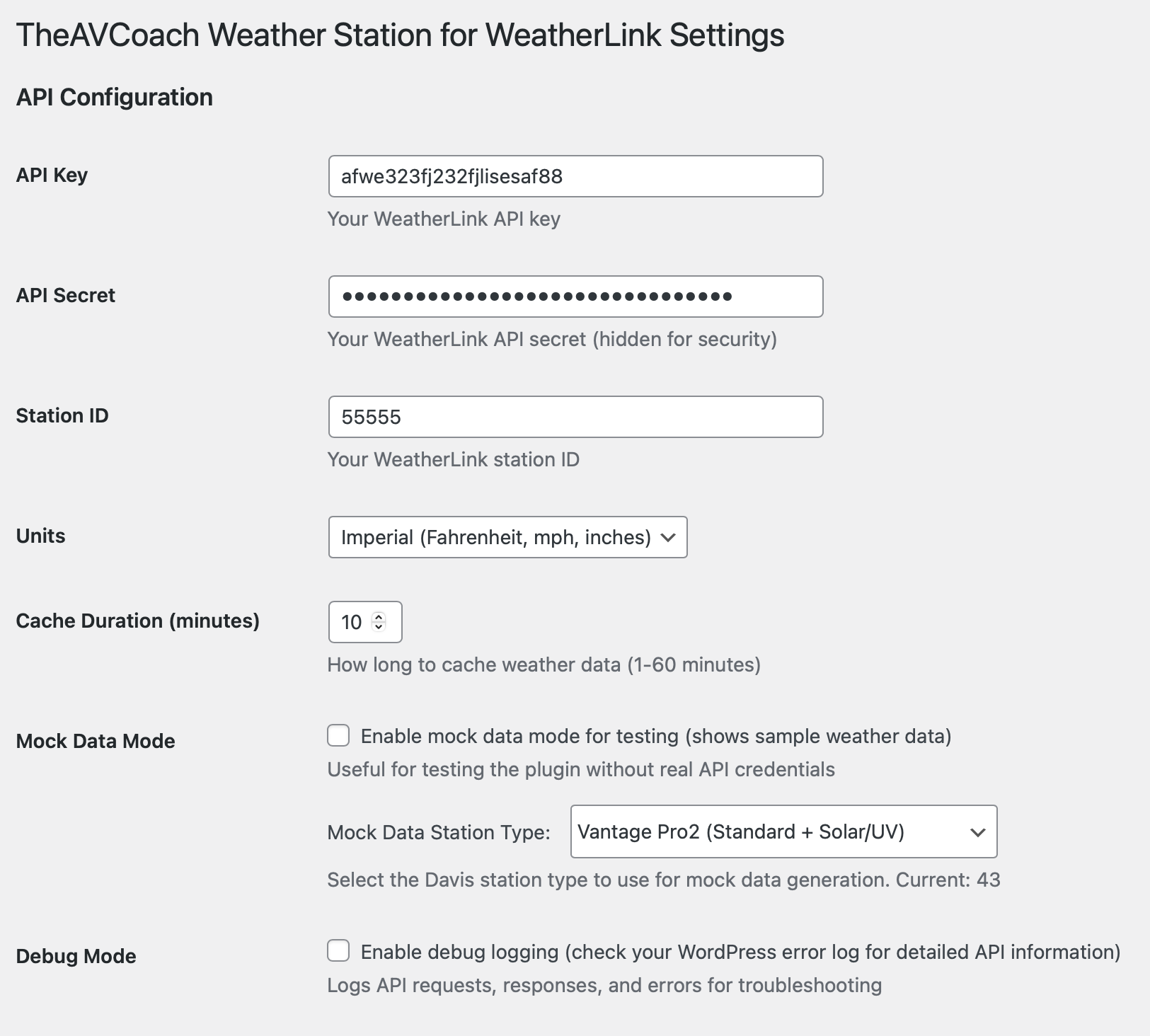
Admin Settings Page - Comprehensive configuration interface
TheAVCoach Weather Station for WeatherLink is a powerful WordPress plugin that seamlessly integrates your Davis WeatherLink station data into your website. Display current weather conditions using a shortcode and/or sidebar widget with extensive customization options, automatic station detection, universal field compatibility, and built-in mock data testing.
🌤️ Key Features
- Real-time Weather Data: Connect to your WeatherLink API for live weather updates
- Automatic Station Detection: Automatically identifies your Davis station type and available sensors
- Universal Field Compatibility: Automatically detects and maps ALL weather variables from ANY Davis station model
- Flexible Display Options: Use a shortcode in posts/pages or a widget in sidebars
- Comprehensive Styling: Full control over fonts, colors, borders, and layout
- Variable Control System: Show/hide individual weather variables with Primary/Secondary priority
- Drag & Drop Ordering: Reorder weather variables via intuitive admin interface
- Mock Data Testing: Built-in testing framework for demonstration and development
- Auto-Refresh Mock Data: Automatically updates mock data when station type changes
- Responsive Design: Works perfectly on desktop, tablet, and mobile devices
- Smart Caching: Efficient data caching to minimize API calls
- Multiple Units: Support for both Imperial and Metric units
- Future-Proof: Automatically adapts to new Davis station models and API changes
📊 Weather Data Available
- Temperature (current, dew point, heat index, wind chill)
- Humidity
- Wind speed, direction, and gusts
- Rainfall (daily, storm total, monthly, yearly)
- Barometric pressure and trend (with enhanced field detection)
- UV Index (for stations with UV sensor)
- Solar Radiation (for stations with solar sensor)
- Timestamp information (with customizable styling)
🎨 Advanced Customization Options
- Font Control: Google Fonts integration with size, color, and weight options
- Table Styling: Header background color, opacity control, and cell border options
- Widget Styling: Separate color settings for labels, values, and backgrounds
- Layout Options: 4-column table layout with customizable header styling
- Variable Management: Unified interface for show/hide, priority settings, and drag & drop reordering
- Responsive Design: CSS grid and table layouts that adapt to any screen size
- Timestamp Styling: Customizable timestamp position, color, and alignment
🏠 Smart Station Detection & Universal Compatibility
- Automatic Identification: Detects Davis station type from API data
- Universal Field Detection: Automatically maps ALL weather variables from ANY Davis station model
- Future-Proof: No manual updates needed for new station models or API changes
- Sensor Mapping: Shows available sensors based on your station model
- Station Types Supported:
- Vantage Vue (basic weather data)
- Vantage Pro2 (includes UV and Solar Radiation)
- Vantage Pro2 Plus (full sensor suite)
- Vantage Vue Plus (Vue + UV sensor)
- Wireless variants of all models
- ANY future Davis station model (automatically supported)
🔧 Technical Features
- API Integration: Direct WeatherLink API v2 integration with proper error handling
- Dynamic Field Detection: Automatically discovers and maps all available weather data fields
- Enhanced Barometric Pressure: Comprehensive field mapping for pressure and trend data
- Smart Caching: Configurable cache duration (1-60 minutes)
- Security: Proper sanitization, nonce verification, and capability checks
- WordPress Standards: Follows all WordPress coding best practices
- Debug Mode: Built-in debugging for troubleshooting with comprehensive API structure analysis
- Smart Mock Data Management: Auto-refresh when station type changes, manual refresh/clear options
- Font Awesome Icons: Professional weather icons throughout
- Mobile Responsive: Optimized for all device sizes
- Automatic Error Recovery: Graceful handling of missing or corrupted data
📱 Usage Examples
Shortcode in Posts/Pages:
[theavcoach_weather]
Widget in Sidebar:
Simply drag the “TheAVCoach Weather Station for WeatherLink” widget to any sidebar area. All widget settings are configured globally in the plugin settings.
🚀 Quick Start
- Install & Activate the plugin
- Configure API Credentials in Settings TheAVCoach Weather Station for WeatherLink
- Add your WeatherLink API key, secret, and station ID
- Station type will be automatically detected
- All weather variables will be automatically mapped
- Customize styling to match your theme
- Configure variable display (show/hide and priority)
- Reorder variables using drag and drop
- Use the shortcode or widget to display weather data
🧪 Mock Data Testing
The plugin includes a comprehensive mock data testing framework:
* Test without API credentials – perfect for development and demonstration
* Multiple station types – test different Davis station configurations
* Realistic data generation – creates believable weather values with dynamic variation
* Interactive testing interface – test all features before going live
* Automatic mock mode – seamlessly switch between mock and live data
Quick Start:
1. Go to Settings TheAVCoach Weather Station for WeatherLink Mock Tester
2. Select a station type (Vantage Vue, Pro2, Pro2 Plus, etc.)
3. Click “Generate Mock Data” to create realistic weather values
4. Click “Inject Into Plugin” to test your plugin with mock data
5. Test shortcode and widget functionality
6. Use “Disable Mock Mode” to return to normal API operation
Supported Station Types:
* Vantage Vue – Basic weather data (temp, humidity, wind, rain, pressure)
* Vantage Pro2 – Full suite including UV Index and Solar Radiation
* Vantage Pro2 Plus – Complete sensor array
* Vantage Vue Plus – Vue capabilities + UV sensor
* Wireless variants of all models
Testing Benefits:
* Verify plugin functionality before purchasing API credentials
* Test different station configurations
* Demonstrate features to clients
* Develop and debug without real weather data
* Test responsive design with various data sets
* Validate all weather variable mappings
🎯 Perfect For
- Weather stations and meteorological websites
- Local news and community sites
- Outdoor activity and sports websites
- Educational institutions with weather programs
- Personal weather enthusiast blogs
- Professional weather service providers
- Developers testing weather integrations
- Any Davis station owner regardless of model or configuration
External Services
This plugin connects to the Davis WeatherLink API to obtain real-time weather station data. This external service is required to display current weather information in the included widget and shortcode.
What Data is Sent and When
API Credentials: Your WeatherLink API key, secret, and station ID are stored securely in your WordPress database and sent to the Davis WeatherLink API servers when:
* Weather data is requested (via shortcode or widget)
* Cache expires and fresh data is needed
* Manual refresh is triggered
Request Data: The plugin sends HTTP requests to Davis WeatherLink API endpoints containing:
* Your station ID (to identify which weather station to query)
* API authentication credentials (key and secret)
* No personal information or user data is transmitted
Data Transmission Frequency:
* Weather data is fetched when the shortcode or widget is displayed
* Caching reduces API calls (configurable from 1-60 minutes)
* No continuous background data transmission
Davis WeatherLink API Service
Service Provider: Davis Instruments Corporation
Service Purpose: Provides real-time weather data from Davis weather stations
API Endpoints Used:
* https://api.weatherlink.com/v2/current/{station_id} – Current weather data
* https://api.weatherlink.com/v2/current/{station_id}/ – Alternative endpoint format
* https://api.weatherlink.com/v2/current/{station_id}.json – JSON format endpoint
Terms of Service: Davis WeatherLink API Terms
Privacy Policy: Davis Instruments Privacy Policy
Data Security: All API communications use HTTPS encryption, and your API credentials are stored securely in your WordPress database.
Alternative: Mock Data Mode
The plugin includes a built-in mock data testing mode that allows you to test all functionality without connecting to external services. This mode generates realistic weather data locally and is perfect for development, testing, and demonstration purposes.
Developer Notes
The plugin follows WordPress coding standards and includes:
* Proper sanitization and validation
* Nonce verification for security
* User capability checks
* Error handling with WP_Error
* Internationalization support
* Proper script and style enqueuing
* Activation/deactivation hooks
* Comprehensive error logging
* Dynamic field detection algorithms
* Universal station compatibility
* Enhanced data extraction methods
* Comprehensive debug and testing tools
Trademark Notice
WeatherLink is a registered trademark of Davis Instruments Corporation. Used here for reference only. This plugin is not affiliated with or endorsed by Davis Instruments.


