
TableMaster for Elementor – Advanced Responsive Tables for Elementor
by BloomPixel on WordPress.org
Advanced Elementor table widget to build beautiful, responsive data tables, pricing tables, comparison tables and more inside Elementor.
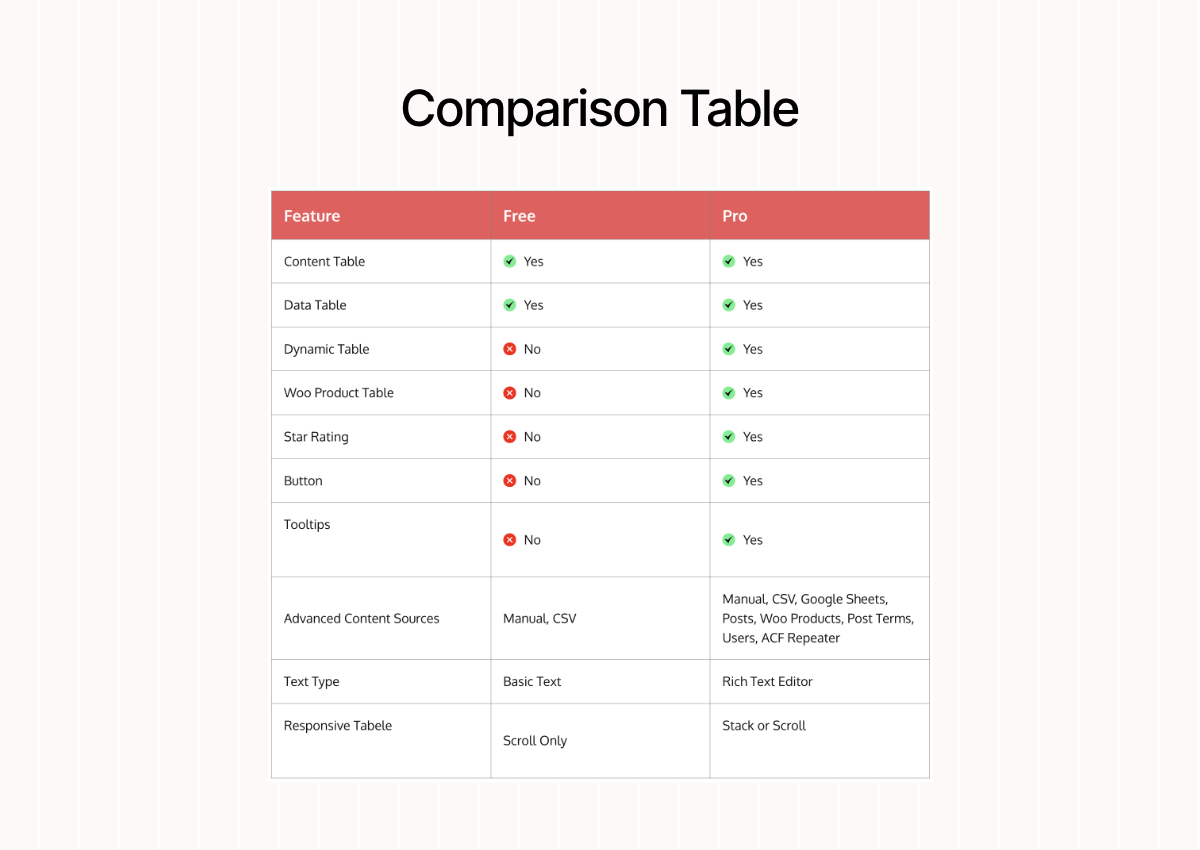
Comparison Table
TableMaster for Elementor allows you to design, edit, and manage responsive, data-rich tables directly inside the Elementor editor – with zero coding skills required.
If you’re a blogger, agency, business owner, or web designer, TableMaster helps you display data in stunning, mobile-friendly tables in just a few clicks.
Seamlessly Integrated With Elementor
TableMaster brings advanced table addons for Elementor, helping you build stylish and functional tables without coding.
You can drag the Elementor table widget into your layout, start adding content, apply styles, and instantly see the results with live editing.
You don’t need to switch screens or refresh the page to preview changes.
Everything happens visually inside Elementor’s native environment.
This lets you:
- Save time on repetitive tasks
- Avoid manual HTML table formatting
- Keep your table design aligned with the rest of your Elementor pages
- Avoid the hassle to style for multiple devices as this Elementor responsive table adapts seamlessly to all screen sizes and resolutions
Why Choose TableMaster for Elementor?
TableMaster brings the simplicity of Excel and the flexibility of Elementor together in one powerful, easy-to-use plugin.
With real-time visual editing, dynamic data support, and advanced styling controls, TableMaster gives you complete control over how your data is displayed, with no workarounds or external tools needed. In short, it is perfect Elementor table builder for every kind of user.
This plugin is perfect for marketers, eCommerce stores, educators, and anyone who needs to present structured data in an organized, professional format.
Love Elementor? With Table Master, you get a fast and responsive table widget for Elementor — better than Ninja Tables, TablePress, WP Table Builder, or wpDataTables.
FREE Features – Everything You Need to Get Started
The free (lite) version of TableMaster gives you powerful tools to build beautiful and responsive tables with ease.
Core Table Features:
- Built specifically for Elementor
- Stack or Scroll – Two responsive table modes
- Visual drag-and-drop table builder
- Manual data entry with intuitive editor
- Import data from CSV files
- Import data from TablePress
Styling & Design Controls:
- Style table structure with width, spacing, and alignment options
- Customize headers with full control over font, background, borders, alignment, and padding
- Apply row styles like alternating backgrounds, text color, and spacing
- Customize individual cells with typography, text, and background color, border styles, and alignments
- Enable column span and row span for more flexible layouts
Enhanced Table Functionality
- Sortable Columns: Enable column sorting so visitors can sort by name, price, or date
- Search Box: Add real-time search filtering to help users find what they need faster
- Pagination: Break large tables into pages using pagination for better readability
- Table Info Display: Show helpful table statistics like total entries and visible rows
PRO Features – Create Dynamic Tables With Advanced Controls
When you’re ready to take your tables to the next level, TableMaster Pro offers advanced features for dynamic data handling and a better user experience.
📥 Data Source Integration
- Google Sheets Integration: Connect live data from Google Sheets and keep tables updated automatically
- Dynamic WordPress Data: Pull dynamic data from WordPress posts, pages, custom post types, taxonomies, and users
- WooCommerce Product Table: Showcase WooCommerce product data in table format
🔎 Advanced Table Features
- Tooltips Support: Add tooltips to provide extra information without cluttering the table
Use Cases – What Can You Create with TableMaster for Elementor?
TableMaster is incredibly versatile and works great for almost any website.
Here are just a few examples of what you can build:
- Comparison tables for affiliate blogs
- Product pricing tables for service providers
- Restaurant menus with multiple sections
- Course schedules for education websites
- Employee directories with contact info
- Event listings with dates and times
- FAQs and knowledge base content
- Data-rich dashboards and reports
🛠️ Built by the Experts at BloomPixel
TableMaster is developed by BloomPixel, the team trusted by over 200,000 WordPress users worldwide.
We develop reliable, high-quality plugins that simplify complex tasks and empower users to create more effective websites.
Other plugins by BloomPixel include
Here are other Ultimate addons for Elementor and Bricks builder by us.
- PowerPack Addons for Elementor – A collection of essential addons for Elementor, featuring over 150 pre-designed Elementor templates.
- Max Addons for Bricks Builder – Supercharge your Bricks Builder with creative elements
- EasyDash for Bricks – Customize and manage your Bricks dashboard with ease
- Bricks Element Manager – Enable or disable Bricks elements from your dashboard
📖 Helpful Documentation
Visit our extensive knowledge base for detailed tutorials, setup guides, FAQs, and examples.
From beginners to advanced users, we have documentation to help everyone get the most out of TableMaster.
💬 Friendly Support When You Need It
Need help setting up your first table?
Have a question about importing data?
Our expert support team is always here to assist you.
Submit a support ticket, and we’ll be happy to assist you.
❤ Love TableMaster for Elementor?
If TableMaster has helped you simplify your table creation process in Elementor, show your support:
- Leave a 5-⭐️ review
- Follow us on Facebook
- Share your experience with your network
- Send feedback to help us improve
Use of 3rd-Party Services
TableMaster for Elementor connects to our secure feedback endpoint only when a user voluntarily submits feedback (for example, during plugin deactivation).
Data is transmitted only after explicit user consent. No data is collected automatically, no background tracking is performed, and no frontend visitor or website user data is collected.
For more details, please review our Privacy Policy and Terms of Service.
Disclaimer
TableMaster for Elementor is an independent product developed by BloomPixel. It is not affiliated with, endorsed by, sponsored by, or officially associated with Elementor Ltd.
“Elementor” is a registered trademark of Elementor Ltd. The use of the term “Elementor” within this plugin name and description is strictly for identification and compatibility purposes only, to indicate that this plugin extends functionality of the Elementor page builder.


