Simple Membership
by wp.insider on WordPress.org
Simple membership plugin adds membership functionality to your site. Protect members only content using content protection easily.
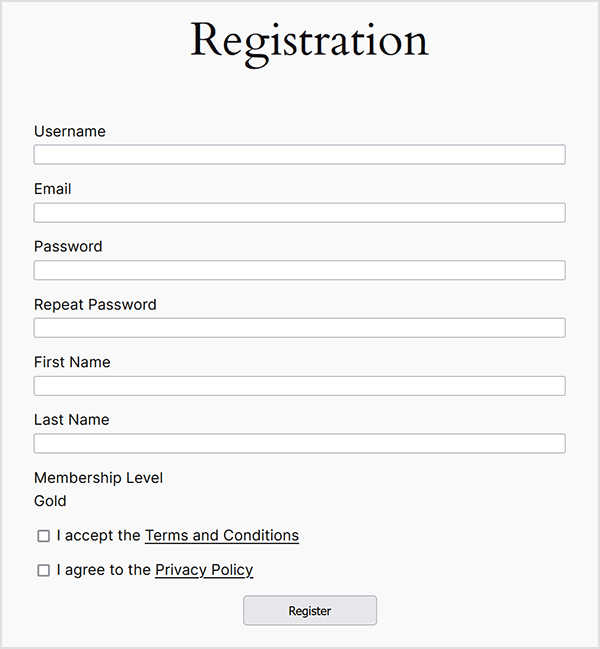
Example of the member registration page.
A flexible, well-supported, and easy-to-use WordPress membership plugin for offering free and premium content from your WordPress site
The simple membership plugin lets you protect your posts and pages so only your members can view the protected content.
Unlimited Membership Access Levels
Set up unlimited membership levels (example: free, silver, gold etc) and protect your posts and pages using the membership levels you create.
Flexible Membership Duration Options
Simple Membership supports multiple membership duration models, including:
- Fixed duration (days, weeks, months, or years)
- No expiry / until canceled
- Fixed future expiry date
- Annual memberships (calendar or fiscal year based)
- Subscription-driven access
Each membership level can be configured independently to match your access rules.
User Friendly Interface for Content Protection
When you are editing a post or page in the WordPress editor, you can select to protect that post or page for your members.
Non-members viewing a protected page will be prompted to log in or become a member.
Have Free and Paid Memberships
You can configure it to have free and/or paid memberships on your site. Paid membership payment is handled securely via PayPal. Membership payment can also be accepted using Stripe or Braintree payment gateways.
Both one time and recurring/subscription payments are supported for PayPal and Stripe.
You can accept one time membership payment via Braintree payment gateway.
Option to make membership payment buttons using the new PayPal Checkout API.
There is also option to use PayPal smart buttons for membership payment.
You can enable email activation or email confirmation for the free memberships.
Membership Payments Log
All the payments from your members are recorded in the plugin. You can view them anytime by visiting the payments menu from the admin dashboard.
Developer API
There are lots of action and filter hooks that a developer can use to customize the plugin.
There is also an API that can be used to query, create, update member accounts.
Member Login Widget on The Sidebar
You can easily add a member login widget on the sidebar of your site. Simply use the login form shortcode in the sidebar widget.
You can also customize the member login widget by creating a custom template file in your theme (or child theme) folder.
Option to show a password visibility toggle option in the login form.
Documentation
Read the setup documentation after you install the plugin to get started.
Plugin Support
If you encounter any issues with this plugin, please visit our website to post on the support forum or contact us directly.
https://simple-membership-plugin.com/
You can create a free forum account to ask your questions.
Additional Features
- Works with any WordPress theme.
- Ability to protect photo galleries.
- Ability to protect attachment pages.
- Show teaser content to convert visitors into members.
- Comments on your protected posts will also be protected automatically.
- There is an option to enable debug logging so you can troubleshoot membership payment related issues easily (if any).
- Ability to customize the content protection message that gets shown to non-members.
- Ability to partially protect post or page content.
- You can apply protection to posts and pages in bulk.
- Ability to use merge vars in the membership email notification.
- Membership management side is handled by the plugin.
- Ability to manually approve your members.
- Ability to import WordPress users as members.
- Search for a member’s profile in your WP admin dashboard.
- Filter members list by account status.
- Filter members list by membership level.
- Site admins can save private notes about members, providing a convenient way to keep track of important information.
- Can be translated to any language.
- Hide the admin toolbar from the frontend of your site.
- Allow your members to delete their membership accounts.
- Send quick notification email to your members.
- Email all members by membership level, with an option to filter by account status.
- Customize the password reset email for members.
- Use Google reCAPTCHA on your member registration form.
- Use Google reCAPTCHA on your member login and password reset form.
- The login and registration widgets will be responsive if you are using a responsive theme.
- Ability to restrict the commenting feature on your site to your members only.
- Front-end member registration page.
- Front-end member profiles.
- Front-end member login page.
- Option to configure after login redirection for members.
- Option to configure after registration redirect for members.
- Option to configure after logout redirection for members.
- Option force the members to use strong password.
- Option to make the users agree to your terms and conditions before they can register for a member account.
- Option to make the users agree to your privacy policy before they can register for a member account.
- Option to hide the registration/join option. Useful if you prefer visitors not to see the registration option on your site.
- Option to automatically logout the members when they close the browser.
- Ability to forward the payment notification to an external URL for further processing.
- Option to configure whitelisting for user email addresses to allow registration only from specific email addresses or email domains.
- Option to configure blacklisting for user email addresses to block registration from certain email addresses or email domains.
- Allows you to set an active login limit for members, helping to prevent account sharing.
- Option to enable and set failed login attempt limit, which helps to protect against brute force attacks.
- Option to enable login event tracking, allowing you to view the history of member logins.
- Option to reset the settings and data of the plugin to start fresh.
- Option to configure PayPal payment buttons for memberships (one-time and recurring payments).
- Option to configure Stripe payment buttons for memberships (one-time and recurring payments).
- Option to configure Braintree payment buttons for memberships (one-time payments).
- Free Social Login addon that lets users log in with their Google or Facebook accounts.
- The plugin is actively maintained and we are working on new features for the plugin.
- Browse the plugin documentation to learn more about the features of this plugin.
Language Translations
The following language translations are already available:
- English
- German
- French
- Spanish
- Spanish (Venezuela)
- Chinese
- Portuguese (Brazil)
- Portuguese (Portugal)
- Swedish
- Macedonian
- Polish
- Turkish
- Russian
- Dutch (Netherlands)
- Dutch (Belgium)
- Romanian
- Danish
- Lithuanian
- Serbian
- Japanese
- Greek
- Latvian
- Indonesian
- Hebrew
- Catalan
- Hungarian
- Bosnian (Bosnia and Herzegovina)
- Slovak
- Italian
- Norwegian
- Mexican
- Arabic
- Czech
- Finnish
You can translate the plugin using the language translation documentation.