Simple History – Track, Log, and Audit WordPress Changes
by Pär Thernström on WordPress.org
Track changes and user activities on your WordPress site. See who created a page, uploaded an attachment, and more, for a complete audit trail.
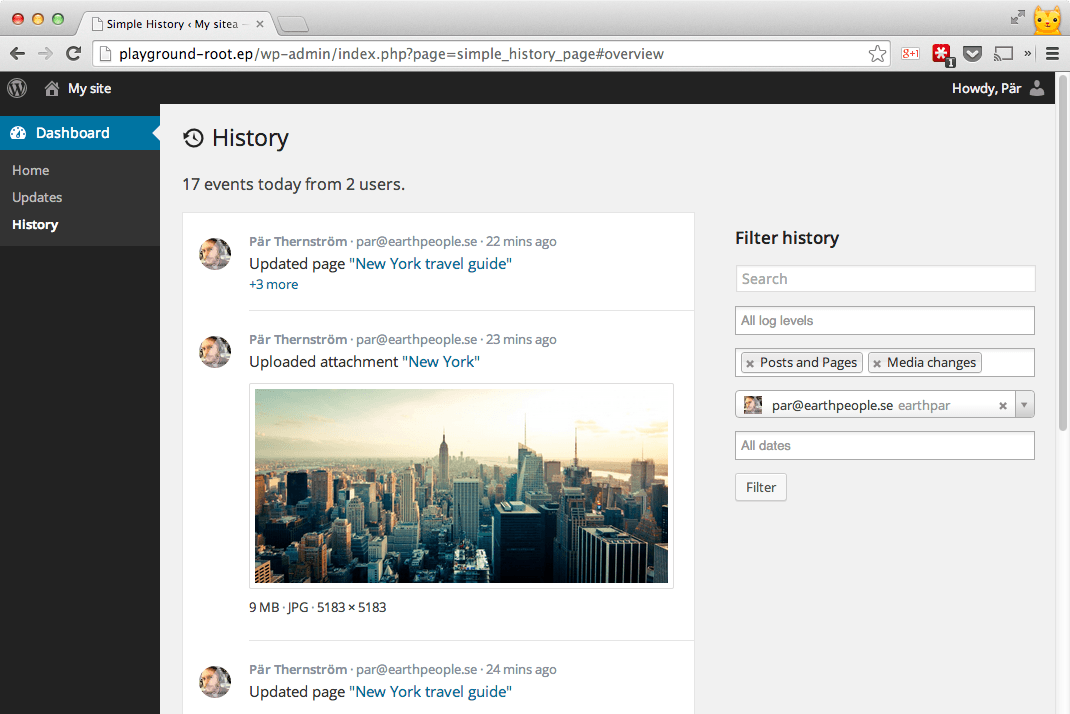
The log view + it also shows the filter function in use - the log only shows event that are of type post and pages and media (i.e. images & other uploads), and only events initiated by a specific user.
“So far the best and most comprehensive logging plugin” – @herrschuessler
Simple History shows recent changes made within WordPress, directly on your dashboard, on a separate page, or in the admin bar.
The plugin acts as an audit log of the most important events that occur in WordPress.
It’s a plugin that is good to have on websites where several people are involved in editing the content.
No coding is required to use the plugin. Just install it and it will start logging events.
🔍 How Simple History Helps in Real Situations
Track what’s happening on your site
“Has someone done anything today? Ah, Sarah uploaded the new press release and created an article for it. Great! Now I don’t have to do that.”
Identify issues and debug faster
“The site feels slow since yesterday. Has anyone done anything special? … Ah, Steven activated ‘naughty-plugin-x’, that must be it.”
Keep Freelancers & Agencies Accountable
“I hired a developer to optimize my site. But did they actually do anything? A quick glance at Simple History shows me exactly what they worked on, so I know I’m getting my money’s worth!”
✨ Simple History Features
Out of the box Simple History has support for:
-
Posts and pages – see who added, updated or deleted a post or page
-
Attachments – see who added, updated or deleted an attachment
-
Taxonomies (Custom taxonomies, categories, tags) – see who added, updated or deleted an taxonomy
-
Comments – see who edited, approved or removed a comment
-
Widgets – get info when someone adds, updates or removes a widget in a sidebar
-
Plugins – activation and deactivation
-
User profiles – info about added, updated or removed users
-
User logins – see when a user login & logout. Also see when a user fails to login (good way to catch brute-force login attempts).
-
User edits – see when a user is added, updated or removed, and get detailed information about the changes made to the user.
-
Failed user logins – see when someone has tried to log in, but failed. The log will then include ip address of the possible hacker.
-
Menu edits
-
Option screens – view details about changes made in the different settings sections of WordPress. Things like changes to the site title and the permalink structure will be logged.
-
Privacy page – when a privacy page is created or set to a new page.
-
Notes – track when notes are added, edited, or removed on posts and pages. Notes is a new collaboration feature in WordPress 6.9 that lets editors leave feedback without modifying the content.
-
Data Export – see when a privacy data export request is added and when this request is approved by the user, downloaded by an admin, or emailed to the user.
-
User Data Erasure Requests – see when a user privacy data export request is added and when this request is approved by the user and when the user data is removed.
-
admin page access denied – see when a user tries to access an admin page they don’t have permission to access.
Built-in logging for third-party plugins
Simple History comes with built in support for many plugins:
-
Jetpack – See which Jetpack modules are activated and deactivated.
-
Advanced Custom Fields (ACF) – See when field groups and fields are created and modified.
-
User Switching – See each user switch being made.
-
WP Crontrol – See when cron events are added, edited, deleted, paused, resumed, and manually ran, and when cron schedules are added and deleted.
-
Enable Media Replace – See details about the file being replaced and details about the new file.
-
Limit Login Attempts – See login attempts, lockouts, and configuration changes made in the plugin Limit Login Attempts.
-
Redirection – See redirects and groups that are created, changed, enabled or disabled and also when the global plugin settings have been modified.
-
Duplicate Post –See when a clone of a post or page is done.
-
Beaver Builder – See when a Beaver Builder layout or template is saved or when the settings for the plugins are saved.
Is your plugin missing? No problem – plugin authors can add support for Simple History in their plugins using the logging API.
Plugins that have support for Simple History includes:
- Simple History Beaver Builder Add-On
- WP-Optimize – Cache, Clean, Compress.
- Add Customer for WooCommerce
- Better WishList API
- AJAX Login and Registration modal popup + inline form
- Loginpetze
- Authorizer
- Ad Inserter
- FV Player Pro
- Login Me Now
💬 What users say
🌟 300+ five-star reviews speak to the reliability of this plugin. 🌟
-
“The best history plugin I’ve found” – Rich Mehta
-
“Custom Logs Are Crazy Awesome!” – Ahmad Awais
-
“Amazing activity logging plugin” – digidestination
-
“Fantastic plugin I use on all sites” – Duncan Michael-MacGregor
-
“Useful Quick View of Activity” – Dan O
-
“The best Activity Plugin” – Rahim
-
“The best free history plugin ever” – abazeed
-
“It is a standard plugin for all of our sites” – Mr Tibbs
🚀 Zero-Config Activity Tracking
Simple History begins tracking your WordPress site’s activities instantly after installation – no setup required. Even better: your activity log won’t be empty on day one. Simple History automatically imports recent activity from your site’s history, giving you a useful log from the moment you activate. View your activity logs through the convenient dashboard widget or browse the full history on the dedicated ‘Simple History’ page in your WordPress admin.
📧 Weekly Email Reports – Stay Informed Without Logging In
Simple History’s weekly email reports give you a quick look at your site’s activity straight in your inbox every Monday morning—know what happened on your site each week without logging in.
Each email report includes:
- Total activity summary – See at a glance how active your site was
- Daily activity breakdown – Identify the busiest days of the week
- Key metrics – Login activity, content updates, plugin changes, and WordPress updates
- Direct links – Jump straight to the full log for more details
Perfect for site owners who want to stay informed without logging in daily, agencies managing multiple client sites, and teams who need regular activity updates.
Enable email reports in the settings, add your email address, and start receiving weekly updates. You can see what the email looks like before enabling it.
📡 RSS feed with changes
Using the optional password protected RSS feed you can keep track of the changes made on your website using your favorite RSS reader.
🤖 WP-CLI commands for automation
Multiple WP-CLI commands exist, to view and search the log, and to view more information about a specific event.
WP-CLI support is perfect for system administrators and agencies managing multiple WordPress sites. Using WP-CLI commands they can automate log monitoring, create reports, or integrate with existing DevOps tools.
Example commands:
wp simple-history event list– List the latest logged events.wp simple-history event get– Get more information about a specific event.wp simple-history event add– Add a custom event to the log.wp simple-history event search– Search for events.wp simple-history stealth-mode– See Stealth Mode status.
🥷 Stealth Mode – Hide Simple History from the WordPress Admin
Stealth Mode allows Simple History to run completely in the background, hidden from the WordPress admin interface. This is ideal for agencies, developers, and administrators who want to track user activity discreetly without exposing the logs to other users.
There are two modes:
- Partial Stealth Mode – Hides the plugin but allows selected users to access the logs.
- Full Stealth Mode – Completely hides Simple History from everyone.
When Stealth Mode is enabled, the activity log remains accessible via the REST API, WP-CLI, and RSS feed, ensuring administrators can still retrieve logs when needed.
Stealth Mode is built into the core/free version and is enabled using constants or filters. The Simple History Premium add-on provides a user-friendly GUI for managing Stealth Mode settings without writing code.
📝 Add your own events to the log using the API
Theme and plugin developers can log custom events in Simple History using the simple_history_log filter:
apply_filters(
  'simple_history_log',
  'This is a logged message'
);
See the documentation for examples on how to log your own events, query the log, and more.
🔆 Extend with Add-ons
Take your activity logging to the next level with add-ons that enhance tracking, security, and customization.
Simple History Premium
Unlock enterprise-grade logging and advanced customization:
Log Channels – Stream Events Beyond WordPress
- File Channel – Write events to local log files in JSON Lines, RFC 5424, or Logfmt format for integration with any log analysis tool.
- Syslog Channels – Forward events to syslog servers via UDP, TCP, or encrypted TLS. Works with Graylog, Papertrail, and other centralized logging platforms.
- External Database Channel – Store events in external MySQL/MariaDB databases for long-term retention and multi-site log aggregation.
- Datadog Channel – Send events directly to Datadog for real-time monitoring, alerting, and dashboards.
- Webhook Channel – Forward events to any HTTP endpoint with custom JSON payloads. Perfect for Slack notifications, custom integrations, or automation workflows.
Enhanced Controls & Productivity
- Custom Log Entries – Document team decisions, manual changes, or system updates that aren’t automatically tracked.
- Export Search Results – Download filtered logs as CSV or JSON for reporting and compliance audits.
- Log Retention – Store logs for as long as you need—set custom retention periods or keep them forever.
- Backfill – Import years of historical content created before Simple History was installed.
- Post Activity Panel – View complete post history directly in the block editor sidebar.
- Stealth Mode GUI – Manage hidden logging through a user-friendly interface.
- Logger Control – Fine-tune which events are recorded by enabling or disabling specific loggers.
- IP Address Anonymization – Full IP logging or anonymization for GDPR compliance.
- Ad-Free Experience – Clean, distraction-free interface.
WooCommerce Logger
Track WooCommerce activity with detailed logs for:
✔️ Orders, refunds, and stock changes
✔️ Product updates and pricing adjustments
✔️ Settings modifications and coupon usage
Debug and Monitor
Gain deeper insights into your site’s background activity:
🛠️ Monitor outgoing requests and emails
🔍 Debug HTTP API calls and server communication
👨💻 Essential for developers, support teams, and anyone curious about what’s happening under the hood
💚 Sponsor this project
If you like this plugin please consider sponsoring the development of the free plugin. The plugin has been free for the last 10 years and will continue to be free.