Five Star Restaurant Reservations – WordPress Booking Plugin
by Rustaurius on WordPress.org
Restaurant reservations made easy. Accept bookings online. Quickly confirm or reject reservations, send email notifications, set booking times and mor …
Restaurant reservations made easy. Accept reservations and table bookings online. Quickly confirm or reject restaurant reservations, send out custom email notifications, restrict booking times and more.
👩💻 Demo | 🌟 Premium | ℹ️ Support
Comes with customizable Gutenberg restaurant block and restaurant reservation shortcode, so you can display your booking form on any page, no matter which page editing system you are using. We also include several patterns, so you can integrate your forms directly into your block-based theme.
Key Features
- Create a customized restaurant reservation form
- Responsive booking form layout that looks great for mobile reservations and on all devices
- Add your reservation form to any page via the included Gutenberg restaurant booking block or shortcode, or just choose your reservation page in the settings
- Set up a specific restaurant schedule by defining the times and dates available for reservation
- Quickly confirm or reject a booking
- Notify a customer by email when their request is confirmed or rejected
- Receive an email notification when a booking request is made
Set up in < 5 Minutes!
Five Star Restaurant Reservations comes with a user-friendly walk-through that runs automatically when you activate the plugin and will help you add the booking form to your site and set key options!
Add the Booking Form to Any Page
Simply insert the Booking Form block or the shortcode below to add the reservation form to any page.
[booking-form]
Automatic Email Notifications
The Five Star Restaurant Reservations plugin automatically sends out email notifications to both the person who made the reservation and to the admin. These are triggered for new pending bookings, both to the customer and to the admin, so you can approve it, as well as for confirmed or denied bookings (to the customer).
You can customize the content of each of the above messages to help streamline your booking and approval processes, including using our built-in template tags to include specific booking information.
Customize Your Booking Form
Create a five star restaurant reservation experience by tailoring your form to yours and your customers’ specific needs. With options to set minimum and maximum party sizes, to require a phone number, to change the date and time format and to write a custom message after a successful online restaurant booking, you can create a familiar and comfortable atmosphere, and make the reservation process as easy and effortless as possible.
Additional Restaurant Reservation Features
Our customizable restaurant reservations plugin comes with several additional features that will help ensure you’re able to set it up not only easily, but with all the options you need. It will also allow you to deliver the best and easiest online restaurant booking system for your visitors. These features include:
- Add and edit bookings directly from the plugin admin panel
- Add exceptions to your schedule (e.g. for holidays and special events)
- With our intuitive and fully customizable notification configuration table, you can create as many different notifications as you need. Choose the action trigger (e.g. setting a booking to confirmed), the recipient (admin or guest), the message type (email or SMS [requires ultimate version, see below]), and write a unique subject and message. We even have template tags that can be used to dynamically include booking information in the notification message.
- Send customers an email about their booking from the admin panel
- Option to automatically confirm reservations below a certain party size.
- Customize the date and time formats.
- Automatically block bookings when you’re closed, including holidays and one-off openings
- Ban abusive customers to save money on no-shows
- Change the language of the datepicker feature
Customizable Booking Schedule
With our reservation system, you can set up the booking schedule for your restaurant. Our settings allow you to be as broad or specific as you want with this, with options for setting the open times, the interval between booking slots, booking in advance, and even the ability to add exceptions to these options.
You know your customers best. By setting a custom schedule, enabling features like automatic confirmation and creating custom notifications, you can tailor your restaurant booking form to meet the specific requirements of your restaurant and business.
Multiple Locations
If you have multiple restaurant locations, you can easily add this as a choice to your booking form. This is made possible by integrating with the Five Star Business Profile plugin. When you enable and create multiple locations in that plugin, they will automatically show up and be included in the Five Star Restaurant Reservations plugin. This lets you:
- Have a dropdown in your booking form to let your guests choose which location they want to reserve at.
- Set separate schedules and exceptions for each location.
- Set separate restrictions and limits at each location (premium feature, see below).
No need to have many separate forms or pages, or a complicated solution, to accept bookings at your multiple locations. Five Star Restaurant Reservations has you covered!
That being said, if you do need to create a separate form for each location, this is easily made possible via a shortcode attribute that lets you specify the location of the form. This will make it so the location selector does not show in the booking form and so that the booking is automatically assigned to this location.
Limit the Number of People or Reservations (Requires Premium)
The premium version of our restaurant reservations plugin comes with several features that let you restrict the number of people in your restaurant, so you can be sure to never overbook.
- Set a dining block length used as a guide to apply the restrictions.
- Set a maximum number of reservations allowed per dining block length.
- Or set a maximum number of seats/people allowed per dining block length.
- Additional options to set a maximum number of reservations or seats per dining block length below which all bookings will be automatically confirmed.
- Works in tandem with all other restriction options (e.g. party size, auto-confirmation of bookings, early bookings, etc.) to make sure only available days and time slots that match all settings show in the booking form.
- Multiple Locations: Both the maximum reservation and maximum seats settings are configurable on a per-location basis.
Custom Booking Form Fields (Requires Premium)
The premium version of our restaurant booking form plugin comes with the ability to create new custom fields and add them to your reservation form. With options for text input fields, dropdowns, checkboxes or radio buttons, you can use these fields to gather any extra info you need from the people making reservations on your site.
If you offer discount or promo codes, let people specify theirs at reservation time. If you would like to collect allergy info or let people choose from certain dietary concerns, this is easily made possible via custom fields. The possibilities are endless.
Premium Notifications
The premium version comes with a notifications table feature, via which you can create an unlimited number of unique notifications. You specify a trigger/event (e.g. new pending booking, confirmed booking, closed booking, etc.), a target (person booking or the admin), an email subject and the message. You can use the same template tags to include specific booking information, but now in an unlimited number of emails for any trigger.
Premium Restaurant Reservations
The premium version comes with many other features that let you extend the functionality of your booking form to offer your customers the best possible experience. These include:
- Stylish New Layout Options: Choose from multiple modern restaurant form layouts to find the one that best suits your site.
- Custom Fields: Plan your dinner service better by asking for special seating requests, dietary needs and more when customers book online. Similar to open table, this allows you to customize the reservation system to have any field you want, allowing you to gather all the info you need to offer the best experience to your customers. This feature also allows you to modify the existing default fields.
- View Bookings Page: Create a page on the front end of your site that displays upcoming bookings and allows you to check in guests who have arrived. Any custom fields you create can also be displayed in the view bookings table. This makes it a great tool for your restaurant manager or host, as they can view the bookings for today and check guests in. There is also an option to make this page private, so it only shows if you’re logged in.
- Advanced Notifications: With the intuitive notification configuration table, you can create an unlimited number of notifications and bind them to any status/trigger/event you wish.
- Email Templates and Designer: Send beautiful email notifications with your own logo and brand colors when your customers make a reservation. A separate template is available for each notification that you create.
- Export Bookings: Easily print your restaurant bookings via PDF or export them to an Excel/CSV file so you can analyze patterns, gather customer data and import bookings into other services.
- MailChimp Integration: Subscribe new reservation requests to your MailChimp mailing list and watch your subscription rates grow effortlessly. Includes an option to add a checkbox to the booking form, so guests can choose whether or not to opt in for this.
- Styling Options: Many styling options are included that let you set the color, font-size, borders, etc. for the different elements of the booking form.
- Labelling Options: The premium version of the restaurant reservations plugin comes with options to modify the text of all labels and messages that show on the front end. This includes the booking form fields and validation messages, the cancel reservation form, the view bookings form/table as well as elements specific to the ultimate version (such as the deposit payment page).
Table Booking (Requires Ultimate)
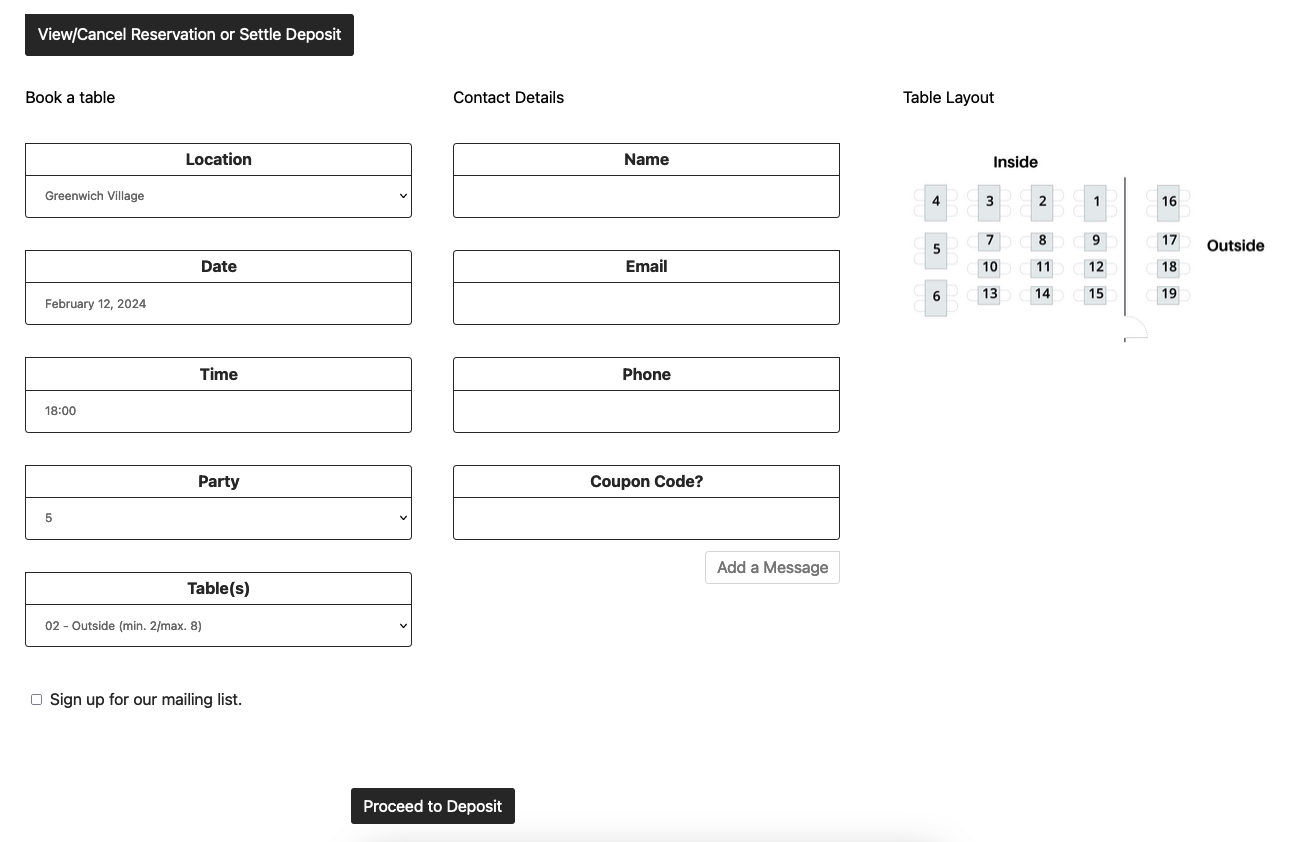
The ultimate version of Five Star Restaurant Reservations comes with a powerful feature that lets you create sections and tables for your restaurant. You can then add a field to your booking form that lets guests choose which table they want when booking.
You are able to specify how many people each table can accommodate and even which other tables it can be combined with. This then works hand in hand with existing bookings, your dining block length and your reservation/people limits, to ensure the tables available to guests when booking are truly only those that are still free.
There is even an option to include your own table layout graphic, so people can visualize the available tables and choose the most appropriate.
Take table management out of your hands and let the plugin do it for you!
SMS Alerts (Requires Ultimate)
With the ultimate version, you can send SMS alerts to guests, and even to the admin if you want. Via the same notifications table, for each new notification that you create, you can now choose whether you want the method to be email or SMS. Want both? This is also possible. You can create as many different notifications as you want, including multiple for the same trigger/event.
Restaurant Reservations Ultimate
The ultimate version of our restaurant reservations plugin contains several powerful features to give you and your guests an amazing booking experience, and also to help you reduce the amount of no-shows at your restaurant. These include:
- Booking by Table: Add your restaurant’s tables to the plugin and allow (or require) guests to select a table when they make their reservation, based on the booking time and party size.
- You can set a minimum and maximum number of seats at each table.
- You can also combine tables to let people book for large parties.
- You can configure your tables on a per-location basis.
- Upload and display a table layout graphic with your reservation form, so guests can visualize exactly where/what they’re booking.
- Conditional Maximums: Set separate maximums (reservations or people) for each scheduling rule or exception that you have. Now you can have, for example, a separate capacity for lunch and dinner services, or manage your capacities differently on the weekend.
- Booking Deposits: Require a deposit, either per guest or per reservation, when someone makes a reservation, to help prevent no-shows.
- Both Stripe and PayPal are available as payment gateways.
- The Stipe payment gateway now makes use of their payment intents system. With this you can enable many different types of payment methods, all directly from within your Stripe account. These include credit card, Apple Pay, Google Pay, direct debit, Afterpay and many other country- and region-specific methods.
- We’ve also provided a method for you to programatically add a different/your own gateway (more info).
- Options to require deposit only for certain party sizes or only at certain times.
- Option to set table-specific deposit amounts.
- Option to take the deposit as a hold and charge/capture payment at a later time (e.g. when you confirm the booking or on the reservation date, etc.).
- Both Stripe and PayPal are available as payment gateways.
- SMS Notifications: Set the notification type to SMS for any notification trigger event, to the admin or customer, all via the notification configuration table.
- Reservation Reminders: Send an SMS or email reminder message before a booking at a time that you specify (e.g. 4 hours before a reservation).
- Late-Arrival Notices: Send an SMS or email message when a guest is late for their reservation by a specified amount of time.
- Post-Reservation Follow-Up: Send a follow-up SMS or email message a specified amount of time after the reservation (e.g. 18 hours, 2 days, etc.). This can be used to get customer feedback, request a review, offer a promotion, or anything else!
Five Star Restaurant Manager Mobile App
The ultimate version also syncs directly with our Five Star Restaurant Manager mobile app, for iOS and Android, which lets you manage your bookings from your phone or tablet without needing to log in to your site/WordPress. With this, you can:
- Receive push notifications every time there is a new booking.
- View all new and existing bookings directly in the app.
- Change the status (e.g. to confirmed) of a booking.
- Check people in as they arrive.
- Includes filtering options, so you can quickly find the booking(s) you are looking for.
The app works in tandem with the restaurant reservations on your site. So, not only do the bookings and statuses immediately sync up, but, for example, when you check someone in via the app, it will tell your site to not send them a late-arrival notification.
With these features, you can set the app up on a tablet for your host to use front of house to manage the bookings for the day and check people in, or for you to manage them anywhere on the …