
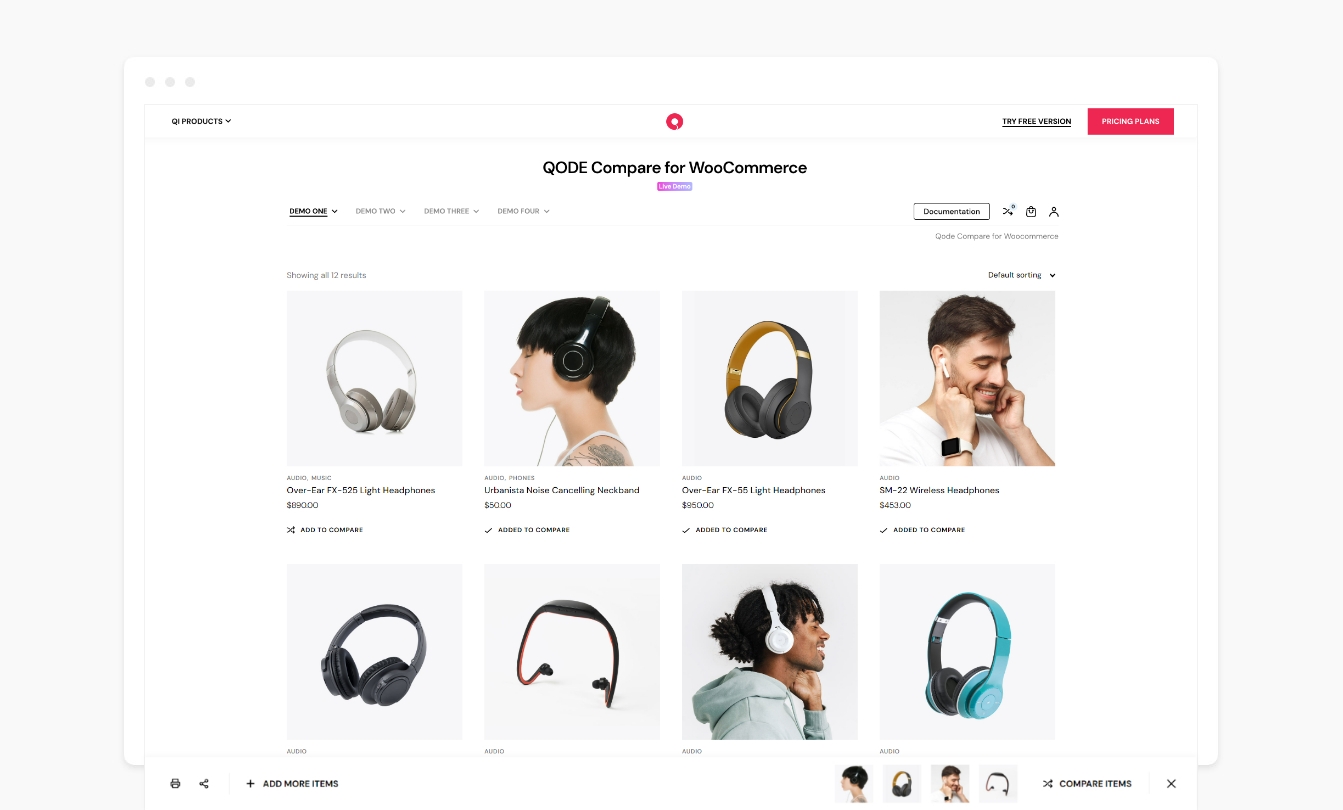
Comparison Bar.
Streamline the user experience for your shoppers by providing them with the practical comparison functionality, allowing for easily accessible side-by-side product overviews with item features & highlighted differences.
Check out the QODE Compare Demo
Check out the QODE Compare documentation
Basic Features:
- Two “Compare” button types to choose from
- Custom “Compare” button labels
- Display “Compare” buttons in WooCommerce loops
- Show “Compare” buttons on single product pages
- Lightbox pop-up tables
- Easily arrangeable product attributes
- Configurable product image sizes in tables
Premium Features:
- Comparison table pages
- Flexible and custom “Compare” button icons
- Separate settings for default and already added product “Compare” buttons
- Modifiable “Compare” button behavior types
- Comparison Bars
- Comparison Sidebars
- Comparison Side Pop-ups
- Comparison confirmation messages
- Adjustable button position in loops and on single product pages
- Wide assortment of stylization options
- Product category filters in tables
- Product info fields in tables
- Highlighting table rows with different values
- Hiding table rows with identical values
- Full product descriptions in tables
- “Clear All” and “Print” buttons in comparison tables
- Configurable comparison table social sharing feature
- Related product sliders after comparison tables
Reduce Product Comparison Times Using QODE Compare
The QODE Compare for WooCommerce plugin is developed to provide your customers with the supremely useful and time-saving product comparison feature.
The feature can be implemented on both product lists and single product pages.
By clicking the ‘Compare’ button found next to a specific product, the user will effectively place said items in detailed comparison tables with multiple product features presented.
This ensures your shoppers will always have an easily accessible way to directly compare products they are interested in purchasing, without the need to navigate back & forth between the two product’s respective single pages.
On top of that, the comparison feature is available to both desktop and mobile users.
“Compare” Button Behavior & Appearance Styles
You have the option to customize a large number of features relating to “Compare” buttons.
You get to pick between textual or solid button types.
If you wish to show the button icons, you can use either predefined or custom icons and choose where they appear inside the button.
You also have the option to input custom labels for the default and already added product buttons separately.
Moreover, you can select what happens when the “Compare” button is clicked – it can lead straight to the comparison page, or display the comparison table pop-up, comparison bar, comparison sidebar, side pop-up, a simple message, or it can just add the product to comparison without performing any further action.
Finally, you can also choose where you wish to position the button on both product lists and product single pages.
Easily Adjustable Comparison Table Styles and Features
The QODE Compare for WooCommerce provides you with a wide variety of ways of arranging and stylizing the look & content of the comparison tables.
You can input custom table labels, optional table images, product category filters, and you get to select which attributes you wish to display alongside the products in the table.
In addition to this, you can pick which product info fields you’d like to show, and make further adjustments to the table, like highlighting rows with different values or hiding rows which contain identical values.
You also have the option to omit fields with no attributes, display custom attributes, full product descriptions, additional “Price” and “Add to Cart” table fields, and more.
One more useful feature lets you show the “Clear All” and “Print” table buttons.
Last but not least, you can enable easily modifiable social sharing for comparison tables, and display eye-catching sliders with related products after comparison tables on your website.
Documentation & Support
- Check out our step-by-step user guide on how to install and use QODE Compare for WooCommerce.
- You can also submit a topic to the support forum at and our support team will be glad to help you out.
Privacy Policy
We use our services
Qode’s CDN – The domain https://export.qodethemes.com is a service from which we retrieve the list of all Qode plugins displayed in the admin dashboard.
Qode’s API – The domain https://api.qodeinteractive.com is an API that’s called when a user deactivates the plugin, to retrieve the reason for deactivation. Upon deactivating the plugin, the users are prompted for a reason for doing so. They also have the option to deactivate without providing a reply. The data obtained from the users who respond to the question is collected to improve the plugin. After the analysis of said data, the plugin is upgraded and enhanced in such a way as to fulfill the users’ expectations.
Qode’s Terms of Use – https://qodeinteractive.com/terms-of-use/
Qode’s Privacy Policy – https://qodeinteractive.com/privacy-policy/
We use third party services for the purposes of sharing posts on their respective platforms. We do not store any of the data sent to those services. Here’s a list of the services used and their corresponding privacy policies:
Facebook – https://www.facebook.com/privacy/policy/
X – https://twitter.com/en/privacy#update
LinkedIn – https://www.linkedin.com/legal/privacy-policy
Pinterest – https://policy.pinterest.com/en/privacy-policy
Tumblr – https://www.tumblr.com/privacy/en
VK – https://m.vk.com/privacy?api_view=1&lang=en
WhatsApp – https://www.whatsapp.com/legal/privacy-policy
Looking for more?
Feel free to try out some of our other products:
Qi Theme
Qi Addons for Elementor
Qi Blocks for Gutenberg
QODE Wishlist for WooCommerce
QODE Quick View for WooCommerce
QODE Variation Swatches for WooCommerce
QODE Product Extra Options for WooCommerce


