Print My Blog – Print, PDF, & eBook Converter WordPress Plugin
by Michael Nelson on WordPress.org
Make printing your blog easy and impressive. For you & your visitors. One post or thousands.
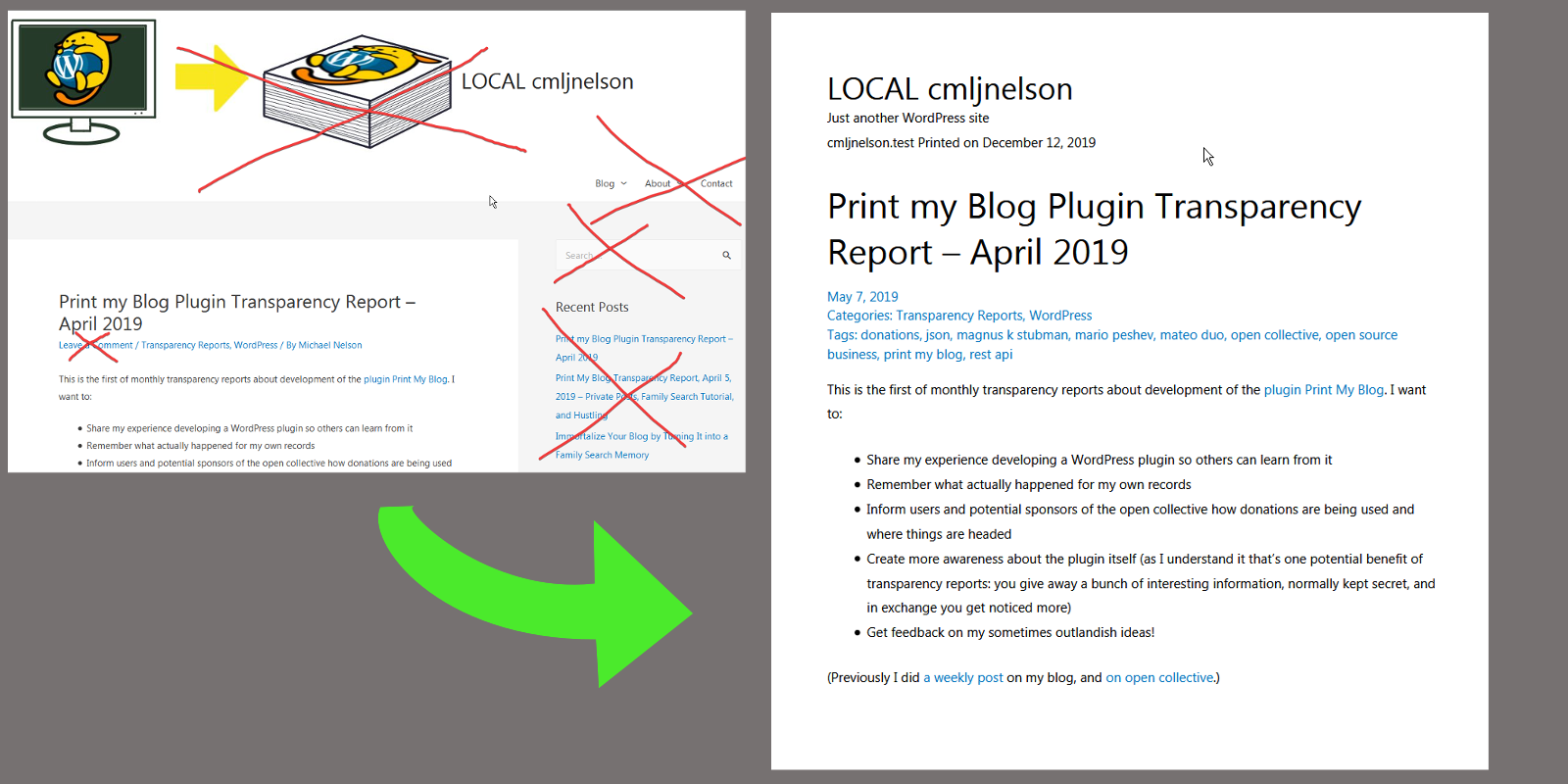
Print My Blog removes junk that doesn’t belong in a printout—like ink-guzzling logos, menus, search-bars, sidebars, footer widgets, etc.
Offline publishing for you, site visitors, and the world outside WordPress.
Print My Blog makes WordPress content useful outside of your website, like in print, PDFs, and other formats. It has 3 main features:
- Quick Print: print thousands of posts in a few clicks
- Print Buttons: let site visitors print individual posts
- Pro Print: make professional-quality books and documents
Each of which takes your WordPress content and optimizes it for print, PDF, and eBook by:
- removing ink guzzlers like site logo, sidebars, and footer
- avoiding page breaks inside images, between images and captions, and even right after headers
- allowing you to use other plugins in your printed output
Read more about each…
Quick Print
Quick Print lets you easily print your entire blog to paper, PDF, or eBook.
- Print your blog to read offline.
- Create a paper backup (book or printout) to read when your blog is taken offline.
- Create a PDF, ePub, or MOBI file as a human-readable, portable backup. Send it to friends, store it in the cloud or a hard drive, or even archive it with a historical organization.
- Copy your entire Blog for quick pasting into another program like Microsoft Word or Google Docs
Quick Print Features
- Loads all your blog’s posts into a single web page so you can print them from your web browser (to paper, PDF, ePub, or anything your web browser supports) or copy-and-paste them into another program (although the other program likely won’t format it as nicely)
- supports printing thousands of blog posts in one click (the record is over 3000 posts)
- prints posts and pages
- uses your theme’s and plugins’ styles (so Gutenberg and page builders are supported)
- print your entire blog, or filter by author, date, status (e.g. draft, pending, private, password-protected, trashed, etc.), category, and tags
- optionally prints comments
- optionally places each post on a new page
- resizes text
- resizes images or removes them altogether
- replaces embedded videos with a link, full video title, screenshot and QRCode
- optionally removes hyperlinks
- optionally includes post excerpts
- orders posts by date, and pages by the “order” attribute
- place the “Print My Blog” Gutenberg block on a page and allow site visitors to print your blog too
- no watermark in print-out, and attribution optional,
- GDPR compliant (no data is collected about you or your visitors)
- free, open-source software, so you can use it for whatever you like without fear of changing terms of use,
customize it to fit your needs (although we’d be curious to hear what you’ve done with it), and even redistribute it. There is no lengthy legal document describing how you’re giving up your rights by using this software!
Print Buttons
You can also automatically add print buttons to help your visitors print your blog.
- Share your content with friends offline
- Save it for reading later
- Improve long reads by converting a portion of your blog to eBook or PDF
Print Button Features
- prints individual posts and/or pages just like Quick Print (e.g. omits the theme’s header, sidebars, footer, etc.)
- displays on all posts and/or pages, or specific ones using the shortcode
[pmb_print_buttons] - enable buttons for print, PDF, and/or eBook
- customize print output settings for each (using the same print settings from Quick Print)
- place buttons above or below content, or somewhere in-between using the shortcode
[pmb_print_buttons] - customize print button text (e.g. “Print”, “Imprimir”, or just a print emoji like 🖨)
- buttons use theme’s design
- make more seamless integration with your design or content using the shortcode
[pmb_print_page_url]to just get the URL of the print page (see this FAQ for more details)
Pro Print
Replace Google Docs and Microsoft Word with WordPress! Turn existing posts, pages, and custom post types—or write all new print materials—into professional-looking documents that are ready to share with customers and the world.
Use your browser to print Pro Print projects for free, and access premium features (e.g. automatic page references, footnotes, and full control of page margins) with a Pro PDF Service subscription.
Example uses:
- white paper. Share an in-depth analysis of a topic on your website and in print.
- printed version of entire website or blog. Print it all, except ink guzzlers like site heading, sidebars, footers and pop-ups. Use your own printer or send to a printing service such as lulu.com.
- book from select content. Add a title page, introduction, table of contents, and pick existing content from your site to make a book. Sell it on Amazon KDP. Just like that, you’re an author!
- new book from scratch. Write new print-only materials that never appear on your website. Leverage WordPress’ great editors and other plugins.
- lead magnets. Compile content on a subject into a PDF and grant access after users signup for your email list.
- members-only content. Combine with Restrict Content Pro or other plugins to only allow access to select downloadable PDFs of your content.
- printed course materials. Create a course using an LMS (learning management system) plugin, and use Print My Blog for learners to print.
- event brochure. Let event attendees print a useful copy of your event’s details to take with them.
- printed user manual. And digital user manual on the website.
- product brochure. Use WooCommerce or other WordPress e-commerce plugins to make content accessible to those who would rather not browse online.
- monthly magazine or newspaper. Reuse the same design and blog post content to create a digital or print magazine to send to your email subscribers.
- research paper. Put your research on your website and print it with a consistent design.
- restaurant menu. Optimized for display on your website, and to look great in print.
Pro Print Features
- saveable projects
- create digital PDFs, print-ready PDFs, ePub eBooks (paid only), and Microsoft Word documents (paid only)
- select posts, pages, print materials (posts intended only for use in Pro Print) and most custom post types (e.g. products from WooCommerce)
- search and filter for posts based on post type, status, categories, tags, custom taxonomies, author, and publish date
- drag-and-drop reordering of content (and add new print materials on-the-fly)
- organize posts into parts
- add front and back matter (usually numbered with roman numerals with Pro PDF Service)
- select from a variety of pre-built designs (similar to WordPress Themes, but for Pro Print)
- customize designs (each has different settings and can have custom CSS) and can be saved for future projects
- Theme Designers will feel at home creating a custom design using HTML, CSS, and even Javascript
- better integration with plugins than Quick Print (especially those using Javascript)
- save project metadata (e.g. title, extra cover page content, categories etc.)
- automatic table of contents (with page references using Pro PDF Service)
- automatically replace hyperlinks to included content with page references (Pro PDF Service only)
- automatically replace hyperlinks to external content with footnotes (Pro PDF Service only)
- automatically move or automatically resize images to reduce whitespace and fit better on the page (Pro PDF Service only)
- choose image quality and maximum image size to reduce filesize or save ink
- choose article templates (e.g. “Content Only” or “Centered Content”)
- choose fonts, font sizes, page sizes and lots more
- optionally apply your active theme’s CSS. Note: Themes are usually not designed for print, so we offer a paid service to those who need help customizing a design to match their brand.
Some designs have features like:
- roman numerals for front matter
- page numbers always in bottom-right corner
- page numbers appearing in outside corners
- running titles (an article’s title appears in the top margin on subsequent pages)
- background colors, even with gradients and choosable logos
- two-column layout
Read more about Pro Print in our extensive user guide.
Wanna See it in Action? Try Print My Blog on a Free Test Site Now
Translations
Print My Blog includes translation files in the following languages:
- German
- French
- Spanish
- Italian
- Japanese
To improve the translations, please get in touch.
Give your story life outside your blog!
Want more? Tell us what matters to you on GitHub. Thanks to a revenue stream through optional payments, this is actively supported and improved.
Plugin Compatibility Highlights
PMB strives to be compatible with all plugins. But here are some that are especially noteworthy:
- BasePress for creating a user manual on both the web and print
- WP Quick LaTeX for mathematical formulas
- Translate WordPress with GTranslate for quick and automatic translating of projects
- WPML for more advanced translating of projects, and adding print buttons in different languages. Read Translating Projects with WPML Plugin
- TablePress makes tables look good in print too, even when they span multiple pages
⚠️Incompability: Some users have reported incompability issues with the Divi theme. If you are using this theme, please use Print My Blog with caution and always back up your database before use.
If you are delighted how PMB worked with another plugin, or had trouble, please let us know!
Our Mission
- Preserve your blog for decades to come in a low-tech format.
- Make WordPress an alternative to Microsoft Word and Google Docs for publishing documents.
Alternatives to Print My Blog
If this doesn’t meet your needs, there are good paid and free alternatives.
Alternatives to Quick Print
printmy.blog we run a hosted version of this same plugin, so you can print your blog without even installing this. Especially useful for WordPress.com users, or those who can’t install the plugin on their site. (Its free like Quick Print, but won’t use your blog’s styles.)
Anthologize is another great plugin for customizing your blog’s content before exporting to an e-book format. Also free.
Blog To HTML is actually very similar to Print My Blog. It allows you to export your blog to HTML for eBook creation.
blogbooker prints a book, or creates a PDF, from your blog using their pre-made styles. (Paid service.)
blog2print ditto, but temporarily requests your username and password. (Paid service.)
Alternatives for adding print buttons
Print, PDF, Email by PrintFriendly lets visitors easily print to paper, PDF, or email themselves a copy. Easy setup and very customizable. Doesn’t use theme’s styles. The free version is not GDPR-compliant and inserts advertisements.
WP Print Friendly automatically adds a link to print the current post, page, or custom post type. Can convert links to endnotes. Doesn’t use theme’s styles.
WP-Print printouts quite customizable. Requires editing theme files. Does not use theme’s styles.
Print-o-Matic add print buttons with a shortcode. Customizable and can work with theme’s and plugin’s styles.
PDF Generator for WordPress Create & Customize PDF for Post, Pages and WooCommerce Products
Alternatives to Pro Print
MPL – Publisher is another free eBook creator / PDF converter plugin you can use to self-publish a book. To be honest probably the best alternative right now. There’s both free and paid versions.
PressBooks is a good paid, hosted alternative. Begin creating or import content for free, and can pay to export to PDF and other formats.
Designrr is great for creating short documents, but is a fully paid option.
Best Wishes Publishing for Print with WordPress!