Post Types Slider
by Waqas Ahmed on WordPress.org
Create fully customizable, responsive sliders and carousels for any WordPress post type or taxonomy. Powered by the Slick Slider library.
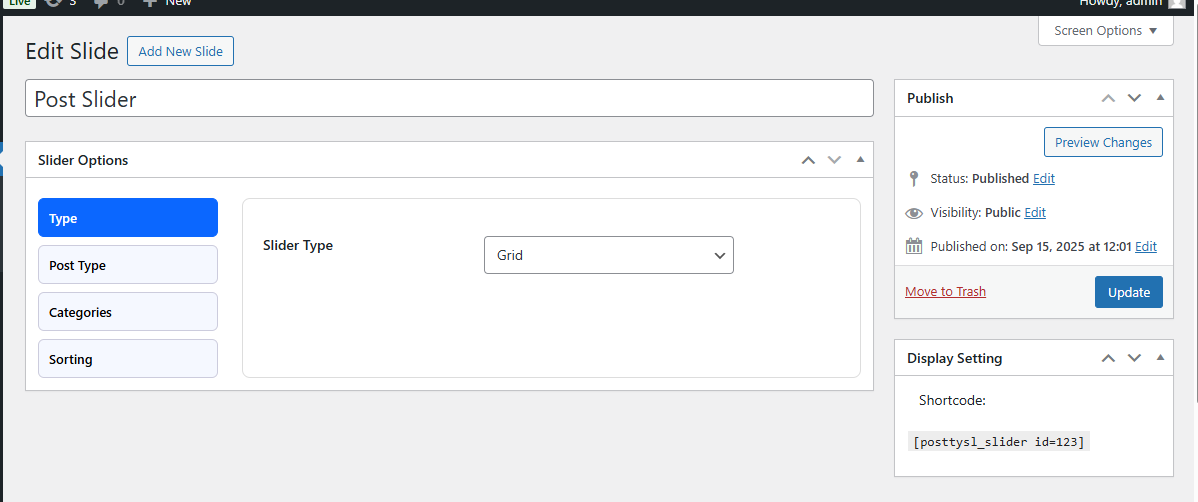
Slider Options – Layout: Choose between grid or carousel layouts.
Post Types Slider is a powerful and flexible plugin that lets you create stunning sliders and carousels from any WordPress post type, custom post type, or category. With an intuitive settings panel and dynamic live preview, you can build professional, responsive sliders in minutes—without writing a single line of code.
Perfect for showcasing blog posts, products, portfolio items, testimonials, or any custom content type.
Key Features:
- Slider Type & Layout Options – Create and edit sliders with support for both grid and carousel layouts.
- Post Type Selection – Choose any WordPress post type, including custom post types, for dynamic content display.
- Category & Taxonomy Filters – Display posts from all categories or filter by specific category terms.
- Sorting Options – Sort posts in ascending (ASC) or descending (DESC) order for flexible display.
- General Settings – Show or hide titles, descriptions, thumbnails, carousels, and navigation arrows.
- Styling Controls – Customize fonts, colors, and layouts with dynamic options and live preview.
- Button Settings – Adjust button styling, colors, and padding to match your theme.
- Responsive & Touch-Friendly – Built with Slick Slider for smooth swipe and mobile support.
- Shortcode Integration – Easily embed sliders anywhere with simple shortcodes.
Usage
To display a slider, use the shortcode:
[posttysl_slider id=74]
Parameters:
– id (required) – The unique identifier of the slider you wish to display.
You can create multiple sliders, each with its own configuration and shortcode.
Gutenberg & Elementor Blocks
Gutenberg Block:
– A dedicated “Post Types Slider” block is available in the Gutenberg editor.
– Simply add the block, select your slider from the dropdown, and it will render dynamically in your post or page.
Elementor Widget:
– A “Post Types Slider” widget is available in Elementor.
– Drag and drop the widget into your layout, choose your slider, and adjust the styling using Elementor’s design panel.
This makes it super easy to integrate sliders without dealing with shortcodes.
Privacy Policy
Post Types Slider uses Appsero SDK to collect some telemetry data upon user’s confirmation. This helps us to troubleshoot problems faster & make product improvements.
Appsero SDK does not gather any data by default. The SDK only starts gathering basic telemetry data when a user allows it via the admin notice. We collect the data to ensure a great user experience for all our users.
Integrating Appsero SDK DOES NOT IMMEDIATELY start gathering data, without confirmation from users in any case.
Learn more about how Appsero collects and uses this data.
License
This plugin is licensed under the GPLv2 or later.
For details, visit https://www.gnu.org/licenses/gpl-2.0.html.