ExpressTechSoftwares Discord Add-on for Paid Memberships Pro
by expresstechsoftware on WordPress.org
This add-on enables connecting your PMPro enabled website to your discord server. Now you can add/remove PMPro members directly to your discord server …
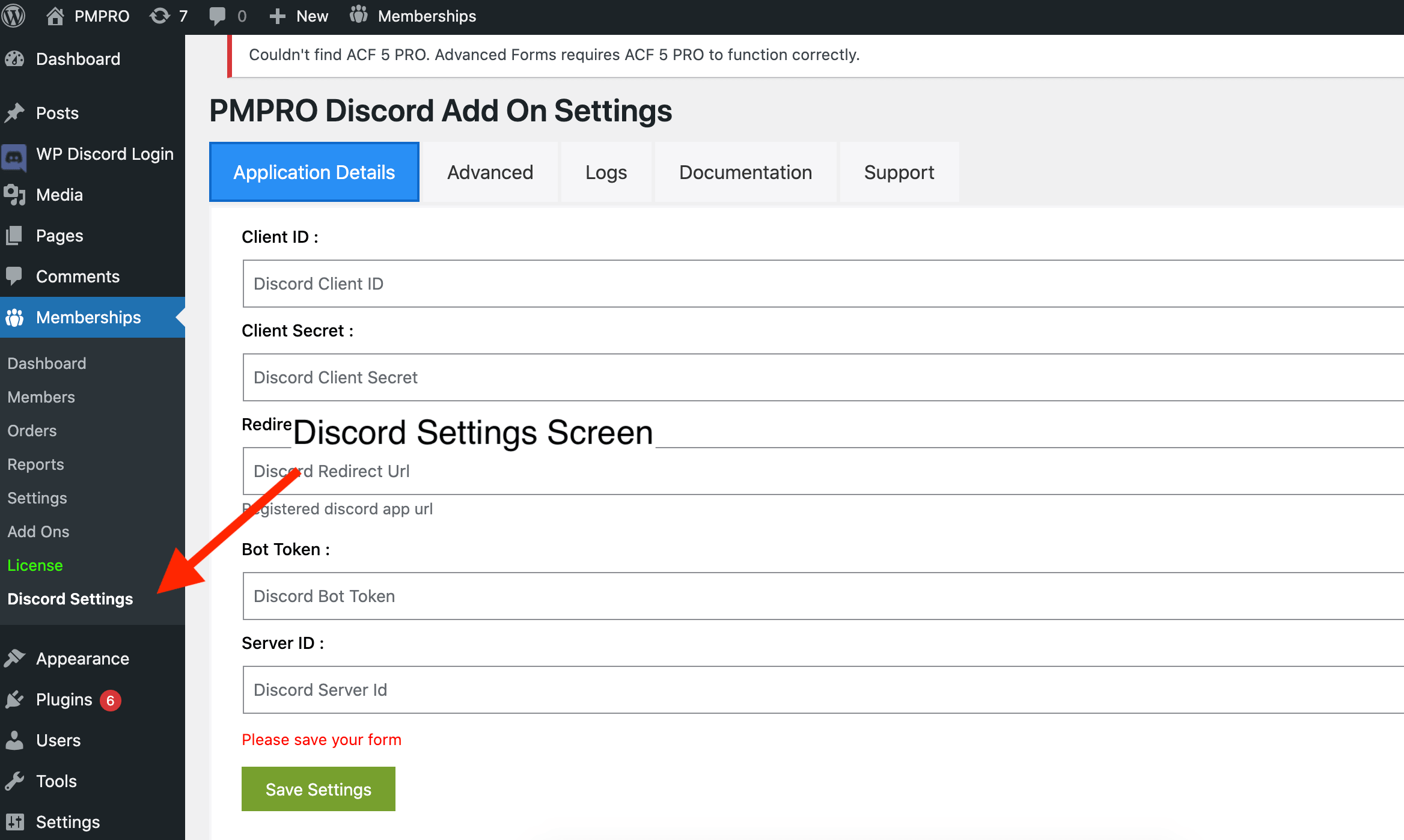
Install and activate the plugin and view the discord settings page inside Memberships
THE EASY WAY TO ADD DISCORD COMMUNITY TO A PMPro MEMBERSHIP SITE ON WORDPRESS.
Paid Memberships Pro Discord Add is a complete solution to secure your discord community content and create a seamless membership discord community experience on WordPress.
With over 18 features to share protected content to discord community server, advanced membership-discord-role management, and built-in join /cancel /expiry role assignment, we provide you with everything you need to create an efficient and user-friendly membership discord community server.
BUILT FOR YOUR PRIVATE DISCORD COMMUNITY OF WORDPRESS MEMBERSHIP SITE
PMPro discord community addon supports any kind of member community-focused business or organization. With over 8 years of experience working with creators like you, this plugin delivers on what you need today and in the future. Select a use case to learn more about how we specialize in supporting your unique business:
Manual | Support | Demo | Premium Features
- Exclusive Community Access: Members are granted access to a private Discord server or specific channels based on their membership level, creating a sense of exclusivity and privilege.
- Segmented Communication Channels: Different Discord channels are set up for various courses and topics, allowing members to engage in focused discussions and network with peers sharing similar interests.
- Direct Support and Q&A Sessions: The platform hosts regular Q&A sessions and support discussions on Discord, offering direct access to instructors and fostering a supportive learning environment.
- Real-Time Notifications and Updates: Members receive instant updates about new course releases, webinars, and events directly through Discord, enhancing communication efficiency.
- Community Building: The interactive nature of Discord, including voice and video chat options, fosters a stronger community bond, encouraging members to actively participate and share their experiences.
18 FEATURE OF DISCORD COMMUNITY ADDON:
Member Management:
These features are focused on managing the status and details of members in relation to their membership and Discord account.
Feature 1: Allow members to connect their Discord account with their Paid Memberships Pro membership account.
Feature 2: Update member roles when membership expires.
Feature 3: Update member roles when membership is canceled.
Feature 4: Change roles by editing user membership in WP Manage user.
Feature 5: Support of Paid Memberships Pro – Cancel on Next Payment Date, ensuring roles aren’t removed immediately upon cancellation.
Role & Access Control:
This category involves managing and assigning roles based on membership status and levels, as well as defining default roles.
Feature 1: Assign roles in Discord as per membership level.
Feature 2: Allow admin to change or remove member roles.
Feature 3: Set a default role for all members upon connecting their Discord account.
Feature 4: Decide if members should stay in the Discord server when membership expires or is canceled.
Feature 5: Set a default role when membership is canceled or expires.
Feature 6: Support for forced Discord authentication before checkout.
Communication & Engagement:
These features enhance member engagement and communication, particularly through direct messaging.
Feature 1: Send a direct message when membership expires.
Feature 2: Send a direct message when membership is canceled.
Feature 3: Send membership expiration warnings via direct message.
Customization & Integration:
This category includes features that allow for customization of the plugin and its integration with other tools.
Feature 1: Use shortcode [discord_connect_button] to display connect/disconnect button.
Feature 2: Join the Discord server through authentication, with the option for a default role for new members.
Feature 3: Button styling feature under plugin settings.
Feature 4: Hide the connect button using a simple filter in the theme’s functions.php or a code snippet plugin.
DOCUMENTATION, SUPPORT.
Pro Version Addon Features for PMPro-Discord
- A. Enhanced Role Management
Multiple Membership Discord Roles: The Pro version of the PMPro-Discord Addon takes role management to the next level. It allows for the assignment of multiple Discord roles based on different membership levels. This feature is especially useful for communities that offer a range of membership tiers, each with its unique benefits and access levels. By assigning multiple roles, community managers can create a more dynamic and tiered community structure, providing members with access to exclusive channels and content based on their specific subscription tier. - B. Premium Support Services
Email Support: Subscribers of the Pro version gain access to dedicated email support. This service ensures that any technical issues or questions related to the PMPro-Discord integration are promptly addressed by a team of experts. This level of support is crucial for maintaining a seamless and uninterrupted community experience, particularly for large communities where quick resolution of issues is paramount. - C. Custom Integration Services
Free Consultation for Custom Discord API Integrations: A standout feature of the Pro version is the offer of a free consultation for developing custom Discord API integrations. This service is invaluable for community managers looking to customize their Discord experience to fit unique community needs. Whether it’s developing specialized bots, automating specific community functions, or integrating with other software, the Pro version opens up a world of possibilities for bespoke community solutions. This feature not only adds tremendous value to the addon but also demonstrates a commitment to accommodating the specific needs of diverse communities.
installation
Download, Install and Activate!
- Go to Plugins > Add New to find and install PMPRO discord Addon.
- Or, download the latest version of the plugin, then go to Plugins > Add New and click the “Upload Plugin” button to upload your .zip file.
- Activate the plugin.
Download, Install and Activate!
- Go to Plugins > Add New to find and install PMPRO discord Addon.
- Or, download the latest version of the plugin, then go to Plugins > Add New and click the “Upload Plugin” button to upload your .zip file.
- Activate the plugin.
Complete the Initial Plugin Setup
Go to Memberships > Discord Settings in the WordPress admin to begin setup. Our Initial Setup Tutorial Video will show you how to configure
More Installation and Setup Documentation
Checkout Our Other Plugins
- Connect MemberPress and Discord
- connect Learnpress and Discord
- Connect LearnDash and Discord
- Connect GamiPress and Discord
- Connect LifterLMS and Discord
- Webhook For WCFM Vendors
- Inspect HTTP Requests
- Product Questions & Answers for WooCommerce
- Connect Ultimate Member and Discord
- Connect Eduma Theme and Discord
- Connect BadgeOS and Discord