
Order Tip & Donations for WooCommerce
by PI Web Solution on WordPress.org
Order Tip for WooCommerce adds an option for customer service tips, tips for waitresses, in WooCommerce.
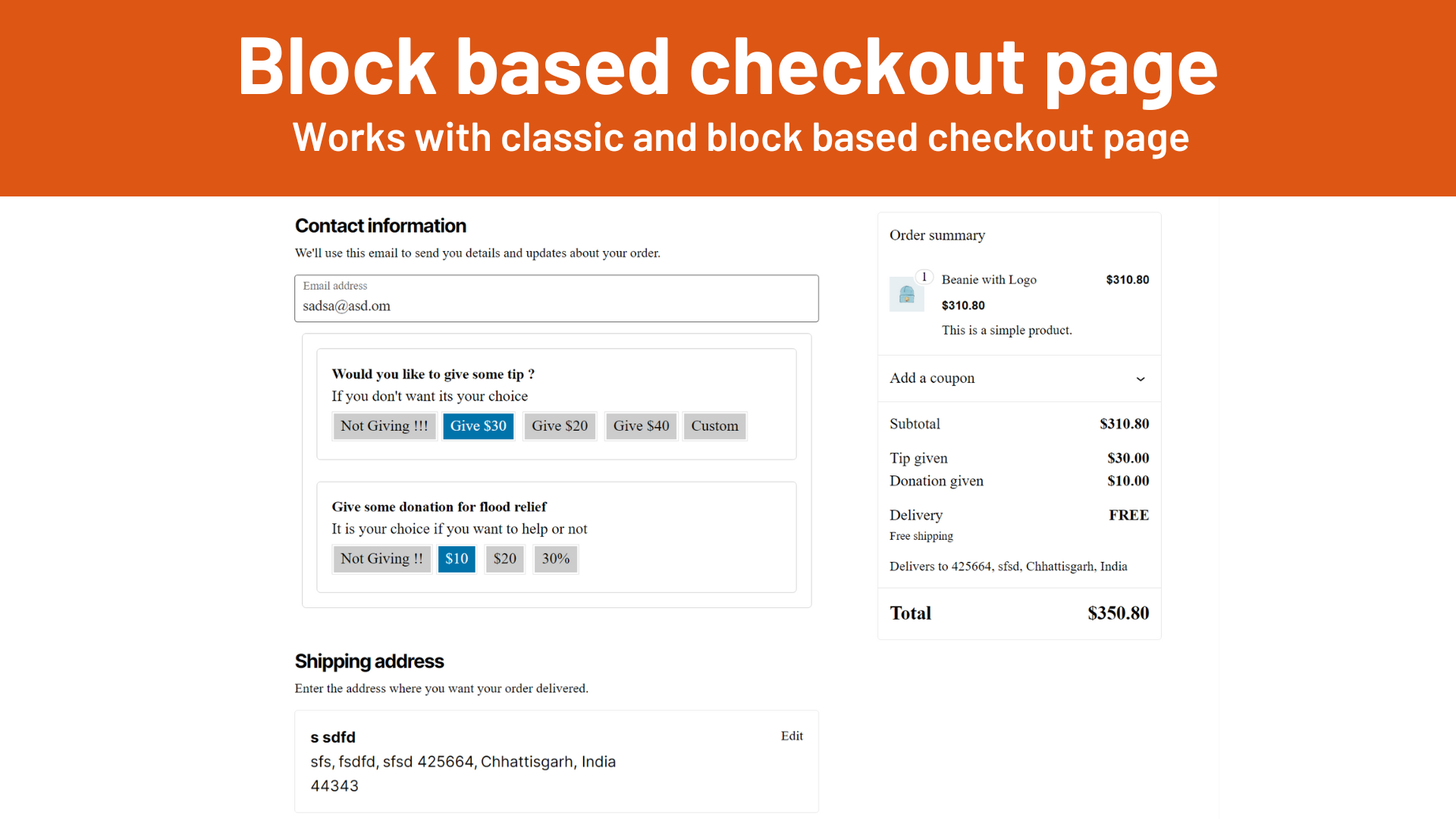
Plugin enables customers to add a tip to a WooCommerce order seamlessly. Whether it’s a custom tip WooCommerce setup or a cash tip WooCommerce option, this plugin provides flexible configurations to enhance the customer experience and support businesses effortlessly.
Accept Tips & Donations Seamlessly in WooCommerce
Our WooCommerce Tips & Donations Plugin is the good solution for store owners who want to encourage customer generosity by allowing them to add a tip at checkout or make a donation to their order in their WooCommerce store. Whether you run a restaurant, nonprofit organization, freelancer service, or any WooCommerce store that benefits from customer contributions, this WooCommerce tip plugin makes the process seamless and user-friendly.
Why Use This Plugin?
In today’s eCommerce landscape, customers appreciate the option to support businesses and causes they love. This WooCommerce tip plugin integrates smoothly into your WooCommerce store, ensuring that tipping or donating is simple, flexible, and fully customizable.
✅ Key Features & Benefits
1️⃣ Multiple customer service tips & Donation Options
✔️ Allow customers to add a custom order tip or choose from predefined order tip percentages.
✔️ Offer fixed-amount donations to support a cause, charity, or business operations.
✔️ WooCommerce tip configuration allows tipping as a percentage of the cart total or a fixed amount.
2️⃣ Seamless Checkout Integration
✔️ Display the tipping/donation option on the cart page, checkout page, or both.
✔️ Provide a smooth and intuitive experience for customers without disrupting the order flow.
✔️ Works flawlessly with WooCommerce payment gateways.
✔️ A WooCommerce order tip that works with block-based checkout.
3️⃣ Customizable UI & Display Settings
✔️ Modify the tip section text, labels, and colors to match your brand.
✔️ Enable or disable tipping for specific user roles.
4️⃣ Guest Checkout Support
✔️ Store tips and donations even if the customer is not logged in.
✔️ Collect customer email and transaction details for tracking.
5️⃣ Compatibility & Performance
✔️ Fully compatible with the latest WooCommerce and WordPress versions.
✔️ Lightweight and optimized for speed & performance.
✔️ Works with other WooCommerce plugins.
WooCommerce Order Tip Plugin Configuration
The WooCommerce tip configuration settings allow store owners to customize how order tips are collected during checkout. You can configure:
Order Tip types: Choose between fixed amounts or percentage-based tips.
Order Tip placement: Display tip options on the cart page, checkout page, or both.
User role restrictions: Enable or disable tipping for specific customer roles.
Custom labels & UI: Modify text, colors, and labels to match your store branding.
WooCommerce Order Tip Tax Options (PRO)
Managing tax on tips is crucial for compliance and accounting. The WooCommerce tip tax options allow you to:
- Enable or disable tax on tips based on local regulations.
- Set tax rates for tips separately from product taxes.
WooCommerce Order Tip Rates
Offering predefined order tip rates simplifies the tipping process for customers. The WooCommerce order tip rates feature includes:
- Standard order tip percentages (e.g., 5%, 10%, 15%, 20%).
- Custom order tip amounts where customers can enter their own value.
- Cash order tip option for offline payments.
- Dynamic order tip suggestions based on order total or customer preferences.
🎯 Use Cases for WooCommerce Order Tip Plugin
✔️ Restaurants & Cafés – Accept tips online for food delivery and takeaway orders.
✔️ Nonprofits & Charities – Collect donations to support a cause.
✔️ Freelancers & Service Providers – Let customers add tips for excellent service.
✔️ eCommerce Stores – Allow customers to support your business with a small contribution.
✔️ Event Organizers – Accept donations for virtual or in-person events.
🔥 Why Choose Our Plugin Over Others?
✔️ User-Friendly Setup – No coding required. Just install, configure, and start collecting tips!
✔️ Highly Customizable – Adjust settings, labels, and display options to fit your needs.
✔️ Mobile Responsive – Works seamlessly on all devices, including desktops, tablets, and smartphones.
✔️ Regular Updates & Support – We continuously improve the plugin based on user feedback.
💎 Upgrade to the Pro Version for More Features!
The Pro version unlocks additional features, including:
🚀 Advanced analytics – Get insights into customer tipping behavior.
🚀 Collect tax on the tip and donation amount
Alternative Use Cases
Service Fees & Convenience Charges
- Add optional service fees for premium support or faster delivery.
- Charge a convenience fee for digital downloads or exclusive content.
Crowdfunding & Fundraising
- Allow customers to contribute to a crowdfunding campaign for new product development.
- Collect funds for community projects or social causes.
Membership & Loyalty Contributions
- Enable customers to support your business with voluntary membership fees.
- Offer a “supporter contribution” for loyal customers who want to help sustain your store.
Event Sponsorships & Participation Fees
- Accept sponsorship contributions for virtual or in-person events.
- Allow attendees to pay an optional participation fee for workshops or webinars.
Charity & Social Impact Initiatives
- Collect funds for disaster relief or humanitarian aid.
- Enable customers to round up their total to donate to a cause.
Key Features
- add order tip for waitress in WooCommerce checkout
- WooCommerce plugin to collect donations or tips on orders
- add a custom order tip field for waitresses before payment in WooCommerce
- accept customer service tips from customers in WooCommerce
- WooCommerce checkout order tip box – free plugin
- collect customer service tips on a WooCommerce store
- WooCommerce order tip jar plugin for the checkout page
- enable order tipping for WooCommerce orders
- WooCommerce order tip amount selection at checkout
- ask customers for a donation on a WooCommerce site
- add optional customer service tips to orders in WooCommerce
- WooCommerce checkout custom fee for order tips
Privacy
If you choose to opt in from the plugin settings, or submit optional feedback during deactivation, this plugin may collect basic technical information, including:
- Plugin version
- WordPress version
- WooCommerce version
- Site URL
- Deactivation reason (if submitted)
This data is used solely to improve plugin quality, compatibility, and features. No personal or user-specific data is collected without consent.