Notification – Custom Notifications and Alerts for WordPress
by Kuba Mikita on WordPress.org
Take full control of WordPress emails and notifications. Replace default messages, add custom triggers, and send alerts via email, webhook, Slack, and …
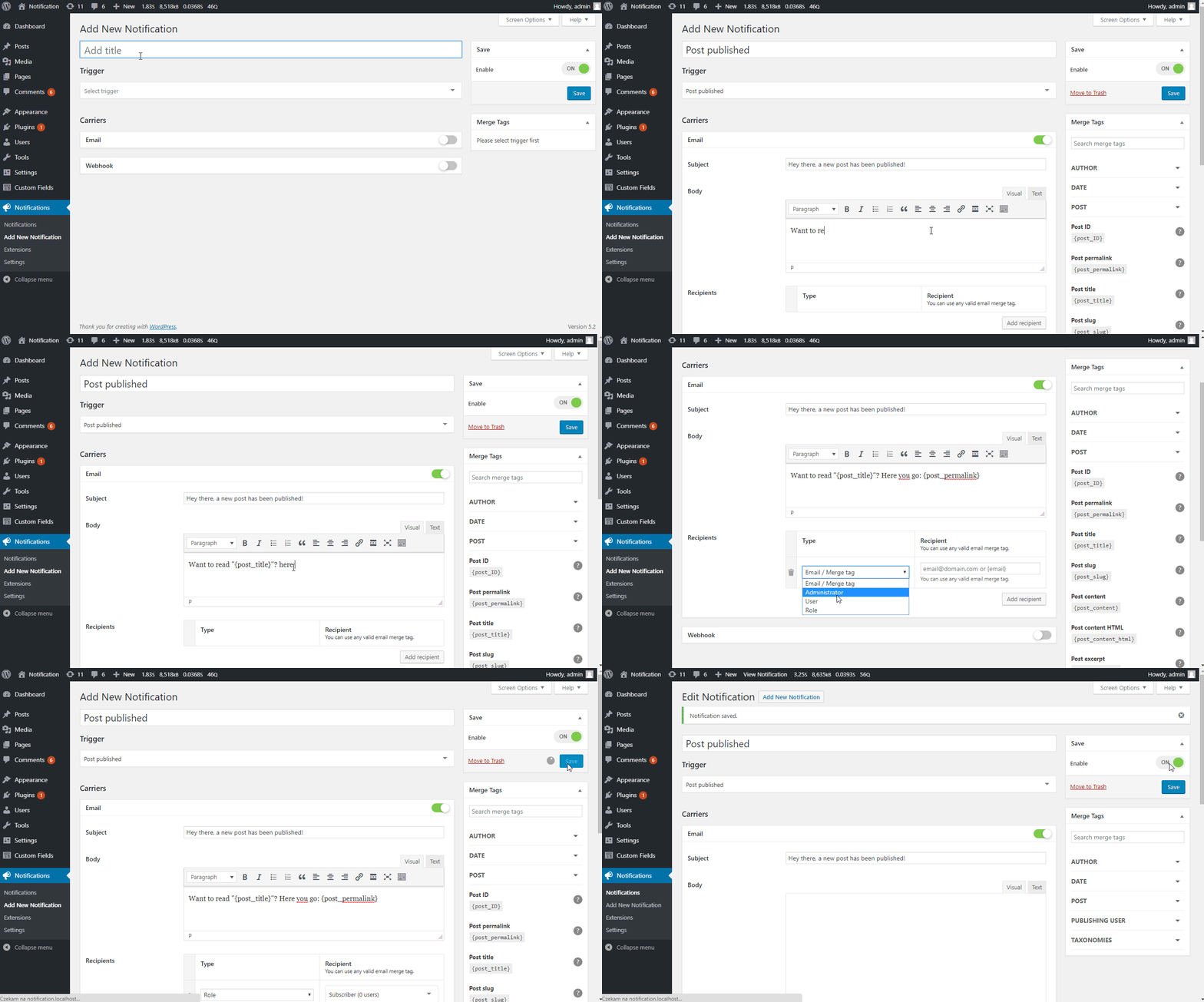
Trigger edit screen
WordPress sends emails you can’t customize. You can’t change who receives them, what they say, or how they look. And if you need to notify your team about content changes, user activity, or security events — WordPress simply doesn’t do that.
Notification fixes this. It gives you complete control over what WordPress sends, to whom, and through which channel. Replace rigid default emails with fully customizable messages, or create entirely new notifications triggered by any WordPress event. No coding required — set up your first notification in under 5 minutes.
WHAT YOU CAN DO WITH THE FREE VERSION
- Replace default WordPress emails — Disable any built-in email (new user, password reset, comments, etc.) and replace it with your own version using the built-in Wizard
- Create custom notifications — Get notified when posts are published, users register, comments arrive, plugins update, and 50+ other WordPress events
- Use dynamic content — Insert Merge Tags like
{post_title},{user_email}, or{comment_content}to personalize every message - Send to anyone — Route notifications to specific email addresses, users, or entire roles
- Send via email or webhook — Email is built-in; webhooks let you connect to any external service or automation tool
- Control with precision — Enable or disable individual triggers, configure carriers, and set up multiple notifications per event
REPLACE DEFAULT WORDPRESS EMAILS
The built-in Wizard walks you through disabling WordPress default emails and replacing them with your own. You keep full control over the content, recipients, and formatting — no more generic messages you can’t edit.
BUILT-IN TRIGGERS
Over 50 triggers are ready to use out of the box. Enable or disable them in Settings.
- Posts & Custom Post Types — published, drafted, updated, pending review, approved, trashed (works with any CPT)
- Taxonomy terms — created, updated, deleted (works with any taxonomy)
- Comments, Pingbacks & Trackbacks — new, replied, approved, unapproved, spam, trashed
- Users — registered, profile updated, logged in, failed login, logged out, password reset/changed, deleted
- Media — added, updated, deleted
- Plugins — activated, deactivated, installed, removed, updated
- Themes — installed, switched, updated
- WordPress — available updates (on a schedule you define)
- Privacy — personal data erased, erase request, exported, export request
Each trigger comes with its own set of Merge Tags, plus you can use Global Merge Tags ({site_title}, {admin_email}, {home_url}, etc.) anywhere.
EXTENSIONS
Extend the plugin with additional carriers, triggers, and features:
- Webhooks – send and receive Webhooks
- Conditionals – send Notifications only when specific conditions are met
- Custom Fields – use any meta value in your Notifications
- Slack – post messages to Slack channel
- Push – send push notifications via browser’s native system
- Discord – post messages to Discord channel
- Twilio – send bulk SMS messages from your Twilio registered phone number
- Scheduled Triggers – schedule your notifications based on events time
- Review Queue – catch your Notifications into a queue for manual review
- WooCommerce – triggers specific to WooCommerce
- Pushbullet – send Push and SMS Notifications via your phone
- Pushover – send Push messages to devices registered in Pushover
- SendGrid – send emails using SendGrid service
- Mailgun – send emails using Mailgun service
- File Log – save Notifications as file logs on the server
- bbPress – bbPress triggers
- BuddyPress – BuddyPress triggers and integration with their notification system
- Signature – add a signature to all your emails automatically
- Email Attachments – attach files to your notification
DEVELOPER-FRIENDLY
Notification is designed to be extended. Create custom Triggers from any do_action() call, add Merge Tags in a single line of code, or build entirely new Carriers. The plugin can be bundled with your theme or plugin and white-labeled with one function call.
- Developer documentation
- Extension Boilerplate to start building your own add-on
USE CASES
- Editorial workflows — Notify editors when a post is submitted for review, and authors when it’s approved or scheduled
- Security monitoring — Get alerts on failed login attempts, user role changes, or plugin activations
- Client sites — Replace confusing default WordPress emails with branded, clear messages for your clients
- Team coordination — Send Slack or webhook notifications when content is updated, users register, or comments need moderation
- WooCommerce stores — Trigger custom alerts for orders, stock changes, and customer activity (with the WooCommerce extension)
Here are some of the most popular specific setups. See the FAQ section for step-by-step details on each.
- Notify authors when their post is published
- Email editors when a post is submitted for review
- Replace the default new user welcome email with a branded version
- Alert admins on failed login attempts with IP address details
- Get notified when someone edits a published post
- Send Slack/webhook alerts when plugins are activated or updated
- Notify users when their role changes
- Disable default WordPress emails and replace them with custom ones
- Monitor user registrations, password resets, and account deletions
- Set up comment moderation notifications for post authors
USEFUL LINKS
CUSTOM DEVELOPMENT
BracketSpace – the company behind this plugin provides custom WordPress plugin development services. We can create any custom plugin for you.