Notifal – Popup Builder & Notification Tool to Grow Email List, Increase Sale & Boost Conversion
by Notifal Team on WordPress.org
Show Newsletter Form Popups, Discounted Products Notifications, Exit Intent Popups and More to Boost Conversion. 🚀 Unlimited Impressions!
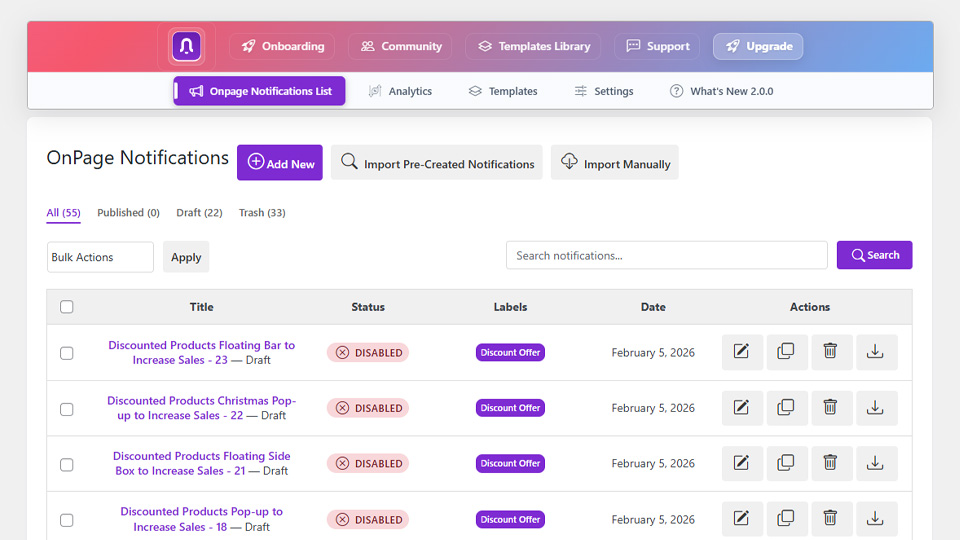
The Notifications List helps you see all the notifications you have active or in draft. Remove, edit, duplicate, or create a new notification from here.
Onboarding — Notifal Pro — Templates Library — Free Configuration — Community
Turn Every Visitor Into a Customer or Lead — Without Writing a Single Line of Code
Every day, potential customers land on your website, browse around, and leave without taking action. No sign-ups. No purchases. No engagement. Just silent exits. What if you could change that?
Notifal is a powerful WordPress popup builder designed to help you capture attention, boost engagement, and drive conversions, all through beautifully crafted popups, floating side boxes, and notification bars.
Whether you want to promote a flash sale, grow your email list, announce new products, or recover abandoning visitors, Notifal gives you everything you need to deliver the right message, to the right person, at the perfect moment. No complicated setups. No developer required. Just results.
🎯 Create stunning, goal-driven notifications in minutes
📊 Track performance with built-in advanced analytics
🎨 Design freely with Elementor or WordPress Block Editor
⚡ Launch faster with 100+ ready-to-use templates
One Plugin. Endless Possibilities.
What makes Notifal truly powerful isn’t just how you build notifications, it’s what you can achieve with them.
From growing your email list to preventing cart abandonment, from building social proof to boosting engagement, Notifal adapts to your goals. No matter what type of website you run — eCommerce store, blog, SaaS, agency, or portfolio — there’s a notification strategy waiting to transform your results.
Here’s what you can create with Notifal:
-
📧 Grow Email List: Newsletter Sign-up Form – Email Sign-Up Discount – Exit Intent Email Capture – Scroll-Based Email Capture
-
💰 Increase Sales: Discounted Products Showcase – Discount Coupon Popups – Exit Intent Coupon Code – First Purchase Coupon Code – Cross-Selling Recommendations
-
⭐ Build Trust & Social Proof: Recent Sales & Buyers Notifications – Google Rating – G2 Rating – Trustpilot Rating – Customer Testimonials
-
🚀 Boost Engagement: New Post Announcement – New Product Announcement – New Post Comment Notification – New Product Review Notification – Scroll-Based Add Comment Form – Exit Intent Post Share Button – Exit Intent Post Suggestions
-
🔄 Recover & Retain Visitors: Idle User Pop-Up – Exit Intent Email Capture – Exit Intent Coupon Code – Exit Intent Contact Info – Exit Intent Post Suggestions – Exit Intent Post Share Button – Cart Exit Pop-Up
-
📱 Promote Your Social Channels: Promote YouTube Video – Promote YouTube Channel – Social Media Follow Buttons
-
🛒 Prevent Cart Abandonment: Cart Exit Pop-Up
-
💬 Communicate with Visitors: WhatsApp Button – All-in-One Chat Widget – Click to Call Button – Exit Intent Contact Info – Inactive User Support Button
-
📈 Grow Average Order Value (AOV): Free Shipping Progress Bar – Cross-Selling Recommendations
-
👥 Grow Your User Base: Sign-Up Pop-Up
-
🔒 Content Blocking & Access Control: Age Verification Pop-Up – Registration Required Pop-Up
Whatever your goal, Notifal has a notification for it.
🔥 With +100 Ready-to-Use Templates, Launch in Minutes, Not Hours
Designing popups from scratch takes time. Finding the right layout, choosing colors, writing copy, positioning elements, it all adds up. What if you could skip all that?
With Notifal’s Template Library, you don’t have to start from a blank canvas. Choose from 100+ professionally designed, ready-to-use notifications and get your popup live in just a few clicks.
Every template is crafted with conversion in mind. Whether you need a sleek email capture form, an attention-grabbing sale announcement, a trust-building social proof notification, or a subtle floating bar, there’s a template waiting for you.
-
🎨 Templates for Every Need: Our library covers all 11 use cases. From growing your email list to preventing cart abandonment. No matter your goal, you’ll find a template that fits.
-
🏢 Designed for Every Industry: Running an online store? A blog? A SaaS platform? A local business website? Notifal templates are built for diverse industries, so you’ll always find something that matches your brand and audience.
-
🖼️ Multiple Themes & Layouts: Minimal and modern. Bold and colorful. Clean and professional. Browse through different visual styles and layouts to find the perfect match for your website’s aesthetic.
-
⚡ Ready in Clicks, Not Hours
Pick a template. Import and customize if you want. That’s it. Your high-converting pop-up is live. -
🆕 Always Growing: Our design team continuously adds new templates to the library. New trends, new use cases, new ideas. You’ll always have fresh options to choose from.
Stop designing from scratch. Start converting faster. Browse the library. Pick a template. Go live.
📊 Know What’s Working and Fix What’s Not with Analytics
Guessing doesn’t grow businesses, data does. Notifal’s built-in advanced analytics gives you complete visibility into how your notifications perform, so you can optimize for maximum results.
-
💵 Revenue Generated: See the real monetary impact of each notification, proof of your ROI.
-
👀 Impressions [PRO]: See exactly how many times each notification has been displayed to visitors.
-
👥 Total Users [PRO]: Track the number of unique visitors who have seen your popups.
-
❌ Close Rate [PRO]: Identify which notifications visitors are dismissing, and refine your approach.
-
🖱️ Click Rate & Total Clicks [PRO]: Measure engagement and understand what drives visitors to take action.
-
🎯 Conversion Rate [PRO]: Know precisely how many viewers are converting into subscribers, buyers, or leads.
-
📅 Campaign-based analytics filters [PRO]: Impressions, clicks, close rate, conversions, and other key performance data based on the campaign your notifications belong to, so you can measure full campaign performance with clarity.
Data-driven decisions. Real results.
Design Your Way. No Limits.
Why learn a new builder when you can use the one you already love? Notifal integrates seamlessly with both Elementor and the WordPress Block Editor, giving you complete design freedom.
-
🎨 Elementor Users: Build your popups and notifications using Elementor’s powerful drag-and-drop interface. Use any widget you want. Forms, images, buttons, countdown timers, WooCommerce elements, and more. If you can build it in Elementor, you can put it in your popup.
-
📝 Block Editor Users: Don’t use Elementor? No problem. Design stunning notifications using the native WordPress Block Editor. Add any block you need. Paragraphs, headings, images, buttons, columns, shortcodes, or third-party blocks. Full flexibility, zero limitations.
Your favorite builder. Your creative control. Unlimited possibilities.
🔗 With Dynamic Tags Create Once. Update Never.
Static popups are limited. Every new product, every new sale, every new comment — you’d have to create a new notification manually. That’s time-consuming and exhausting.
Notifal’s Tag Generator changes everything.
With dynamic tags, you create a notification once, and its content updates automatically based on real-time data. No more repetitive design work. No more outdated popups. Just smart, dynamic notifications that stay relevant, forever.
🔄 How Tags Work
Instead of writing static text like: “New Offer for You” You write: “New Offer for You, {user_name}”. Now every visitor sees their own name. Sara sees **“New Offer for You, Sara. Alex sees ***”New Offer for You, Alex”***.
This is just a simple example. With tags, you can pull in product names, prices, discount percentages, order details, comment content, usernames, and so much more. Creating fully personalized, real-time notifications.
🏷️ Three Powerful Tag Categories
-
📝 WordPress Tags: Dynamically insert Post, Page, Comment, and User data into your notifications.
-
🛒 WooCommerce Tags: Pull real-time Order and Product data, perfect for sale announcements, recent purchases, and discount popups.
-
⚙️ Post Type Tag Generator [PRO]: Have custom post types? Generate your own tags based on any post type in your database. Complete flexibility.
🎯 Right Message. Right Person. Right Moment.
A popup shown to the wrong audience, or at the wrong time, isn’t just ineffective. It’s annoying. And annoyed visitors don’t convert.
Notifal’s advanced targeting and timing controls ensure every notification reaches the right person, at the perfect moment. No wasted impressions. No frustrated visitors. Just precise, strategic messaging that drives action.
With Display Rules Control Who Sees What
Not every notification belongs on every page, or for every visitor. With Notifal, you decide exactly where and to whom your popups appear.
Target by:
-
📄 Pages, Posts or Products: Show notifications only on specific pages or blog posts.
-
🔗 URLs [PRO]: Show different notifications on specific URLs or even based on URL parameters (for example, visitors coming from
?source=facebookcan see a different message than?source=google). -
📁 Categories [PRO]: Display popups based on post or product categories.
-
👤 User Roles [PRO]: Show different notifications to guests, subscribers, customers, or administrators.
-
🔀 Multi Rules [PRO]: Combine multiple conditions for laser-focused targeting. Example: Show only to logged-out users, on product pages, in the “Sale” category.
With Timing Triggers, Control When It Appears
Timing is everything. A popup too early feels intrusive. Too late, and visitors are already gone. Notifal gives you full control over when notifications appear.
Trigger options:
-
⚡ Immediately on Page Load: Display your message the moment the page loads.
-
⏳ After Delay: Wait a set time (e.g., 10 seconds) before showing the notification.
-
📜 On Scroll [PRO]: Trigger when visitors scroll to a specific point on the page.
-
🚪 On Exit Intent [PRO]: Capture attention right before visitors leave your site.
-
💤 After User Idle [PRO]: Re-engage inactive users who have stopped interacting.
-
🛠️ Custom Triggers [PRO]: Advanced control with click-based triggers (class or ID), JavaScript conditions, and more.
Stop showing popups randomly. Start showing them strategically.
📅 Campaign Manager — Align Timing Across Notifications
Running a seasonal sale, a product launch, or a limited-time offer? With Campaign Manager, you can group related notifications under one campaign, define the campaign schedule once, and manage the whole promotion more clearly from one place.
Instead of treating every notification as an isolated item, campaigns help you organize multiple messages around a single goal. Assign several notifications to the same campaign, keep their timing aligned, simplify management for larger promotions, and review performance with campaign-based filtering in analytics. When a notification belongs to a campaign, the campaign schedule takes priority, so your messages stay coordinated without repeating the same date settings on every notification.
Built for Every Website. Tailored for Your Goals.
It doesn’t matter what kind of website you run. If you have visitors, you have opportunities to convert them. Notifal adapts to your industry, your audience, and your unique goals, helping every type of website turn passive traffic into measurable results.
-
🛒 eCommerce & Online Stores: Boost sales with discounted product popups, recover abandoned carts with exit-intent offers, display recent purchase notifications for social proof, increase average order value with free shipping bars, and drive repeat purchases with coupon codes.
-
📝 Blogs & Content Websites: Grow your subscriber base with newsletter signup popups, announce new posts to keep readers engaged, display recent comments to spark discussions, suggest related articles before visitors leave, and encourage social sharing to expand your reach.
-
💼 SaaS & Software Companies: Convert visitors into trial users with signup popups, showcase customer testimonials and G2 reviews to build credibility, announce new features or updates, and capture leads with strategically timed email forms.
-
🏢 Agencies & Service Businesses: Generate more leads with contact form popups, display client testimonials to build trust, add WhatsApp or click-to-call buttons for instant communication, and capture inquiries with exit-intent contact forms.
-
🎓 Online Courses & Membership Sites: Drive registrations with signup popups, block premium content for non-members, announce new courses or modules, and retain students with engagement notifications.
-
📰 News & Magazine Websites: Grow your readership with newsletter capture forms, announce breaking news or trending articles, encourage social media follows, and re-engage idle readers with content suggestions.
-
🏪 Local Businesses: Make it easy for customers to reach you with click-to-call and WhatsApp buttons, showcase Google reviews to build local trust, promote special offers, and capture inquiries with contact popups.
-
🔗 Affiliate & Review Websites: Capture emails for your recommendation lists, display product popups at the right moment, build trust with testimonials, and recover leaving visitors with exit-intent suggestions.
-
🎗️ Non-Profits & Charities: Encourage donations with compelling popups, grow your supporter base with email signups, announce upcoming events or campaigns, and share impact stories with notification bars.
-
🔞 Adult & Age-Restricted Websites: Ensure legal compliance with age verification popups before granting access to restricted content, protecting your business and your audience.
Whatever you build, Notifal helps you grow it.
Everything You Need. All in One Plugin.
Core Features:
- Number of Active Notifications (Just 1 in FREE Version – Unilimited in PRO Version)
- Campaign Manager — create campaigns with schedule windows and assign on-page notifications
- Import Notification
- Export Notification
- Build Templates with Elementor
- Build Templates with WordPress Block Editor
- Import Templates
- Export Templates
- Device Visibility
- Display Toast Notification
- Display Popup Modal
- Display Top Bar Banner
- Display Floating Element
- Display Inline Content
- Display Corner Badge
- Notification Position on Desktop
- Notification Position on Mobile
- Animations
- Add Sound to Notifications
- Multi-Filters for Dynamic Content Notifications [PRO]
Display Rules and Advanced Targeting:
- Targeting by Post Type
- Targeting by Pages
- Targeting by Posts
- Targeting by Categories [PRO]
- Targeting by URL Conditions [PRO]
- Targeting by Users [PRO]
Advanced Display Timing:
- Display Durations
- Notification Frequency
- Trigger Notifications Immediately on Page Load
- Trigger Notification After Delay
- Trigger Notifications On Scroll [PRO]
- Trigger Notifications On Exit Intent [PRO]
- Trigger Notifications After User Idle [PRO]
- Custom Trigger [PRO]
- Require User Consent [PRO]
- Pause Notifications When Tab Inactive [PRO]
- Resume Notifications When Tab Active [PRO]
- Prevent Multiple Instances [PRO]
Advanced Behavioral Settings:
- Enable ARIA Labels
- Focus Trap
- Announce Notification Content to Screen Readers
- Prevent Page Scroll when Notification Appears
- Close Notification on Form Submit
- Maintain Notification State When Page Is Refreshed
- Swipe to Dismiss Notification [PRO]
- Dismiss Notification on Click Outside [PRO]
- Dismiss Notification on Escape Key (Esc) [PRO]
- Dismiss Notification on Scroll [PRO]
- Browser Tab Badge (Change Browser Tab Icon and Text When a Notification Appears) [PRO]
Advanced Analytics System:
- Revenue from Notifications (single and total from all)
- Total Impressions [PRO]
- Total Clicks [PRO]
- Click-Through Rate [PRO]
- Conversion Rate [PRO]
- Close Rate [PRO]
- Performance Overview Chart [PRO]
- Top Performing Notifications Table [PRO]
- Analytics Data Filtering [PRO]
- Export Analytics Data [PRO]
Advanced Tag Generator System:
- User Tags
- Post Tags
- Page Tags
- Product Tags
- Order Tags
- Comment Tags [PRO]
- All Post Types Tags [PRO]
External services
This plugin connects to notifal.com in two ways:
- Deactivation feedback — When you submit the deactivation survey (Plugins Deactivate), the plugin may send the following to notifal.com: site URL, admin email address, deactivation reason, and any optional details you provide (e.g. which plugin you switched to or additional feedback), …
![[CR]PostWarning logo](https://s.w.org/plugins/geopattern-icon/crpostwarning.svg)