
Active Directory/LDAP Integration for Cloud & Shared Hosting Platforms
by miniOrange on WordPress.org
Active Directory integration/LDAP integration enables authentication & login for WordPress sites on Shared Hosting like Bluehost, GoDaddy, SiteGro …
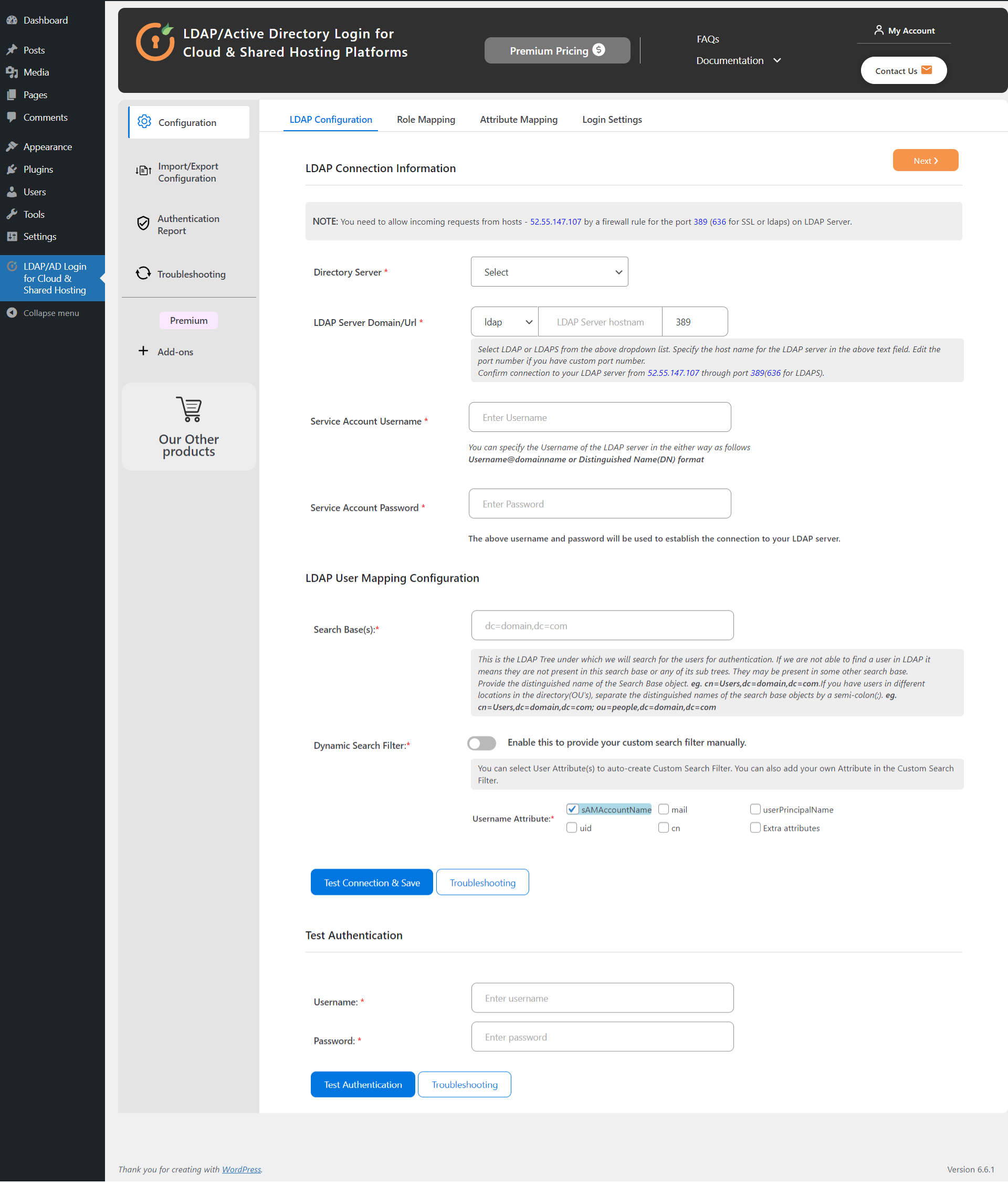
Active Directory/LDAP Server Configuration
Showcase | Documentation | Features | Add-Ons | Contact Us
Active Directory Integration / LDAP Integration allows you to log in to your WordPress site hosted on any cloud / shared hosting platforms, such as Hostinger, Bluehost, DreamHost, HostGator, GreenGeeks, SiteGround, A2 Hosting, Flywheel, WPEngine, Kinsta, GoDaddy, by using the credentials stored in your Active Directory, such as Microsoft Active Directory, Azure Active Directory, OpenLDAP Directory, Sun Active Directory, JumpCloud, FreeIPA Directory, Synology, OpenDS, or other LDAP directories. This plugin does not require you to have the LDAP extension enabled and is a safe way of performing authentication for your WordPress site.
How can we Integrate LDAP/Active Directory with WordPress Shared Hosting?
Integrating LDAP/Active Directory with a WordPress shared hosting platform is simple by using the miniOrange LDAP Integration plugin. This plugin enables users to log in securely using credentials from directories such as Microsoft AD, Azure AD, and OpenLDAP, without requiring the PHP LDAP extension. After installing the plugin, configure your Active Directory settings, map LDAP attributes to WordPress user profiles, and authenticate users from multiple Active Directories for seamless and secure access to your WordPress site.
Features:-
- Perform LDAP / AD Login into your WordPress website hosted on a shared hosting environment/cloud platform using Active Directory / other LDAP directory credentials.
- Supports LDAP / AD authentication for WordPress site(s) hosted on Cloud / Shared Hosting Platforms such as Hostinger, Bluehost, DreamHost, HostGator, GreenGeeks, SiteGround, A2 Hosting, Flywheel, WPEngine, Kinsta, GoDaddy, etc.
- No Need to install/configure any additional extension (like PHP LDAP extension) on the cloud / shared hosting platform to facilitate a connection to the Active Directory / other LDAP directories.
- Automatic User Registration in WordPress: Automatically register LDAP/AD user(s) in your WordPress website after a successful LDAP / AD login.
- Multiple Search Containers: Authenticate users against multiple search bases from your LDAP Active Directory / any other LDAP directory.
- Login With Any LDAP Attribute Of Your Choice: Authenticate users against multiple LDAP / Active Directory username attributes like sAMAccountName, UID, UserPrincipalName, mail, cn, or any other custom LDAP attribute(s) according to your LDAP Active Directory / any other LDAP directory.
- Custom LDAP to WordPress Profile Mapping: Mapping of your AD / other LDAP directory user profile attributes to the WordPress user profile. Upon login, WordPress user profile information will automatically be updated depending on the LDAP / Active Directory user profile attributes.
- Role Mapping: Mapping of LDAP groups from your AD / other LDAP directory to WordPress Roles upon LDAP authentication.
- Advanced Attribute Mapping: Map user profile information to be retrieved from Active Directory / other LDAP directory. eg: first name, last name, phone number, email, etc. Configure any LDAP / AD attribute such as givenname, sn, uid, mail, telephone number, department, company, sAMAccountName, UserPrincipalName, etc, to WordPress user profile attributes.
- Redirect to custom URL after WordPress LDAP authentication: Our LDAP Active Directory Integration plugin for Cloud & Shared Hosting Platforms allows you to redirect users to a WordPress Profile page, Home page, or any other Custom URL after successful LDAP authentication from your AD / other LDAP directory.
- Advanced Role Mapping: Assign specific WordPress roles based on the LDAP / Active Directory group memberships or the Organizational Units (OU’s), which are set in the LDAP Server / Active Directory. Using our LDAP AD integration plugin, you can assign a default WordPress role to all the LDAP / Active Directory users.
- Supports both LDAP and LDAPS (LDAP Secure Connection) connection: This plugin supports LDAP / Active Directory Login Integration for WordPress via LDAP and LDAPS protocol for safe and secure authentication.
- Authenticate users from LDAP and WordPress: Enable AD Login for LDAP / Active Directory users only. Also, allow login for both LDAP and WordPress users.
- Support WordPress Password as a fallback: Fallback to the local WordPress password if Active Directory / other LDAP Directory is temporarily unreachable.
- Supports Custom Search Filter: This WordPress LDAP plugin allows you to configure a custom search filter for LDAP / AD login. You can restrict user(s) from logging in depending on the user group(s), userAccountControl, etc.
- Support for Import / Export Plugin Configuration: Export your WordPress LDAP plugin configuration from the staging/testing site and import it to the production / live site. This will save you the hassle of reconfiguring the LDAP plugin.
- LDAP Authentication Logs Report: The plugin provides a feature to records detailed logs of all failed LDAP/AD Login attempts.
- Test authentication using credentials stored in your Active Directory / other LDAP directory.
- We provide active support for configuring your Active Directory / other LDAP directory.
- Keep the user’s profile information in sync with the AD / other LDAP Directories upon every WordPress LDAP authentication.
- Works perfectly with third-party plugins such as BuddyBoss, BuddyPress, Ultimate Member, Gravity forms, Groups, and eMember.
- Compatible with the latest versions of WordPress and PHP.
- Multisite Support: The plugin also supports LDAP Active Directory Login integration for multisite environments. [PREMIUM]
- Multiple LDAP/AD Support: Authenticate users against multiple Active Directories/ other LDAP directories. [PREMIUM]
- Active Support provided: miniOrange provides 24/7 support to all our customers. We have a team of dedicated developers who can help you debug any issues you may face to keep your WordPress site always live and functioning. You can reach out to us at ldapsupport@xecurify.com
- We provide extensive, easy-to-understand documentation and YouTube setup videos to assist you while configuring our LDAP Active Directory Integration (AD Integration) Plugin for Cloud / Shared Hosting Platform.
You can find out how to configure the plugin through the video below
= Add-ons List=
- Auto-Login(SSO) for shared hosting: Using our Auto-Login(SSO) add-on, the user can perform an auto-login / Single Sign On from Domain Joined Machines into their WordPress site, which is hosted on a cloud / shared hosting environment.
- Sync Users LDAP Directory: Sync the users present in your LDAP Active Directory to your WordPress site. Schedules can be configured for when the LDAP AD sync should run and can even be set to perform the LDAP AD sync after a specific interval.
- Page/Post Link Restriction: Restrict user access to pages or posts on your WordPress website based on the WordPress roles assigned to a specific user. This allows you to make the website accessible only to logged-in users.
- Customize WordPress Login Page: Customize your WordPress login page by adding your own logo and displaying a custom message(s).
- BuddyPress Extended Profile Integration for Shared Hosting:Integrates users’ BuddyPress extended profile attributes with their LDAP Active Directory attributes upon LDAP AD Login.
- Profile Picture Sync Add-on: Update the WordPress user profile picture with the thumbnail photo stored in your Active Directory / LDAP server.
- Third Party Plugin User Profile Integration: Update the user profiles created using any third-party plugins with the attributes present in your Active Directory / LDAP Server.
- WP Group Plugin Integration: Assign users to WordPress groups based on their group memberships present in the Active Directory. You can map any number of WordPress groups to the LDAP / AD groups.
- Ultimate Member Login Integration: Using your LDAP credentials, log in to Ultimate Member and integrate your Ultimate Member User Profile with the attributes present in your LDAP Active Directory.
Other Use-Cases we support :-
- miniOrange WP LDAP/AD Login for Intranet sites plugin supports LDAP login to WordPress sites using credentials stored in Active Directory and LDAP Directory systems. Only if you have access to the LDAP Extension on your site.
- Search Staff/Employee present in your Active Directory: allows you to search and display the users present in your Active Directory / LDAP Server on a WordPress page using a shortcode.
- WordPress Login and User Management Plugin: This plugin offers several functionalities, including bulk user management, user redirection based on WordPress roles, user session management, auto-logout users, and the ability to make a page or post private or public based on an ID or URL.
- miniOrange also supports VPN use cases Log in to your VPN client using Active Directory /other LDAP Directory credentials and Multi-Factor Authentication.
- miniOrange supports API Security use cases to protect and secure your APIs using our product XecureAPI which helps you to enable Authentication methods ( like OAuth, SAML, LDAP, API Key Authentication, JWT Authentication etc ), Rate Limiting, IP restriction, and much more on your APIs for complete protection.
- miniOrange supports Single-Sign-On (SSO) into a plethora of applications and supports various protocols like RADIUS, SAML, OAuth, LDAP/LDAPS, using various IDPs like Azure Active Directory, Microsoft On-Premise Active Directory, Octa, ADFS, etc.
- Contact us at info@xecurify.com to know more.
Do you want support?
Please email us at info@xecurify.com or Contact us


