
Menu Ghost
by Reza Sarailoo on WordPress.org
Target menu items by role, device, schedule, and campaign rules using a fast, native conditions interface inside the menu editor.
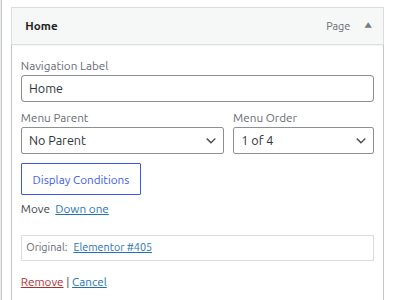
Menu item meta box with the Display Conditions button inside Appearance ▸ Menus.
Menu Ghost lets you conditionally display each menu item based on factors like user role, device, date, pages, and more.
Design frictionless navigation experiences and boost conversions by only showing relevant menu items to each visitor. Menu Ghost integrates with the native WordPress menu editor and adds a modern conditions interface that feels like it belongs in core. Everything happens inside Appearance Menus (classic themes) or Site Editor Navigation (block themes) no shortcodes or template edits required.
What does Menu Ghost do?
Menu Ghost gives you total control over which navigation links appear and when. Build unlimited rule sets per menu item, combining audience, page, schedule, and campaign conditions. Hide seasonal promotions after a sale ends, display member-only dashboards, or show localized links based on browser language.
Key features
- Audience targeting – Show or hide menu items based on user role, login status, browser language, or detected device (desktop, tablet, mobile).
- Page & post rules – Limit links to specific pages, post types, taxonomies, archives, author archives, search results, or 404 pages.
- Scheduling controls – Activate items on selected weekdays, within date ranges, or during daily time windows.
- Campaign awareness – React to query-string values, UTM parameters, or custom marketing links for landing pages.
- No-code workflow – React-powered UI inside the existing menu screen. Toggle rules with familiar WordPress components.
- Unlimited conditions – Stack include/exclude rules to create precise logic for every menu item.
- Performance friendly – All logic runs server-side with cached WordPress APIs. No front-end scripts added to your theme.
Popular use cases
- Display a “Members Area” link only to logged-in customers on desktop.
- Promote a holiday sale on every page until a specific date/time is reached.
- Replace “Book a call” with “Download brochure” on mobile visitors to boost conversions.
- Show “Return to checkout” when users view product archives, but hide it elsewhere.
- Localize navigation labels and URLs based on browser language or UTM campaigns.
Why choose Menu Ghost?
- Native experience – Built with the WordPress components library for a seamless admin UI.
- Clean code & extensibility – PHP logic follows core standards and stores data in post meta.
- Marketing ready – Understand traffic sources and tailor menus without page builders.
- SEO aware – Hide links for humans while keeping friendly markup for search engines (links still exist, only visibility changes).
The interface is built with React and uses WordPress components so it remains responsive, accessible, and familiar. All rule data is stored in post meta to keep compatibility with exports, migrations, and backups.
Rule reference
Pages tab
- Include / Exclude – Decide whether a matching condition should show or hide the menu item.
- Entire Site – Create a catch-all rule that always fires. Place it below granular rules when you need fallback behavior.
- Archive scopes – Target date archives, author archives, taxonomy listings, WooCommerce product archives, search results, or even the 404 template.
- Singular scopes – Limit links to specific posts, pages, custom post types, parent/child relationships, or taxonomy terms.
- Add Condition – Stack unlimited rules. Menu Ghost evaluates them from top to bottom, so keep broad rules toward the bottom of the list.
Advanced tab
- User Role – Match any WordPress role, including custom roles added by eCommerce or membership plugins.
- User Device – Detect desktop, tablet, or mobile visitors to tailor calls to action per device.
- Login Status – Serve different menu links to logged-in versus logged-out visitors.
- Signup Date – Target members who registered before or after a specific date—ideal for onboarding flows.
- Browser Language – Show localized links when the visitor’s browser shares a preferred language.
- Days of the Week – Toggle links on specific weekdays (e.g., “Weekend brunch menu”).
- Within Date Range – Schedule seasonal links to appear between two calendar dates without manual edits.
- Within Time Window – Display links only during a daily time slice, such as support hours or flash sales.
- URL Query Parameter – Require a query-string key/value (like
ref=partner) before the menu item appears. - UTM Campaign / Content / Medium / Source / Term – React to marketing URLs so visitors see campaign-specific navigation when arriving from ads or emails.
Development
The source code for Menu Ghost lives in the public repository at https://github.com/sarailoo/menu-ghost.


