
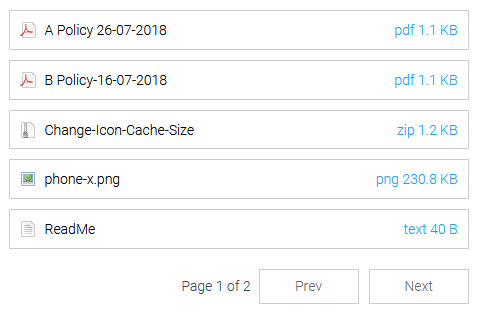
Medialist using the ml-white style
Medialist plugin is designed to make displaying posts or attached page media, documents and more an easy process. Upload your content, attach it to a page, then place a medialist shortcode to display a neat list of items. You can customise the shortcode to only display a certain category or a certain number of items if you wish and also alter the style to suit your page.
Features
Note: This plugin does not add a menu item to the wordpress dashboard, functionality and customisation is purely in the form of a shortcode.
- Incredibly lightweight
- List posts and posts by author
- List page attachments
- List posts and attachments by tag
- Define a category of items to display
- Define how many items to display
- Define the order in which items are displayed
- Toggle pagination on/off
- Multiple built-in styles
- Displays the item type with identifiable icons, with the items download size
- Place the shortcode anywhere on a page/post
- Ability to use the shortcode many times on a single page. You can split categories, On the same page, thats fun.
- Ability to toggle sticky posts on/off
- Ability to paginate the list of items after a defined number of items
- Ability to search for items in the list
- NEW: Compatible with RML Real Media Library Plugin.
How to use the shortcode
Shortcodes are a simple way to add functionality to any wordpress page.
To use this plugins shortcode you need to write the shortcode into the page editor or guttenberg block where you want your item list to appear.
- For a default list write [medialist] with the square brackets included (this will display all attached media in a list on the page and will display pagination at 10 or more items).
- To customise the shortcode we add some keywords, for example [medialist order= orderby= category= mediaitems= paginate= style=]. After each equals(=) sign, we need to provide a customisation. All possible customisations are listed below.
Example
[medialist type=post order=DESC orderby=date category=recipes,cakes]
The above example will display a list of most recent posts by date in descending order that have recipes and or cakes as the category.
Customise the shortcode with additional keywords
Note: Some keywords can have multiple options, ensure they are seperated by a comma i.e [medialist mediatype=pdf,audio].
- type=attachment (or) post
- mediatype=excel,pdf,doc,zip,ppt,text,audio,images,other (You can use more than 1 here.)
- order=ASC (or) DESC
- orderby=none, ID, author, title, name, type, date, modified, parent, rand, comment_count
- category=uncategorized,(any defined category taxonomy assigned to media or post items, you can use more than 1 here.)
- mediaitems=10 (Provide a number of items you wish to display in the list before pagination)
- paginate=0 (Setting paginate to 0 will disable pagination, mediaitems number will be the max items displayed, default is 10)
- style=ml-default (Various built-in styles, write one of the style names listed below.)
- author=author-username-here (This will display posts uploaded by the specified author, case sensitive.)
- search=1 (Setting search to 1 will enable a basic search facility.)
- tags= (any defined tag assigned to media or post items, you can use more than 1 here.)
- rml_folder=(folder ID) You can find the folder ID by selecting a folder, and click the three dots on the folder toolbar. A dialog opens and in the bottom right corner there is a text label with the ID.
Note: If using the RML Real Media Library Plugin, attach your files within RML folders to the desired page as normal or use the globalitems=1 attribute.
Other: The mediatype (other) currently supports exe,sql & xml files.
Available styles
- ml-metro-light-green
- ml-metro-green
- ml-metro-magenta
- ml-metro-light-purple
- ml-mauve
- ml-taupe
- ml-sienna
- ml-white
Override options for shortcode
For special use cases, you may want to override parts of the plugin using the following shortcode keywords.
- sticky=0 (By default sticky posts will be ignored, setting this to 0 will pin sticky posts to the top of the list.)
- max=200 (By default the plugin will only add 200 items to a list. You can override this by setting max= to a larger number. Or similarly a smaller number.)
- globalitems=1 (By default attachments from the current page (or) post are able to be displayed. Setting this attribute to 1 will allow the list to display all items in the Media Library. It is recommended to set a category attribute first before using this override option.)
Example [medialist sticky=0 max=1000 mediaitems=10 type=post order=DESC orderby=date category=recipes]
The example will now pin sticky posts to the top and will also display up-to a thousand items and because mediaitems=10 there will be 10 items per page for a total of 100 possible pages.
The defaults
A medialist will by default have the following features unless changed in your shortcode with keywords
- Pagination Enabled
- Display a maximum of 200 items
- Sticky posts will be ignored
- A total of 10 items will display per list and paginate for items over this number
- Generate a list of the mediaitems attached to the current page only and of any category
- Organise each list in ascending order by title
** Significantly older versions of WordPress upto 2 major versions are no longer tested.**
Thank You


