Loading Page with Loading Screen
by codepeople on WordPress.org
Loading Page with Loading Screen plugin performs a pre-loading of images on your website and displays a loading progress screen with percentage of com …
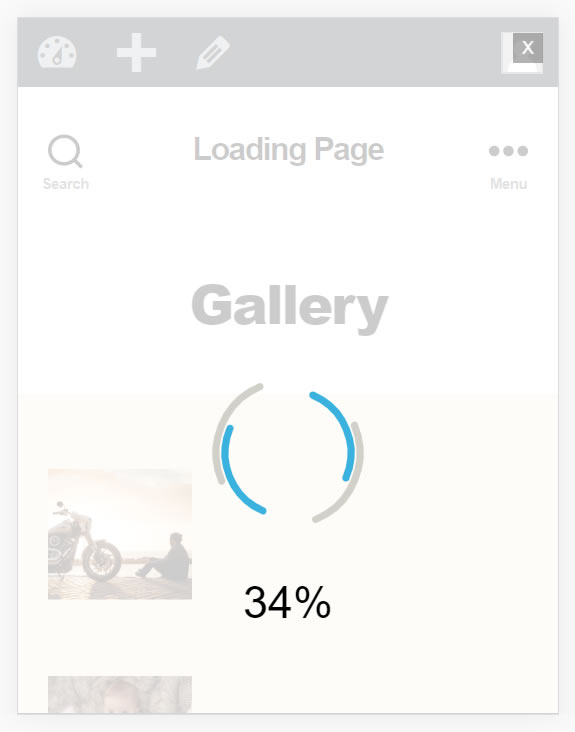
Loading Page Preview
Loading Page with Loading Screen features:
Displays a screen showing loading percentage of a given page
Includes multiple loading screen alternatives (Bar, Logo, and Text) you can choose from the plugin settings page
Displays the page’s content with an animation after complete the loading process
Increase the WordPress performance
Allows to select the colors of the loading progress screen,
As background colors and images
Allows to display or remove the text showing the loading percentage
Pre-loads the page images
Loading Page with Loading Screen plugin performs a pre-loading of image on your website and displays a loading progress screen with percentage of completion. Once everything is loaded, the screen disappears.
More about the Main Features:
- Displays a screen showing loading percentage of a given page. In heavy pages the “Loading Page with Loading Screen” plugin allows to know when the page appearance is ready.
- Allows to display the loading screen on homepage only, or in all pages of website.
- Allows to select the colors of the loading progress screen, or select images as background. By default the colour of loading screen is black, but it may be modified to adjust the look and feel of the loading screen with website’s design.
- Allows to display or remove the text showing the loading percentage.
The base plugin, available for free from the WordPress Plugin Directory, has all the features you need to displays an loading screen on your website.
Premium Features:
- Allows to choose a loading progress screen. The premium version of plugin includes additional loading screens not available in the free version.
- Allows to select from multiple possible animations, to display the page’s content after complete the loading process.
- Improves the page performance.
- Lazy Loading feature allows to load faster and reduce the bandwidth consumption. The images are big consumers of bandwidth and loading time, so a WordPress website with multiple images can improve its performance and reduce the loading time with the lazy loading feature.
- Allows to select an image as a placeholder, to replace the real images during pre-loading. It’s recommended to select the lighter images possible to increase the WordPress performance, the image selected will be used instead of the original images, in the loading page process.
Demo of Premium Version of Plugin
https://demos.dwbooster.com/loading-page/wp-login.php
https://demos.dwbooster.com/loading-page/
What is Lazy Loading?
Lazy Loading means that the original images are not loaded until finalize the loading of page. This action improves the download speed of webpages.
If you want more information about this plugin or another one don’t doubt to visit my website:
http://wordpress.dwbooster.com
Interface
To use Loading Page with Loading Screen on your website, simply activate the plugin. If you wish to modify any of the default options, go to the plugin’s Settings. They can be found either by going to Settings > Loading Page on your WordPress dashboard, or by going to Plugins; a link to Settings can be found in the plugin description.
The Loading Page with Loading Screen setup is divided in two sections: the first one is dedicated to the activation and setup of the loading screen, and the second to the delayed loading of the images that are not shown immediately ( images that require on-page scrolling in order to be seen).
Loading Screen Setup
The setup options for the loading screen are:
- Enable loading screen: activates preloading of images and displays a loading screen while the webpage is loading.
- Display the loading screen once per session: display the loading screen only once per session.
- Display the loading screen on: display the loading screen with all screens sizes, or if the screens sizes satisfy the conditions.
- Display loading screen only in: displays a loading screen only on homepage, all pages, or specific pages or posts. In the last case the IDs of pages or posts should be separated by comma symbol “,”
- Devices: Allows selecting the devices where to show the loading screens (Desktop, Mobile, or Both).
- Exclude the loading screen from: excludes the loading screen from pages or posts whose IDs are entered separated by comma symbol “,”
- Select the loading screen: allows to choose a loading screen. The premium version of plugin include multiple loading screens.
- Select background color: allows to select the background color for your loading screen compatible with the design guidelines of your website.
- Select images as background: allows to display an image as loading screen background, the image can be displayed tiled or centered.
- Display image in fullscreen: allows to adjust the background image in fullscreen mode.
- Select foreground color: Allows to select the color of the graphics and texts that display the loading progress information.
- Additional seconds: Allows to add seconds before remove the loading screen at the end of the load process.
- Include an ad, or your own block of code: Allows to add ads, or other block of code, to the loading screen.
- Apply the effect on page: Display the page’s content with an animation after complete the loading process.
-
Display loading percent: Shows the percentage of loading. The loading percent is calculated in function of images in the page.
-
Troubleshoot Area – Loading Screen: allows disabling/enabling the search in deep.
Lazy Loading Setup (in premium version only)
The options to set up Lazy Loading and increase the WordPress performance are:
- Enable lazy loading: Enables the delayed loading of images outside of the current viewing area of the user improving the rendering time of complete page.
-
Select the image to load by default: Choose an image to be shown as a placeholder of the actual images, the loading of which will be delayed. It’s recommended the selection of a light image to increase the WordPress performance.
-
Troubleshoot Area – Lazy Loading: allows entering some texts to exclude the images tags with the entered texts in the classes or attributes.