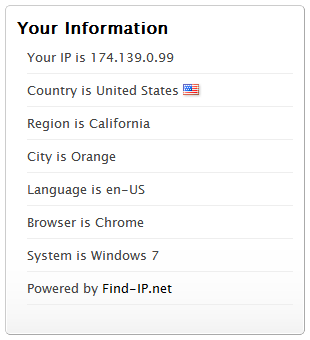
screenshot 1
Show the visitor’s information in a widget, including the IP address, country, country flag, city, region, language, operating system, and browser.
You can choose the information to be shown. It’s shown in the visitor’s language automatically.
How to use it?
- Go to the admin menu Appearance > Widgets.
- Then drag the IP address widget to your Sidebar.
Here is a live demo: https://free-proxy-list.net/blog/
3rd Party API
- The plugin is relying on our IP Widget API service
- It gets the visitor’s information by that API
- IP Widget API service Privacy Policies
- IP Widget API service Terms of Use
Active installations100+
Weekly downloads
21+5.00%
Version1.0.5
Last updated11/11/2020
WordPress version2.7
Tested up to5.6.14
PHP version4.0
Tags
ipip addressip address widgetip widget IIipaddress