
Import Spreadsheets from Microsoft Excel
by SpreadsheetConverter on WordPress.org
Import live, calculating spreadsheets from Microsoft Excel to WordPress. The uploaded online spreadsheet is live, and looks and feels like in Excel.
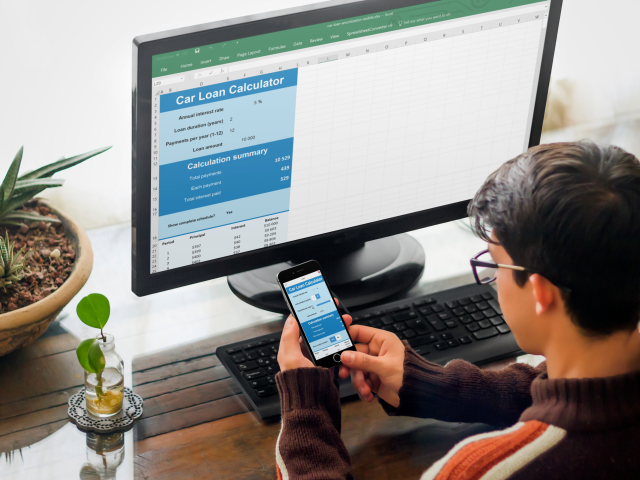
A car loan calculator in Excel can be downloaded as a web app.
Import Spreadsheets from Microsoft Excel is a WordPress plugin that allows you to import live, calculating spreadsheets from Microsoft Excel to your blog or website in WordPress. The plugin is free but the calculating web page must have been generated with a paid license for SpreadsheetConverter, an add-in for Excel that converts the Excel spreadsheet to HTML and the formulas in Excel to JavaScript. The uploaded online spreadsheet is live and looks and feels exactly like in Excel. Now you can use Excel everywhere!
SpreadsheetConverter works like an Excel compiler creating live online spreadsheets in HTML and JavaScript. It is not a simple Excel viewer; the web spreadsheet plugin runs all your formulas in real-time – all the cells and charts are live!
You usually need to have your own WordPress server to install plugins. It may not be possible to install plugins on WordPress.com or other shared WordPress servers. If you are unable to use this plugin, you can use our Publish to Cloud service instead. It is built into SpreadsheetConverter and uploads the calculator to a cloud server. In most cases, this works just as well.
Note: before you upload a spreadsheet, you must use the SpreadsheetConverter add-in for Microsoft Excel to convert your spreadsheet to web format. To use this add-in, you must have Microsoft Excel 2007 or later for Windows – and the basic skills to create spreadsheets with it. Prices for unlimited, lifetime licenses for the current version start at $254. There are no extra fees per server, month, page or visitor.
We’d love to help you try SpreadsheetConverter on one of your own spreadsheets. You don’t have to install the software to test it. Just send one of your own spreadsheets, and we’ll send it back as a live, intelligent web form or calculator. Use the online form and remember to attach the spreadsheet!
This service is free, because it’s so simple to convert your spreadsheet to web format with SpreadsheetConverter that we can do it in almost no time at all. If you want to keep your web calculator or form up-to-date without ever installing or learning the converter, you can have us do all the conversion work for you, forever, using the paid conversion service.
SpreadsheetConverter is an advanced product that may require some time to learn. If you don’t want to invest in this new skill set right now, you can test the plugin right now with example files in the plugin’s ZIP file – read more below.
Please don’t post negative reviews until you have at least read the FAQ. Even better: contact support for any difficulties you have; we will help you get started for free!
Insert a live spreadsheet in your blog with just a few clicks
Any Excel spreadsheet can be published on the web:
- Open the spreadsheet in Excel and click Convert on the SpreadsheetConverter toolbar to have the Excel converter create a web spreadsheet.
- Click WordPress Plugin on the SpreadsheetConverter toolbar to create an SSC Calculator file with everything you will need in WordPress.
- Use this plugin to upload the SSC Calculator file to WordPress.
- Embed the calculator or form into one or more of your posts or pages in WordPress.
- Click Publish in WordPress and your calculator goes live, online on the web!
Please visit the Embed a spreadsheet in WordPress, FAQ and Screenshots sections for more detailed instructions.
A full online help for the plugin is available on the SpreadsheetConverter website.
Create beautiful web apps
At last you can create online calculators for your website without the help of a programmer. All you need is Microsoft Excel. Help your visitors do a better job, and they will return to your website for more.
- Price calculation: Online pricing calculators help your customers get the total price including options, maintenance etc.
- Financial calculation: provide online mortgage calculators, interest calculation, loan calculators or online lease calculation.
- Calculators for government and counties: online income tax calculation, online social benefits, online payroll calculators.
- ROI: Use online return on investment calculation to better show the benefits of your product, or calculate internal rate of return (IRR).
- Technical and engineering calculators: online dimensioning tools, online HVAC calculations, load calculators, concrete calculation, torque calculation, area calculators, volume calculation, electrical calculation, power calculation.
- Health calculators: online body mass index calculator, online calorie calculation, online body fat calculator.
You can use any feature of Excel on the web, including formulas and functions, to validate data entry, select intelligent default values or show customized images or maps.
- Create mobile-friendly, responsive calculators that automatically adapt to different screen widths, portrait/landscape orientation etc.
- Embed xls files with smart table lookup in an unlimited number of background data tables.
- Use graphical widgets like buttons and sliders to make the calculator easier to use.
- Use advanced data validation including Excel’s Data Validation presets.
- Show live graphs that automatically update when values are changed.
- Upload spreadsheets to any standard web server.
- With Real-time Sync, two or more persons can collaborate on an advanced calculation in real-time.
- Fetch live data from corporate databases when run on Node.js servers.
- Build calculating web apps that can be started directly from the iPhone or Android Home screen – even when the phone is offline.
Our calculators are completely self-contained and do not require any additional plugins. There is nothing to install in your server or website except this plugin, and it is only used when you edit. You don’t need any programming skills and there is no change to configuration or settings.
Build smart web forms with automatic data validation
Publish your electronic forms on the web and have completed web forms sent directly to your inbox. If you get a lot of electronic forms for post-processing, have forms saved in a cloud database as they arrive.
- Website contact forms with quality assurance for all contact data including e-mail addresses, phone numbers and addresses.
- HTML order forms with automatic calculation of totals and weights.
- Web booking forms with built-in input data validation.
- Online purchase order forms with automatic assignment of cost center and accounts.
- Web surveys converted from xlsx files.
The tabular Excel worksheet makes it very easy to design easy-to-use forms. The web page inherits the formatting in Excel and supports the use of graphical themes.
You can use any feature of Excel, including formulas and functions, to validate data entry, select intelligent default values or show customized images or Google maps.
- Create mobile-friendly, responsive forms that automatically adapt to different screen widths, portrait/landscape orientation etc.
- To make it easier to understand a large form, split into two or more sections and let users navigate between the sections using tabs, next/previous buttons or sliding panels.
- Use graphical widgets like menus and calendars to make the form easier to use.
- Hide rows or complete sections of a form until you know they are applicable.
- Allow file attachments with submitted web forms.
- Form fields can be made mandatory. Use hidden fields to discretely include supplemental information in the form.
- With Real-time Sync, two or more persons can collaborate on a form in real-time.
- Fetch live data from corporate databases when run on Node.js servers.
- Build apps for mobile data entry that can submit smart forms directly from iPhone or Android devices – even when the phone is offline.
- Use live, interactive charts that invite users to point-and-click, and the charts automatically update when values are changed.
Our forms processing services are completely self-contained, and the only thing you need to provide is an e-mail address. There is nothing to install in your server or website except this plugin, and it is only used when you edit. You don’t need any programming skills and there is no change to configuration or settings.
Create simple sign-up lists and other shared forms
Want to bring people together for a football game, a beach party or a barbecue? The Real-Time Sync feature allows all the users of a web spreadsheet to share the same content. Just create a spreadsheet with column headings for the information you want from each participant, e.g. Name and Age. Publish the empty list on your blog with the Real-Time Sync feature enabled, and all the readers of your blog will see who has registered for the event.
More information
Learn more about the plugin in the full Online Help for the plugin.
Learn more about the SpreadsheetConverter add-in for Microsoft Excel on the SpreadsheetConverter web site.
Installation instructions
Requirements
To use the plugin, you need the following:
- A web page created with a paid or free-trial license for SpreadsheetConverter. The plugin does not import unconverted spreadsheets. An example file is delivered with the plugin.
- Your paid SpreadsheetConverter license must be for the Professional Edition.
- You must use the same major version of the plugin as your SpreadsheetConverter license is for.
- A WordPress server that allows you to install plugins and use iframes. If you use WordPress.com or other hosted environments that limit this, it’s usually just as easy to use Publish to Cloud instead.
- Your WordPress server must be running version 4.5 or later of WordPress. For security reasons, WordPress should always be updated to the latest stable version.
- The plugin supports PHP 5, PHP 7, and PHP 8.
- The plugin requires that the ZipArchive extension for PHP is installed and enabled.
- You will need the help of a WordPress Administrator or be one yourself to install and maintain the plugin. Unfortunately we are unable to support you with basic WordPress issues.
Test it with the example file!
To upload a spreadsheet to WordPress, you first convert it to web format with an add-in for Excel called SpreadsheetConverter. Excel and the add-in will be your primary tools when publishing spreadsheets on your website.
You should first test the plugin with the example files that come with it. If you like it, you can then install SpreadsheetConverter in Excel and learn how to convert your own spreadsheets for the web.
Install the plugin file directly from the WordPress plugin directory
- Login to the WordPress administration page for your server.
- Click on Plugins in the left-hand menu. If you cannot find this in the menu, contact your WordPress administrator.
- Click on Add New.
- Type import spreadsheets in the search box on the right-hand side, and navigate to the plugin Import Spreadsheets from Microsoft Excel.
- Click on Install Now for this plugin.
- Locate the new plugin in the list of installed plugins and click on Activate Plugin.
- The plugin is now installed and active. You should now see a new menu option Upload SSC Calculator in the left-hand menu.
Manually upload the plugin file to your WordPress server
- Login to the WordPress administration page for your server.
- Click on Plugins in the left-hand menu. If you cannot find this in the menu, contact your WordPress administrator.
- Click on Add New.
- Click on Upload Plugin on the Add Plugin page.
- Click on Choose File on the Add Plugin page.
- In the File Explorer window, select the plugin zip file and click Open.
- Click on Install Now on the Add Plugin page.
- Locate the new plugin in the list of installed plugins and click on Activate Plugin.
- The plugin is now installed and active. You should now see a new menu option Upload SSC Calculator in the left-hand menu. This is where you start when you want to upload a converted calculator to WordPress.
A full online help for the plugin is available on the SpreadsheetConverter website.
Unfortunately, we are unable to support you in normal day-to-day WordPress activities. If you have problems installing the plugin, begin by contacting your local WordPress Administrator or webmaster. If they find any errors in our plugin, they are welcome to report the error in the support forum for the plugin.
Uploading instruction
You upload the result of the conversion in SpreadsheetConverter to WordPress in the form of an SSC Calculator file. The SSC Calculator file contains everything that WordPress needs to run the calculator.
Uploading a new calculator
Follow these instructions only when you upload a new calculator for the first time. If you later want to update an existing calculator that you have already uploaded at least once to WordPress, there are separate instructions below.
Creating the SSC Calculator file
With the plugin, you get two example files, one that you will use for this initial upload and one for the update described below.
Uploading the SSC Calculator file
- In WordPress, locate the Upload SSC Calculator link in your WordPress menu. If you don’t see this link, please verify that you have installed the plugin correctly according to the instructions above.
- Click on Upload SSC Calculator, then Add New if you are about to upload a new calculator that you haven’t uploaded before.
- Enter a unique, descriptive name for this particular calculator in the Enter calculator name field. For the example file, you can use Weekly Time Card.
- Click on Choose Package and select the SSC Calculator file. The example file provided with the plugin is in the examples > 1-upload folder of the plugin ZIP. Locate the weekly-time-card.zip file, select it and press Open.
- Press the Publish button and the SSC Calculator file will be uploaded to WordPress. It will not be visible in any post or page until you embed it (read more below).
Embedding instructions
Before you embed a spreadsheet, you must follow the steps above to upload the SSC Calculator file to WordPress. Now, it’s time to embed the calculator in one or more web pages.
Using the Block editor
To insert a converted spreadsheet in WordPress using the Block editor:
- In WordPress, click on the Upload SSC Calculator link in the menu.
- In the list of calculators, locate the calculator you want to embed.
- In the column Calculator iframe, click on the Click to Copy button for the calculator you want to embed. This copies the complete embed code to the clipboard.
- Open the Block editor for the …


