
HurryTimer – An Scarcity and Urgency Countdown Timer for WordPress & WooCommerce
by Nabil Lemsieh on WordPress.org
Create unlimited urgency and scarcity countdown timers for WordPress and WooCommerce to boost conversions and sales instantly.
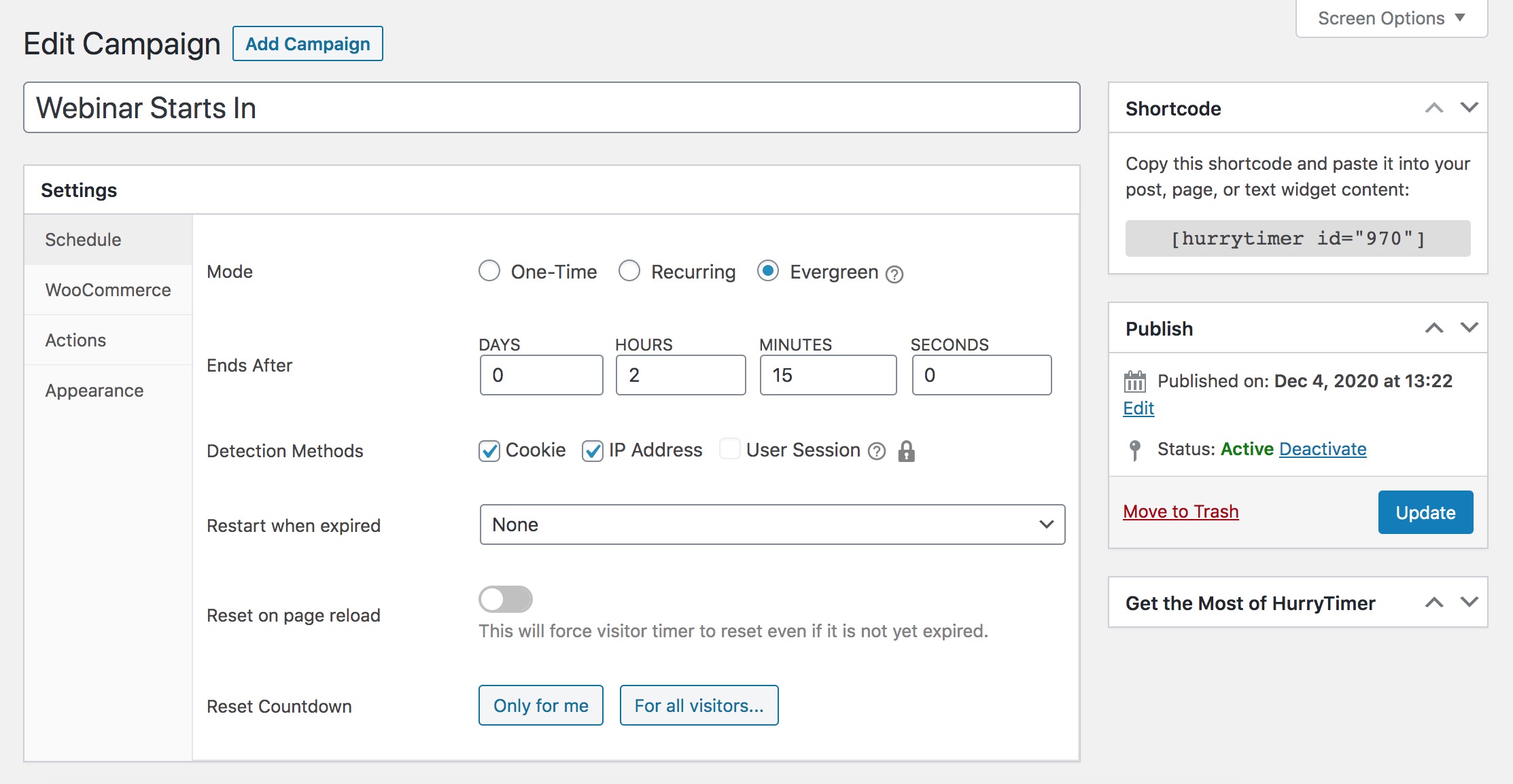
"Evergreen" mode settings.
HurryTimer is a flexible and lightweight plugin that lets you create smart countdown timers to add urgency and scarcity that drives clicks, increases sales, and highlights upcoming events or deadlines.
Easily create:
- Evergreen timers personalized for each visitor
- One-time fixed-date timers for global deadlines
- Recurring timers (PRO) for repeating daily deals, shipping cutoffs, and more
Works with any theme and all major page builders like Elementor, Divi, Beaver Builder, WPBakery, and Gutenberg.
Whether you’re running flash sales, promoting an event, or adding urgency to WooCommerce products, HurryTimer helps increase engagement and conversions — no coding required.
✅ FREE FEATURES
🔁 Evergreen Countdown Timers
Each visitor sees their own unique countdown, no matter when they visit.
Great for evergreen sales funnels and personalized campaigns.
Tracking methods:
– Cookie-based
– IP-based
📅 One-Time Countdown Timers
Set a shared deadline for everyone — between a start and end date.
Perfect for:
– Black Friday sales
– Webinar registrations
– Product launches
⚙️ Expiry Actions
Decide what happens when the timer reaches zero:
– Hide the timer
– Show a custom message
– Redirect to a URL
🛒 WooCommerce Integration
Automatically show countdown timers on product pages and control actions when time expires:
– Hide the “Add to Cart” button
🎨 Live Timer Styling
Customize timer appearance in real time:
– Edit labels (Days, Hours, Minutes, Seconds)
– Set custom colors, spacing, and more
– Add a CTA button
➕ More Free Features
- Auto-restart timer (on revisit or immediately)
- Display one timer multiple times per page
🚀 PRO Features
In addition to all features in Lite, HurryTimer Pro provides access to many other powerful features:
🔁 Recurring Countdown Timers
Recurring timers are countdowns that automatically reset and start again based on a defined schedule.
Unlike one-time timers that expire once, recurring timers repeat continuously on intervals you set, such as:
– Every minute
– Every hour
– Every day
– Every week
– Every month
What is it used for?
Recurring timers are perfect for campaigns and offers that happen regularly and need to restart without manual intervention. Examples include:
– Daily flash sales that reset every 24 hours
– Hourly countdowns for limited-time product availability
– Weekly shipping cut-off reminders (“Order before Friday 5 PM”)
– Monthly promotions that recur on specific dates
This feature helps create a persistent sense of urgency while automating timer resets to match your marketing calendar or business rules.
🎟️ Expire WooCommerce Coupons
Set a timer to automatically deactivate specific WooCommerce coupon codes.
Great for:
– Time-limited discounts
– Flash sales
– Cart recovery offers
📌 Sticky Countdown Bar
Display a fixed countdown timer at the top or bottom of the screen.
Visible across all pages or specific pages only.
Boosts visibility and urgency during active promotions.
⏰ Custom Timezone
Set a specific timezone for fixed-date and recurring timers instead of server timezone.
Ensures countdowns align perfectly with your intended audience’s local time.
🔄 Restart Evergreen Timers After Specific Time
Allows you to set a waiting period before the evergreen timer restarts for the same visitor.
For example, you can make the timer pause for 24 hours after expiring before showing a fresh countdown again.
This controls how often returning visitors see a new urgency window, preventing constant restarts.
🌍 Ends Evergreen Timer at User’s Local Time
Instead of ending the timer after a fixed duration from the first visit, this option makes the evergreen countdown expire at a specific time of day in the visitor’s own local timezone.
For example:
– The timer always ends at midnight local time for each visitor, regardless of when they started the countdown.
This creates urgency synced to each user’s day cycle, making offers feel more natural and timely worldwide.
➕ Multiple Expiry Actions
Trigger more than one action when a timer ends, such as hide timer + show message.
🎨 Advanced Design Controls
Unlock extra customization options and inject custom CSS per timer.
Create visually consistent timers that match your site branding.
🧑💼 Priority Support
Get fast, dedicated support via email or chat.
Usage
- Visit “HurryTimer > Add New Timer”.
- Choose between Evergreen, and One-time.
- Enter a period for “Evergreen” mode, or select a date and time for “One-Time” mode.
- Click on “Publish”.
- Copy shortCode and paste it into your post, page, or text widget content. You can also go to “WooCommerce” tab to integrate the countdown timer directly within a product page.
To learn more, check out HurryTimer documention.
Bug reports
If you noticed any bug, please post it on the support forum.
Further reading
For more info check out the following:
- The HurryTimer Plugin official homepage.
- Documention.
- Follow HurryTimer on Twitter.
Explore Our Other plugins:
- Smart Image Resize – Make all your WooCommerce product images the same size automatically — no manual work, no inconsistent layouts.
- ReThumbify – Regenerate thumbnails in the background with features like pause/resume, selective regeneration, cleanup of old or unused thumbnails, and more.