
HTML Page Sitemap
by Angelo Mandato on WordPress.org
Adds an HTML (Not XML) sitemap of your pages (not posts) by entering the shortcode [html_sitemap], perfect for those who use WordPress as a CMS.
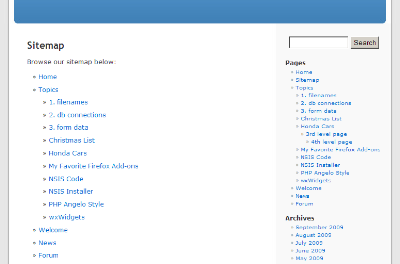
HTML Page Sitemap in the Default WordPress theme.
This simple plugin adds an HTML (Not XML) sitemap of your pages (not posts) by using the shortcode [html_sitemap]. This plugin can display a sitemap with specific depths, from a specific parent page and include/exclude specific pages by ID. The sitemap uses the unordered HTML list tags .
Shortcode attributes include sort_column, sort_order, exclude, include, depth, child_of, meta_key, meta_value, authors, number, offset, post_type, and post_status parameters from the wp_list_pages function. In addition you can also set class, id, and ordered_list_type to further customize the html page sitemap.
This plugin is perfect for those who use WordPress as a CMS.
Shortcode Tag Attribute Options
The following wp_list_pages tag attribute options are supported:
authors— Comma-separated list of author IDs. Default empty (all authors).child_of— ID of child page, ‘CURRENT’, or ‘PARENT’. The value ‘CURRENT’ will use the current page ID. The value ‘PARENT’ will use the current page parent ID.depth— -1 (any depth), 0 (all pages), 1 (top-level pages only), 2 (top-level and 2nd level pages only), etc.date_format— e.g. ‘l, F j, Y’. See WordPress Date Formatexclude— Comma-separated list of page IDs to exclude.include— Comma-separated list of page IDs to include.item_spacing— Whether to preserve whitespace within the menu’s HTML. Accepts ‘preserve’ or ‘discard’.meta_key— Limits output to pages having a specific custom field key.meta_value— Limits output to pages having a specific custom field value.number— Limits the number of links displayed (SQL LIMIT).offset— Skips a specific number of pages before displaying the list.post_type— Post type to query for. Default ‘page’post_status— Comma-separated list or array of post statuses to include. Default ‘publish’show_date— Whether to display the page publish or modified date for each page. Accepts ‘modified’ or any other value. An empty value hides the date.sort_column— Comma-separated list of column names to sort the pages by. Accepts ‘post_author’, ‘post_date’, ‘post_title’, ‘post_name’, ‘post_modified’, ‘post_modified_gmt’, ‘menu_order’, ‘post_parent’, ‘ID’, ‘rand’, or ‘comment_count’. Default ‘post_title’.
Please see documentation for the wp_list_pages function for reference.
In addition the following tag attributes are available exclusively for this plugin:
class— Specify class values for the initial HTML Page Sitemapid— Specify ID values for the initial HTML Page Sitemapordered_list_type— Specify the ordered list type. Accepts ”, ‘1’, ‘A’, ‘a’, ‘I’, and ‘i’. Default empty value will display an unordered list.
The ordered_list_type attribute options in more detail:
ordered_list_type=""— The list items will be unorderedordered_list_type="1"— The list items will be numbered with numbersordered_list_type="A"— The list items will be numbered with uppercase lettersordered_list_type="a"— The list items will be numbered with lowercase lettersordered_list_type="I"— The list items will be numbered with uppercase roman numbersordered_list_type="i"— The list items will be numbered with lowercase roman numbers
Note: This plugin only works with Hierarchical Custom Post Types such as pages. This plugin will not work if your post type is not hierarchical. Not setting an ordered_list_type will use an unordered list (default).
Examples
First example shows how to add a sitemap for the entire site.
[html_sitemap]
Example shortcode will add a sitemap to a page displaying a depth limit of 3 and exclude page ID 708.
[html_sitemap depth=3 exclude=708]
Example shortcode will add a sitemap to a page displaying only children and grandchildren of the current page.
[html_sitemap depth=2 child_of=CURRENT]
Example shortcode will add a sitemap to a page displaying children and grandchildren of the parent page (would include the curent page as well).
[html_sitemap depth=2 child_of=PARENT]
Example shortcode will add a sitemap displaying the page modified date with the pages sorted by the menu order number.
[html_sitemap show_date=modified sort_column=menu_order]
Example shortcode excluding multiple pages with ids 708, 1024 and 42.
[html_sitemap exclude="708,1024,42"]
Example shortcode will add a class attribute to the
[html_sitemap class="custom-class"]
Example shortcode will add an id attribute to the
[html_sitemap id="custom-element-id"]
Example shortcode will display an ordered list using lowercase letters with a depth of 1.
[html_sitemap ordered_list_type="a" depth=1]
Example shortcode with roman numbering in capitalization, with custom field “featured-list” and custom value “yes”
[html_sitemap ordered_list_type="I" meta_key=featured-list meta_value=yes sort_column=post_date]
For the latest information visit the website.
http://www.pluginspodcast.com/plugins/html-page-sitemap/
Contributors
Angelo Mandato, founder of Painless Analytics and FrontPup – Plugin author