
Happy Coders Multi Address for WooCommerce
by Happy Coders on WordPress.org
Allow logged-in WooCommerce customers to manage multiple addresses in an address book and select them easily during checkout.
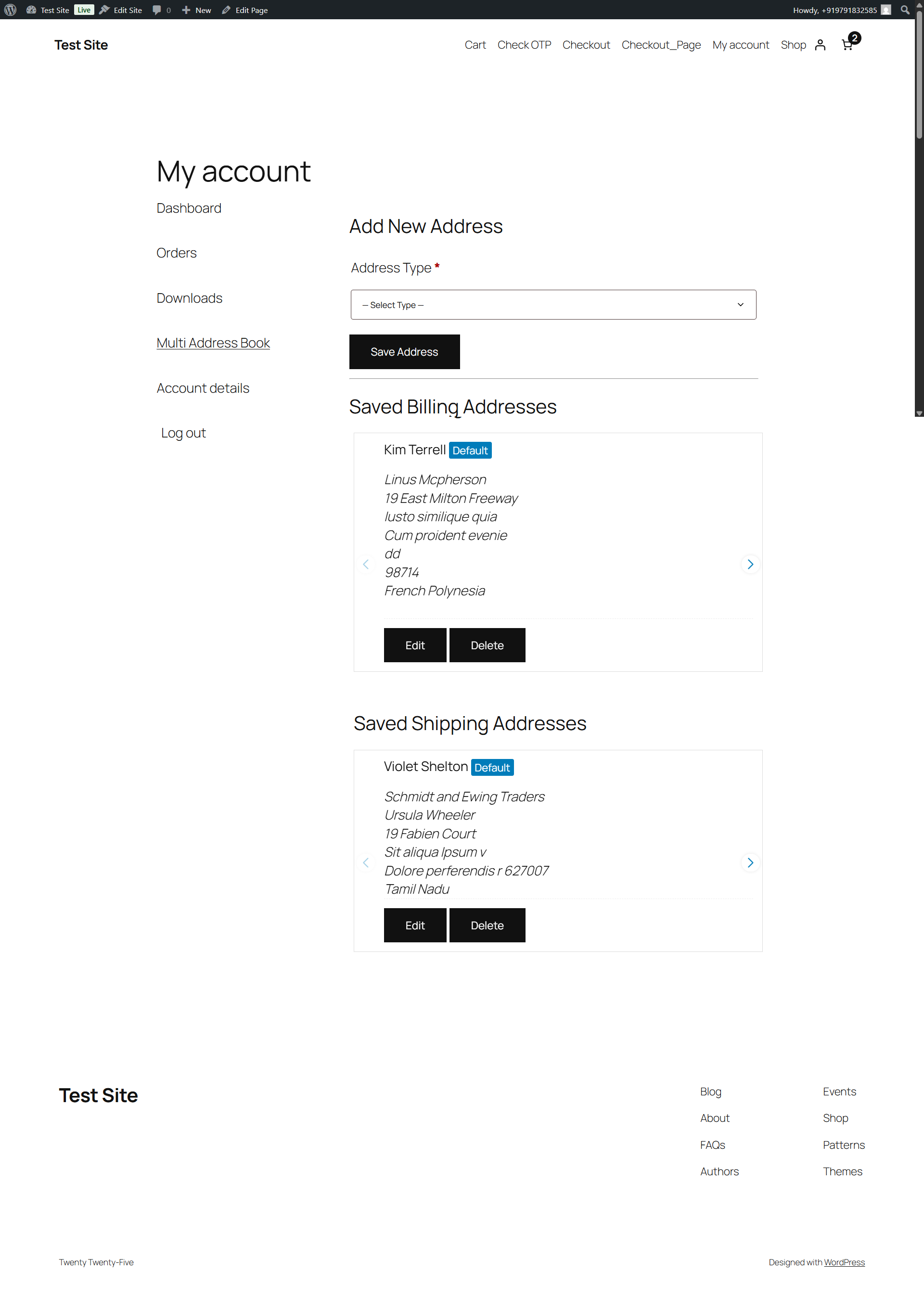
The "Multi Address Book" section in the My Account page showing saved addresses.
Tired of customers having to re-type addresses for different shipping locations or billing details? HappyCoders Multiple Addresses for WooCommerce enhances the WooCommerce “My Account” area and Checkout process by providing a robust address book feature.
Logged-in customers can save multiple billing and shipping addresses, give them nicknames for easy recognition (like “Home”, “Work”, “Parents’ House”), set defaults, and edit or delete addresses as needed.
During checkout, customers can quickly select from their saved addresses using a dropdown or list format (configurable by the admin), streamlining the process and reducing errors. This plugin integrates with both the Classic WooCommerce Checkout (using the [woocommerce_checkout] shortcode) and the modern Block-Based Checkout experience.
Key Features:
- Multi Address Book: A dedicated section in the “My Account” page.
- Automatic Import: Seamlessly imports a customer’s existing default WooCommerce address into the address book on their first visit.
- Automatic Saving of New Checkout Addresses: Any new, unique address a customer enters during checkout is automatically saved to their address book and set as the new default for future use.
- Save Multiple Addresses: Customers can save distinct billing and shipping addresses.
- Address Nicknames & Types: Easily label and identify saved addresses with custom nicknames and predefined types (Home, Work, Other).
- Set Default Addresses: Designate default billing and shipping addresses.
- Easy Editing/Deletion: Customers can manage their saved addresses.
- Checkout Selection: Choose saved addresses directly on the checkout page.
- Admin option for Dropdown or Radio List display.
- Admin option to allow/disallow entering a brand new address at checkout.
- Address Limits: Admin can set maximum number of billing/shipping addresses per user.
- Customizable Menu Text: Admin can change the “Multi Address Book” menu item text.
- Auto-Default New Address: Newly added addresses automatically become the default.
- Classic & Block Checkout Integration: Works with both checkout types.
- Classic: Uses standard WooCommerce hooks.
- Block: Uses modern JavaScript integration with the WooCommerce Blocks API (
registerCheckoutBlock).
- Multisite Compatible: Includes support for Multisite installations, ensuring endpoints and functionality work correctly across the network.
- My Account Address Display Style: Admin can choose to display saved addresses in the “My Account” page as a carousel or a list.
Building from Source
This plugin uses modern JavaScript tools for development. The source code is included for transparency and to allow developers to contribute or modify the code. You do not need to follow these steps to use the plugin; the pre-built files are included.
If you wish to modify the JavaScript or CSS source files (/src directory), you will need to have Node.js and npm installed on your machine.
-
Navigate to the Plugin Directory:
Open your terminal and navigate to the plugin’s root directory:
cd path/to/wp-content/plugins/happycoders-multiple-addresses/ -
Install Dependencies:
Run the following command to install the necessary development packages listed inpackage.json:
npm install -
Build for Production:
To compile and minify the source files for a production environment, run:
npm run build
This will generate the final JavaScript and CSS files in the/builddirectory. -
Run in Development Mode:
For active development, use this command to watch for changes in the/srcdirectory and automatically re-compile the files:
npm run start
The source files for the block integration can be found in the /src directory.