
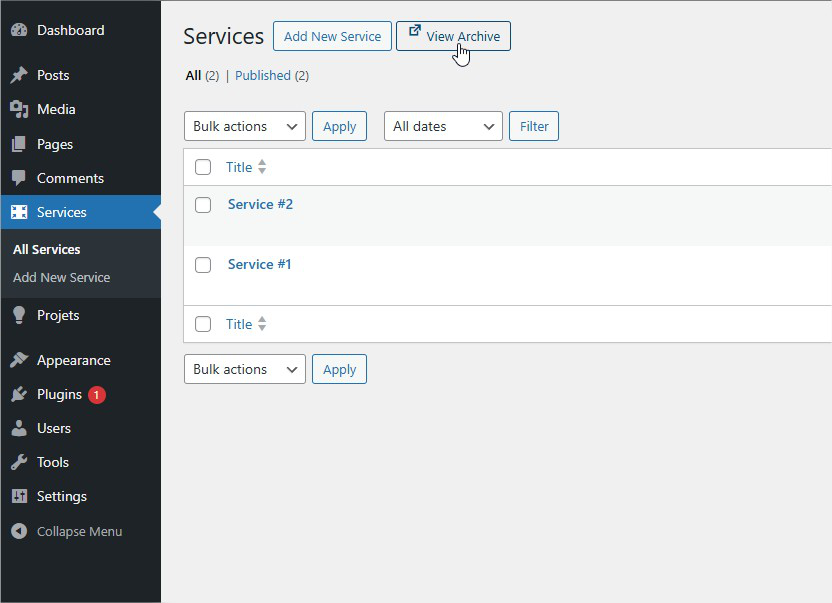
The "View Archive" button appears next to "Add New" on post type screens
Handy Archive Link is a simple yet powerful WordPress plugin that adds a “View Archive” button to your admin screens, making it incredibly easy to preview archive pages without having to remember URLs or navigate away from your workflow.
Key Features
- One-Click Archive Access – View archive pages directly from post type list screens
- Smart Detection – Only shows the button when an archive page exists
- Customizable Settings – Choose your preferred icon, icon position, open behavior, and disable for specific post types
- Automatic Management – Intelligently handles the default Posts type based on your Reading settings
- Developer-Friendly – Includes filters for advanced customization
- Lightweight – No bloat, just the essentials
- Translation Ready – Fully translatable
Perfect For
- Content managers who frequently preview archives
- Developers building custom post types
- Anyone who wants faster WordPress admin navigation
- Sites with multiple custom post types
How It Works
Once activated, Handy Archive Link automatically adds a “View Archive” button next to the “Add New” button on all public post types with archives enabled.
The plugin intelligently detects:
* Whether a post type has has_archive enabled
* If a “Posts page” is set in Settings > Reading (for default Posts)
* Automatically disables the button for Posts if no posts page is configured
No configuration needed – it just works! But if you want to customize, head to Settings > Handy Archive Link.
Customization Options
Open in New Tab
Choose whether archive links open in a new browser tab or the same window.
Button Icon
Select from 5 different icons:
* External Link (default)
* Eye
* Link
* Archive
* Portfolio
Icon Position
Choose whether the icon appears before or after the button text for a personalized look that matches your workflow.
Disabled Post Types
Choose which post types should NOT display the “View Archive” button. Note: The default “Posts” type is automatically disabled if no posts page is configured in Settings > Reading.
Developer Features
Handy Archive Link includes filters for developers who need advanced control:
Post Type Filters:
* handy_archive_link_show – Control button visibility per post type
* handy_archive_link_url – Modify archive URL per post type
Example usage:
// Hide button for specific post type
add_filter('handy_archive_link_show', function($show, $post_type) {
    if ($post_type === 'my_cpt') {
        return false;
    }
    return $show;
}, 10, 2);

// Custom archive URL
add_filter('handy_archive_link_url', function($url, $post_type) {
    if ($post_type === 'product') {
        return home_url('/shop/');
    }
    return $url;
}, 10, 2);

// Conditional logic based on user role
add_filter('handy_archive_link_show', function($show, $post_type) {
    if ($post_type === 'product' && !current_user_can('manage_woocommerce')) {
        return false;
    }
    return $show;
}, 10, 2);
Compatibility
Works seamlessly with:
* Custom post types created by any plugin (ACF, Metabox, Pods, Toolset, etc.)
* Any theme
* Multisite installations
* Page builders
Translations
Handy Archive Link is translation-ready and includes:
* English (en_US) – Default
* French (fr_FR) – Français
Support
For support, feature requests, or bug reports:
* Visit the support forum
* Open an issue on GitHub