GS Books Showcase – Display Books in Grid, Slider & More | Library for WordPress
by GS Plugins on WordPress.org
Showcase your books in Grid, Slider, Filter & Flip layouts. GS Books Showcase is the ultimate book library plugin for WordPress.
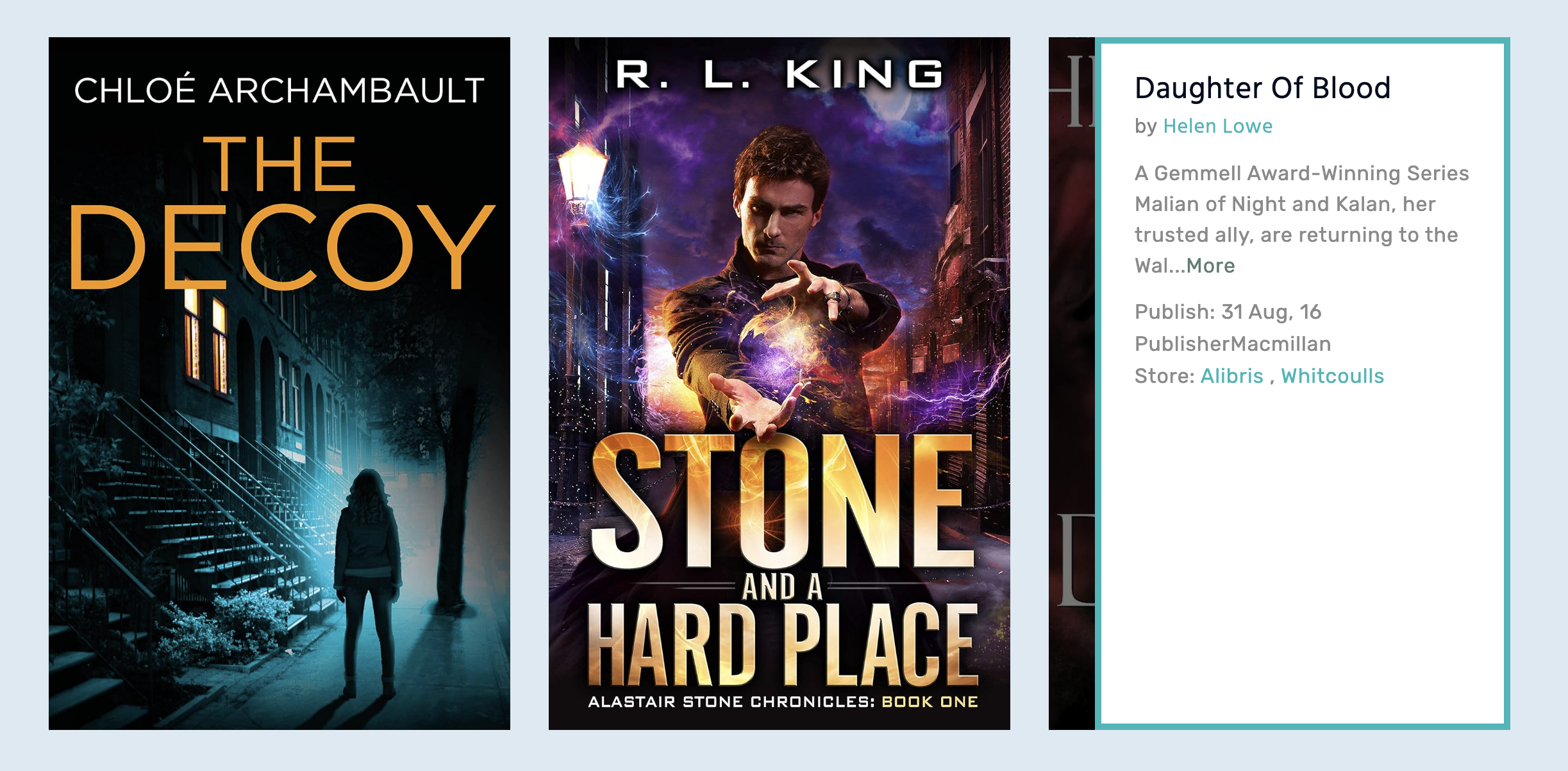
Grid Style with Hover.
GS Books Showcase is the ultimate responsive WordPress plugin for elegantly displaying comprehensive book details. Whether you’re featuring physical books or eBooks, it highlights everything from the cover, author, and publisher to reviews, ratings, translator, ISBN, ASIN, page count, country, language, dimensions, file size, and even the author’s biography.
Packed with flexible customization options and various beautifully designed themes, this plugin makes it easy to create a visually compelling book showcase. Simple yet powerful, GS Books Showcase turns your WordPress site into a polished, book-focused experience.
🎬 Live Demo ⬆️ Upgrade to PRO 📚 Documentation 🙋♂️ Support
Why Choose the GS Book Showcase?
You should choose GS Books Showcase to transform your book collection into a powerful digital library. With dynamic themes, intuitive customization, and seamless shortcode and widget integration, this Books Plugin WordPress users love delivers a visually stunning, user-friendly experience that enhances your WordPress Books Gallery effortlessly.
What makes the Books Showcase stand out?
- Professional & Polished Look: Give your website a refined, bookstore-ready appearance with a sleek book showcase. Perfect for authors, publishers, and book lovers.
- Easy-to-Use & Customizable: No coding is required! Manage and display your books with an intuitive interface, offering flexible customization for all skill levels.
- Multiple Display Styles: From grid, list, slider, table, and more – choose the perfect layout to match your website’s style and captivate your audience.
- Visually Engaging Designs: Dynamic layouts and stylish customization options ensure your book collection looks modern, eye-catching, and professional.
Comprehensive Plugin Features
Unlock a world of possibilities with the GS Book Showcase – packed with powerful features to display your books beautifully! 🚀
- 30+ Designs: Choose from layout options like Grid, Horizontal, Flip, Slider, and Filter.
- Versatile Link Options: Link Books to a Single Book Page or Popup.
- Design Variety: 4 modern design options for a Single book Page, 3 modern design options for an author page, 4 modern design options For Popup.
- Theme Flexibility: Switch seamlessly between Grid, Slider, or Filter themes.
- Multilingual Support: Compatible with multiple languages.
- Bulk Import: Adding Book data efficiently from CSV files using the import feature.
- Flexible Query Options: Filter Books by location, specialty, language, and gender.
- Page Builder Compatibility: Integrates with popular page builders.
- Drag-and-Drop Order: Easily arrange Books and book groups with a drag-and-drop interface.
- Group Display: Showcase Books by group or other taxonomies like Categories, tags,
- Instant Search: Quick searches by book name.
- Filter Options: You can filter by categories, tags, ISBN, ASIN, genre, language, country, author, series, and publisher’s specialty.
- Reset Filters: A convenient reset button for filters.
- Multi-Select Filter: Choose multiple filter options simultaneously.
- Multi-Select Ellipsis: Use ellipsis to represent multi-selected values.
- Show/Hide All Filter Button: Toggle the All Filter button’s visibility.
- Pagination: Number pagination for smooth navigation.
- Social Media Integration: Repeatable social media link meta boxes for each Author’s social profiles.
- Custom CSS: Inject custom CSS for personalization.
- Dummy Data Management: Import or delete dummy data.
- Shortcode Management: Edit, clone, duplicate, or delete Shortcodes easily.
- Multiple Shortcodes: Use multiple Shortcodes on the same page.
- URL Flush: Avoid 404 errors with a URL flush after installation or slug update.
- Optimized Performance: Swift loading for better user experience.
- Conditional Script Loading: Load scripts only where needed.
- Localization Input Fields: Replace texts for localization easily.
- Responsive Design: Compatible with various devices.
- Theme Compatibility: Works with any standard WordPress theme.
- Unlimited Books: Add unlimited Books.
- Developer-Friendly: Easy customization options for developers.
- Browser Compatibility: Supported across all modern browsers.
- SEO Boost: Enhance SEO with schema.org markup.
- W3C Valid Markup: Adheres to W3C standards.
- Flexible Output: Showcase your Books anywhere with Shortcodes.
- User-Friendly Setup: Easy to set up with a user-friendly interface.
- RTL Support: Upcoming.
- Continuous Updates: Stay updated with new features and improvements.
Available fields to add Books
- Book Name: Enter the full name.
- Book Description: Provide a Book summary.
- Book Cover Image: Upload the cover image.
- Published On: Enter the publication date.
- Co-Publisher: Enter the co-publisher’s name.
- Translator: Enter the translator’s name.
- ISBN 10: Enter the 10-digit ISBN.
- ISBN 13: Enter the 13-digit ISBN.
- ASIN: Enter the Amazon Standard Identification Number.
- DOI: Enter the Digital Object Identifier.
- LLCN: Enter the Library of Congress Control Number.
- Total Pages/Length: Enter the total number of pages or length.
- Book Dimensions: Enter the physical dimensions of the book.
- Weight: Enter the weight of the book.
- File Size (if e-book): Enter the file size for the e-book version.
- Download URL (for e-book): Enter the URL for the e-book version.
- Book Cover Variation: Upload any alternative cover images.
- Price: Enter the price of the book.
- Book Availability: Indicate the current availability status.
- Pre-Order Availability: Indicate available books for pre-order.
- Age Group: Specify the target age group for readers.
- Reading Level: Specify the recommended reading level.
- Edition: Enter the edition information.
- Book Edition Features: List any unique features of this edition.
- Awards and Recognitions: List any awards or recognitions.
- Reading Time: Provide an estimated reading time.
- Accessibility Features: List any features that enhance accessibility.
- Readers’ Rating: Provide the readers’ evaluation.
- Review: Provide a review or summary of reviews.
- Book Short Description: Provide a concise description.
- Book Gallery: Upload or link to additional images.
- Bookstores: List the stores or platforms.
- Book Formats: List all available formats.
Available Icons For Book Author’s Profile
Linkedin, Facebook, Twitter/X, Google+, Youtube, Vimeo, Instagram, Dribbble, Behance, Pinterest, Flickr, Stumbleupon, Delicious, Reddit, VK, Vine, Github, Stack Overflow, Soundcloud, Envelope/Email, Link/Website, Skype, Whatsapp, Dropbox, WordPress, Tumblr, Foursquare, Xing, Lastfm, Hacker News, Yahoo, Trello, Steam, Deviantart, Feed, Renren, Spotify, twitch, Digg, SlideShare, Bandcamp, Map Maker & Map Pin.
– Now available: 470 Social & Brand Icons.
General Settings
Start by navigating to GS Book Showcase > Shortcode. Here, you can create a new shortcode or edit an existing one. Once inside, you’ll land on the General Settings page.
- Shortcode Name: Give your shortcode a unique identifier.
- Style & Theming: Choose a theme from Style 01, Horizontal, Flip, 3D Style, Widget 01 (Especially For the Sidebar or Footer Section), and Author Style (Only For The Book’s Author).
- Columns: Control the number of columns for Desktop, Tablet, Portrait Mobile, and Mobile (ranging from 1 to 6 columns).
- View Type: Select a view type like grid, slider, or filter.
- Enable Carousel: Switch the Slider between Grid/Slider/Filter to unlock features across 22 new templates in Grid, 3D Style, Horizontal, and Flip.
- Carousel Settings (when the view type is a carousel):
- Move Items: Set the number of items to move (1 to 6).
- Slides Speed: Duration of transition between slides (in milliseconds).
- Infinite Loop: Enable/Disable looping through slides.
- Reverse Direction: Reverse the direction of carousel navigation.
- Autoplay: Enable/Disable automatic slide change.
- Delay: Set the autoplay delay in milliseconds. The default is 2000 ms.
- Stop On Hover: Pause autoplay on hover. The default is Off.
- Enable Filter: Enable filter for this theme; it may not be available for certain themes.
- Link Books: Toggle the link for a Book’s name, description, and image to either display a popup or navigate to a single member page.
- Link Type Selection:
- Single Page: It directs to an individual Book’s dedicated page.
- Popup: Displays Book details in a popup upon clicking.
- Show/Hide controls for:
- Book Name.
- Book Details.
- Book Store.
- Book Author.
- Pagination.
- Book Publish Date.
- Book Publisher.
- Details Control: Set the maximum number of characters for the Book Details Control.
- Filter Settings (When Enabled Filter):
- Instant Search by Name: Show or Hide Instant Search.
- Filter by ISBN: Show or Hide Filter by ISBN.
- Filter by ASIN: Show or Hide Filter by ASIN.
- Filter by Genres: Show or Hide Filter by Genres.
- Filter by Languages: Show or Hide Filter by Languages.
- Filter by Tags: Show or Hide Filter by Tags.
- Filter by Categories: Show or Hide Filter by Categories.
- Filter by Series: Show or Hide Filter by Series.
- Filter by Publishers: Show or Hide Filter by Publishers.
- Reset Filters Button: Enable the Reset all filters button in filter themes. The Default is Off.
- Enable Multi Select: Enable multi-selection on the filters; Default is Off.
- Enable ‘All’ Filter: Enable the All filter in the filter templates; Default is On.
- Enable Child Filters: Enable child group filters; Default is Off.
- ‘Show All’ Filter Text: Set your preferred text instead of Show All.
- Filter Category Position: (Left, Center, Right)
- Dynamic Preview: As you customize settings on the left, the right area displays a real-time preview.
Style Settings
Easily Customize Your Book Showcase Display:
Navigate to GS Book Showcase > Shortcode to begin your customization. Create a new shortcode or edit an existing one. Then, proceed to the 2nd tab labeled Style Settings.
- Image Filter: Explore a diverse collection of 9 image filter styles, including blur, contrast adjustments, and inversion, to enhance your visuals. Apply these effects in both normal and hover states for dynamic interactions.
- Book Name: Customize the font size, weight, style, and color of the book names.
- Book Details Text Alignment: Choose the text alignment for your book details – left-aligned, right-aligned, or centered.
- For Slider View Type:
- Enable Slider Navs: Toggle navigation arrows on the slider .
- Enable Slider Dots: Toggle navigation dots for the Slider.
- Slider Navs Style: Choose from One / Two / Three styles for carousel navigation arrows. (Total 10 Nav Styles)
- Slider Dots Style: Choose from One / Two / Three styles for navigation dots. (Total 10 Dot Style)
- For Filter View Type:
- Filter Tab Style: We offer 10 unique filter tab styles, giving you a wide selection to enhance your design. You are welcome to use any style that fits your vision.
- Thumbnail Sizes: Select the book image size (thumbnail, medium, large, or others ).
Query Settings
Navigate to GS Book Showcase > Shortcode. Create or edit a shortcode, then go to the Query Settings tab.
- Books: Set max Books to display. Default -1 shows all.
- Order:
- DESC: Descending order.
- ASC: Ascending order.
- Order By:
- Date: Sort by creation date.
- Book ID: Sort by ID.
- Book Name: Sort alphabetically.
- Random: Display randomly.
- Custom Order: Define specific order.
- Group Order:
- ASC: Ascending (A-Z).
- DESC: Descending (Z-A).
- Group Order By:
- Custom Order: Arrange by Drag & Drop.
- Group ID: Order by IDs.
- Group Name: Sort alphabetically.
- Include Group: Include Categories/Tags from a group.
- Exclude Group: Exclude Categories/Tags from a group.
Preference ( Global Settings)
Navigate to GS Books Showcase > Shortcode and select Preferences.
- Book Single: Choose from styles like Style One to Four. We’ve designed four templates for different single-page designs for books.
- Author Single: We have created three templates specifically for the Author Single design. You can use anyone.
- Link Target: Set where links open; defaults to ‘New Tab’.
- Currency: Display book prices in various currencies to facilitate easy browsing and purchasing for a global audience.
- Include fields when searching: Enable searching through all fields.
- Store: Redirect users to any e-commerce site with a clickable image or button, making book purchases seamless!
- Custom CSS: For users who desire ultimate flexibility in design, the Custom CSS option provides direct access to styling.
Localization
Customize text for specific elements with preferred alternatives.
- Author: Text for the author label.
- Publish: Text for the publication date.
- Co Publisher: Label for co-publisher information.
- Translator: Label for the translator field.
- Format: Text for the book format.
- ISBN: Label for the ISBN field.
- ASIN: Text for the ASIN field.
- Pages: Text for the total pages field.
- Country: Label for the country of publication.
- Language: Text for the language field.
- Dimension: Label for book dimensions.
- File Size (e-book): Text for the file size field for e-books.
- Reader’s Review: Label for the reader’s review section.
- Rating: Text for the rating field.
- Store: Label for the store section.
- Description: Text for the book description.
- Author Details: Label for the author’s detailed page.
- Book Details: Text for the book’s detailed page.
- Download: Label for e-book download links.
- Show All Publisher: Text for the “Show All Publisher” filter.
- Search By Book Name: Text for the search input.
- Select Book Name: Placeholder text for selecting a book name.
Page Builder Support
- Gutenberg.
- Elementor.
- WPBakery.
- Divi Builders.
Multilingual Support
- WPML
- Loco Translate
GS Books Showcase’s Shortcode Usage
Basic Usage –
Choose a theme, view type, and other parameters to customize your display. The shortcode will be generated with an ID, like [gs_bookshowcase id=1]
[gs_bookshowcase id=2]
Shortcode PHP Usage
Documentation
If you have any questions regarding the WordPress Books Gallery plugin and how to work with it, We recommend referring to our comprehensive online documentation. It provides detailed information and instructions to assist you in navigating and utilizing the plugin effectively. You can find the Documentation here.
Quick Support & Bug Reporting
If you encounter any problems or discover bugs, please post them in our Support channel. We aim to respond as soon as possible (excluding holidays).
Pro users are requested to contact our support channel for dedicated assistance.
🙋♂️ Alternatively, you can reach out to us through our Support or WordPress.org support forum.
Development Team
Crafted and Developed with Passion by GS Plugins