Gravity Forms + Custom Post Types
by Dave from Gravity Wiz on WordPress.org
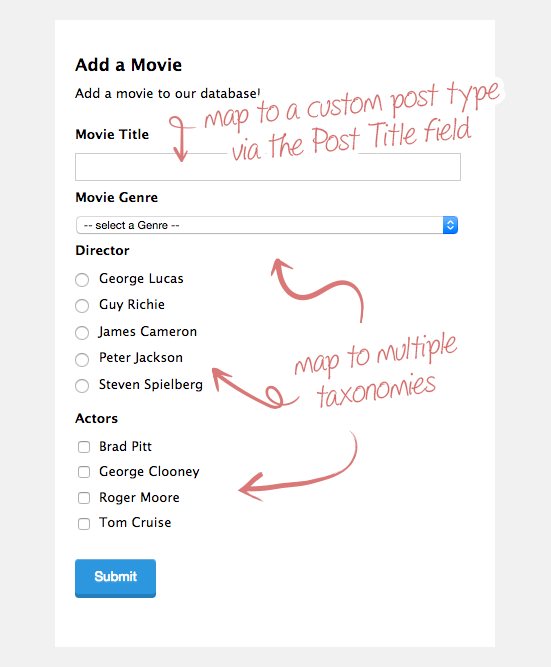
Frontend: Example of mapping to a custom post type and multiple taxonomies
This plugin is an add-on for Gravity Forms. Make sure you visit GravityWiz.com for more free Gravity Forms resources. And if you’re looking to the largest collection of Gravity Forms plugins, check out Gravity Perks.
Gravity Forms allows you to create posts from a form submission using special Post Fields. By default, the submitted form will be created as a standard WordPress post. This plugin allows you to change the post type of the generated post. No code required! This plugin also provides the ability to assign the generated post to a custom taxonomy.
Need to update posts? Learn how to update posts with Gravity Forms.
Features
- Map posts to a custom post type
- Map posts to a custom taxonomy (via Drop Down, Multi-select, Radio Button or Checkbox field)
- Map posts to multiple taxonomies
- Visual hierarchy support for hierarchical taxonomies (Drop Down field only)
- Populate a Drop Down with posts
- Assign parent post for generated post (Drop Down field only)
- Single Line Text field support for taxonomies (enter as a comma-delimited list: term a, term b, term c)
- Enhanced UI support for Single Line Text fields (see screenshots)
How to map a form to a custom post type
- Add a Post Title field to your form and click on it to open the field settings.
- Below the “Description” field setting, you will find the “Post Type” setting.
- Select the desired post type from the drop down (default is “Posts”).
How to link a field to a custom taxonomy
- Add the desired field to which the custom taxonomy should be mapped. Drop Down, Multi Select, Radio Buttons and Checkboxes fields are current supported.
- Open the field settings by clicking on the field and click on the “Advanced” tab.
- Check the “Populate with a Taxonomy” checkbox.
- Select the desired taxonomy from the drop down that appears.
How to link the saved post to taxonomies using a single line text field
Single Line Text fields are a great way to allow users to select existing taxonomy terms and to also add new terms.
- Add a Single Line Text field to your form.
- Open the field settings by clicking on the field and click on the “Advanced” tab.
- Check the “Save to Taxonomy” checkbox.
- Select the desired taxonomy from the drop down that appears.
- (optional) Check the “Enable Enhanced UI” checkbox to enable an awesome tag-input style UI (see screenshots).
Note: If the user inputs exising term names, the generated post will be assigned these terms. If the user inputs term names that do not exist, these terms will be added to the selected taxonomy and the generated post will also be assigned these terms.
How to set a parent post with the drop down field
When populating a Drop Down field with a post type, you may wish to set the selected post as the parent post for the generated post.
- Add A Drop Down field to your form.
- Click on the field to open the field settings. Then click on the “Advanced” tab.
- Check the “Populate with Post Type” checkbox.
- Select the desired post type from the drop down that appears. Be sure to select the same post type for which the post is being generated.