
Popup Builder for Block Editor – FooConvert
by FooPlugins on WordPress.org
Build WordPress bars, flyouts, and overlays in the block editor with templates, targeting, triggers, leads, and analytics.
(3)
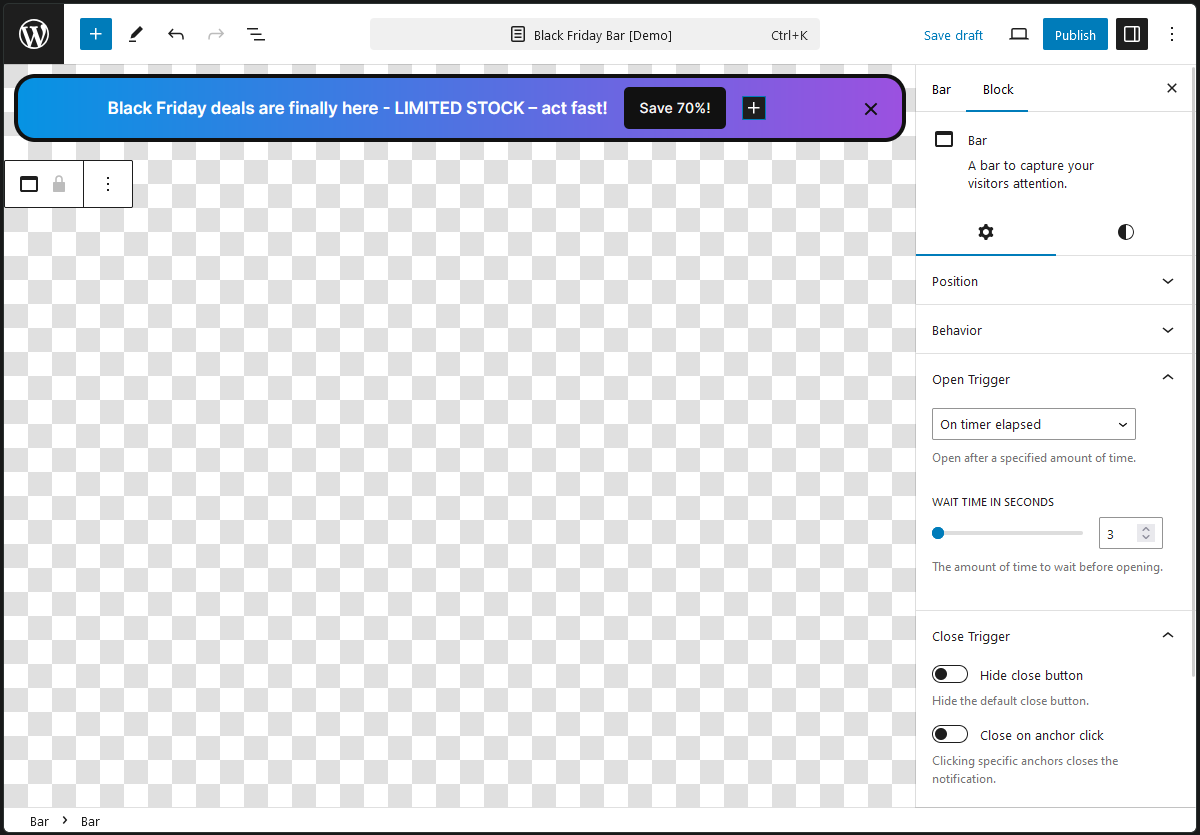
Popup Editor
FooConvert lets you create bars, flyouts, and overlays directly in the WordPress block editor.
It includes popup templates, built-in popup blocks, display rules, open triggers, lead capture, popup stats, and styling controls for building campaigns without leaving wp-admin.
Read the FooConvert documentation
What FooConvert Includes
- Bars, flyouts, and overlays managed from the same workflow
- 15 bundled templates across bars, flyouts, and overlays
- Sign Up, Countdown, and Coupon blocks
- Support for WordPress core blocks, embeds, and shortcodes inside popup content
- Display rules for locations, exclusions, and user targeting
- Triggers for page load, timers, scroll depth, exit intent, and element interactions
- Leads capture with CSV export
- Popup stats with daily activity charts
- Google Fonts support and popup styling controls
Popup Types
Bar: top or bottom announcements, promo strips, newsletter bars, and sticky calls to action.Flyout: slide-in messages and sidebar-style opt-ins that stay visible without taking over the whole screen.Overlay: centered modal popups for forms, announcements, coupon offers, and embedded content.
Building Popup Content
- Use WordPress core blocks and most third-party blocks inside popup content.
- Shortcodes and embedded content are supported inside popups.
Sign Upblock: capture name and email, or run email-only forms, with configurable labels, placeholders, button text, and success behavior.Countdownblock: build evergreen or fixed countdown campaigns with editable labels and optional close-on-expire behavior.Couponblock: show a coupon code with copy-to-clipboard behavior, custom button text, copied message, and optional close-on-copy behavior.
Templates And Design Controls
- Start from one of the 15 bundled templates or build from scratch.
- Adjust colors, spacing, borders, radius, shadows, dimensions, and typography in the editor.
- Add background images to popup designs.
- Choose a global editor background so the editing canvas is easier to work with.
- Register Google Fonts from the settings screen and reuse fonts bundled with templates.
- Build responsive popups for desktop and mobile layouts.
Display Rules
- Show popups on the entire site, front page, blog index, search results, no-results pages, and 404 pages.
- Target specific posts, pages, public custom post types, public taxonomies, and post type archives.
- Add exclusions so a popup appears only where it makes sense.
- Target all users, only logged-in users, only logged-out users, or specific user roles.
Open Triggers
- Open on page load.
- Open after a timer elapses.
- Open after a visitor scrolls a chosen percentage of the page.
- Open on exit intent.
- Open when an anchor is clicked.
- Open when an anchor becomes visible.
- Open when a selected element is clicked.
Leads And Popup Stats
- View captured leads from the built-in Leads screen in wp-admin.
- Search, sort, bulk delete, and export selected leads to CSV.
- View per-popup stats including views, unique visitors, engagements, and daily activity charts.
- Open popup stats directly from the popup list table.
- Popup analytics data is retained for 14 days by default.
Settings And Admin Tools
- Add demo content to see example bars, flyouts, and overlays on a real site.
- Choose the popup editor background for all popup types.
- Enable debug mode when troubleshooting an issue.
- Hide selected dashboard panels or promo messages if you want a cleaner admin area.
- Review database stats and remove old or orphaned event data.
- Copy system information when contacting support.
Typical Use Cases
- Newsletter signup bar on the homepage.
- Coupon or limited-time offer overlay.
- Slide-in lead magnet or content upgrade.
- Announcement bar for site-wide notices.
- Embedded video or shortcode-based popup content.
Pro Version
The Pro version adds WooCommerce-specific targeting, extra store blocks, revenue attribution, and A/B testing. FooConvert works on its own and includes all features listed above.
Repository
The source code for this plugin is available publicly on GitHub here.
Active installations10+
Weekly downloads
23+35.29%
Version2.0.0
Last updated4/20/2026
WordPress version6.5
Tested up to7.0
PHP version7.4
Tags
barsconversionflyoutsmarketingpopups


