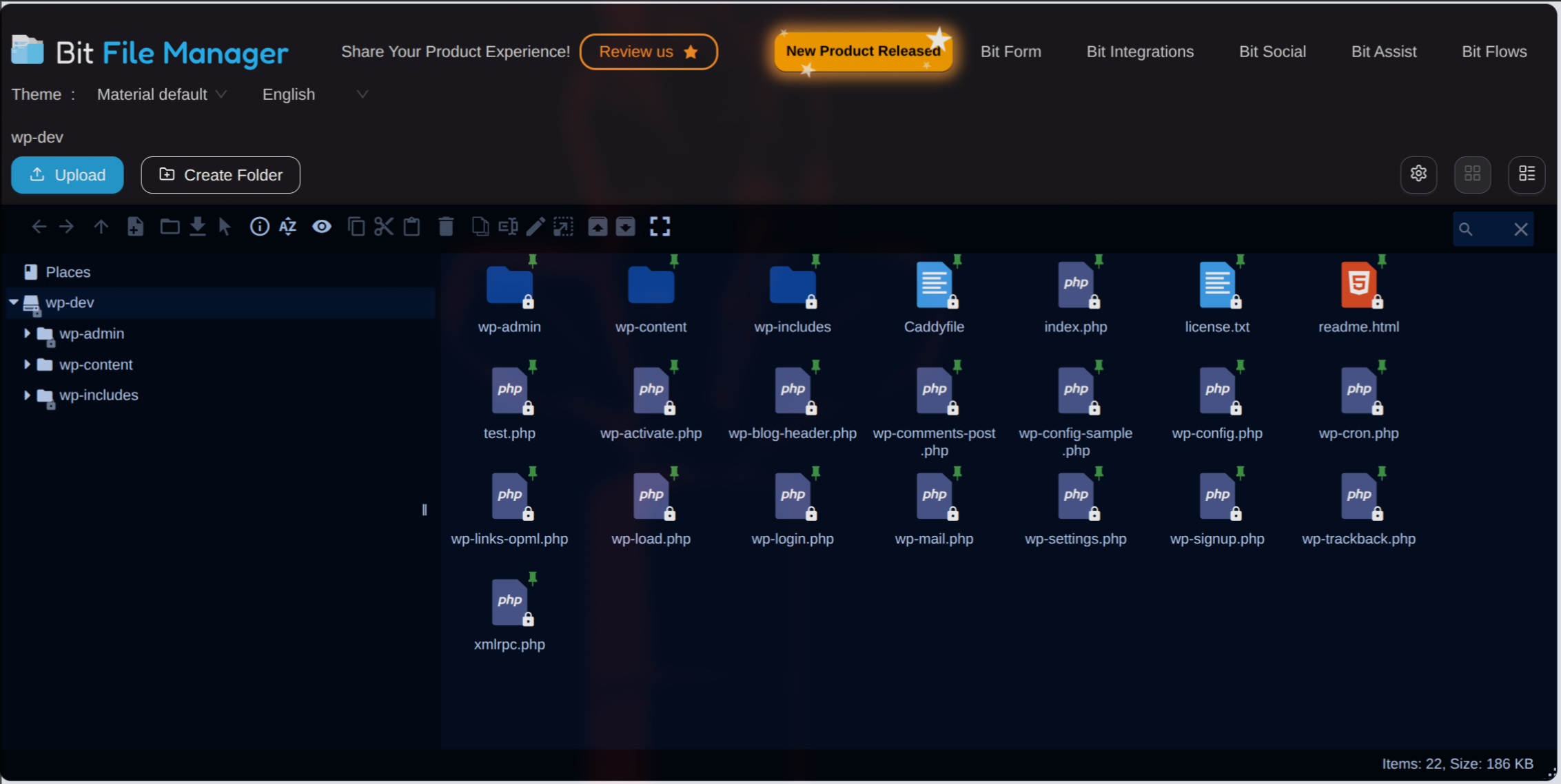
Overall View
File Manager lets you manage your WordPress files easily right from your dashboard, no need for FTP or cPanel!
Bit File Manager is an advanced WordPress file management plugin with a built-in code editor. It allows you to edit, upload, delete, move, rename, archive, and extract files and folders right from your WordPress dashboard.
A secure and easy solution for file management and code editing in WordPress without FTP access.
Every operation (copy, paste, rename, etc.) can be done with a few clicks or drag-and-drop, making file management fast. The intuitive and responsive interface ensure that even beginners can manage theme/plugin files, code snippets, and media folders without confusion.
Manage your WordPress files securely. Compress, extract & organize files easily from the WordPress dashboard.
📢 join our community & get updates of our new plugin.
📢 We’re open for freelance work or custom development for this plugin. Reach out to us for more details.
Bit File Manager also smoothly integrates with the WordPress Media Library. Uploaded images, PDFs, and zip files can be added to your media folders automatically. This way, managing media folders and other assets is as easy as working with local files, directly in your site’s dashboard.
🔥Quick Highlights of File Manager Plugin
- Frontend Access: Easily enable the file manager for frontend users.
- Shortcode Support: Add Bit File Manager anywhere on your site using shortcodes.
- Personal User Folder: Each user gets a unique private folder.
- Public User Folder: All users can share a common folder.
- User Role Folder: Shared folders based on user roles.
- User Role Permission: Set permissions for each user role.
- User Permission: Set permissions for individual users.
- File Type Control: Choose what file types can be uploaded/downloaded.
- File Size Control: Set the max file upload size.
- Operation Control: Support and manage 13+ file operations for users and roles.
Key Advantages of File Manager
- Granular Shortcode Support: Place the file manager plugin anywhere on your site.
- User Role Permission: Admins can control who can read, write, edit, delete, upload, download, archive, extract, etc.
- Personal Folder Privacy: Every user’s private folder is only accessible by them.
- Shared Public Folders: Let all users access and share files in a common folder.
- Operation Control: Fine-tune 13+ operations for users/roles to keep your WordPress files safe.
File Manager for WordPress Features Overview
- Comprehensive Operations: Edit, upload, download, delete, copy, move, create folders/files, rename, archive, and extract.
- Code Editor and Code Editor: Edit PHP, JS, CSS, and any text-based files.
- Modern UI: Sleek, light, and user-friendly client UI.
- Drag & Drop: Easily upload files and folders by dragging from your device.
- Multiple Views: Switch between list and icon views.
- FTP & cPanel Alternative: Handle all file management tasks inside WordPress.
- Archive Support: Work with zip, rar, 7z, tar, gzip, bzip2.
- Edit Images and Files: Modify files, including images, without external tools.
- Quicklook & Preview: Instantly preview file contents before downloading.
- Directory Size Calculation: Check directory space usage.
- Media Preview: Preview/play video and audio files.
- Search & Sort: Instantly find and manage files and folders.
- Automatic Media Sync: Media auto-sync to your WordPress Library.
- Trash Folder: Restore deleted files at any time.
- High-performance Backend: Fast and stable for better workflow.
- File Activity Log: Monitor all edits, uploads, and deletions.
- Keyboard Shortcuts: Manage files faster with keyboard shortcuts.
- Bulk Selections: Select multiple files/folders for quick bulk operations.
- Move/Copy with Drag & Drop: Rearrange or duplicate using drag & drop.
- Context Menu & Toolbar: Access advanced features in just a click.
- Image Thumbnails: See quick previews of images for easy management.
- Auto-resize on Upload: Uploaded images are automatically resized.
- UTF-8 Naming Support: Ensures compatible file names/paths.
- Sanitizer: Cleans file/folder names automatically.
- Folder Upload: Upload entire folders in one go.
- Chunked Upload: Upload large files in parts for reliability.
- Direct Upload to Folder: Send files right where you need them.
- Custom Archive Names: Specify archive names during file creation.
- File Browsing History: Track your navigation through folders.
- Fully Responsive: Manage files on desktop, tablet, or phone.
⚡ Bit File Manager Features Deep Dive ⚡
Operations (Edit, Upload, Download, Delete)
Perform all typical file and folder operations: copy, move, upload, create, rename, archive, extract, edit, download, cut, duplicate, paste, delete, and more.
Use-case: Admins can manage plugin files such as Contact Form, LMS, WooCommerce, and more with ease.
User-Friendly UI
The light, clean, and intuitive UI means easy file management for This plugin is simple and easy for everyone. You don’t need any complicated guides.
Drag & Drop
Upload files/folders by dragging from your computer to your site.
Use-case: Instantly edit any file or action hook (like Contact Form) with just a drag-and-drop upload.
List & Icon Views
Switch between list and icon layouts to suit personal admin preferences.
FTP & cPanel Alternative
Manage your files and folders directly in WordPress without extra FTP or cPanel steps.
Supported Archives
Work with all major archive formats: zip, rar, 7z, tar, gzip, bzip2.
Use-case: Easily package any plugin folder (like Contact Form) for debugging or transfer.
Image & File Editing
Open and edit files (including images) directly from the file manager.
Quicklook & Preview
Preview common file types (before download) so you can check your work instantly.
Use-case: Quickly review WooCommerce, Contact Form, or Tutor LMS file changes.
Directory Size Calculation
Monitor directory/builder/plugin sizes to manage your resources.
Use-case: Easily view Page Builder, WooCommerce, or LMS folder usage.
Video & Audio Preview/Play
Preview and play video/audio files without leaving WordPress.
File Search & Sort
Efficiently search and sort to locate any file or folder.
Use-case: Search files/folders for plugins like Contact Form, WooCommerce, or LMS.
Automatic Media Sync
Keep media in sync automatically within WordPress.
Trash Folder
Easily restore deleted files or folders from trash as needed.
Use-case: Return WooCommerce, Contact Form, or LMS plugin files you may have deleted.
High-Performance Backend
Built for speed and stability when managing site files.
No Database Needed
Using the local file system plugin is simple and easy for everyone. No database setup or storage bloat.
Keyboard Shortcuts Available
Navigate and manage files even faster via keyboard shortcuts.
Multiple File/Folder Selection
Select and manage several files/folders simultaneously.
Use-case: Batch-select and bulk-edit plugin assets.
Move/Copy with Drag & Drop
Easily move or copy files between folders using intuitive drag & drop.
Use-case: Organize plugin files quickly (Contact Form, WooCommerce, LMS).
Rich Context Menu & Toolbar
Access smart, organized menus for all file management actions.
Thumbnails for Images
Preview images with thumbnail views for quicker identification.
Auto-resize on Upload
Images get automatically resized as you upload them.
UTF-8 Naming Support
Ensures your file/folder names work everywhere.
Name/Path Sanitizer
Automatic cleaning and correction of all file names and folder paths.
Folder Upload
Upload one or more folders directly from your device.
Use-case: Upload a complete plugin folder in one step.
Chunked File Upload
Upload large files more reliably by chunking them.
Direct Upload to Folder
Send files/folders into the right folder in a single action.
Create Archive with Custom Name
Choose a custom name when creating archives.
Use-case: Make archives for plugin files (Contact Form, WooCommerce, LMS) by setting your filename.
File Browsing History
Track visited folders for convenient backtracking.
Use-case: Review which plugin folders you’ve worked in recently.
Responsive Design
Manage your site’s files from desktop, tablet, or This plugin is simple and easy for everyone. wherever you are.
Compatibility
If you notice any compatibility issues with a third-party plugin or theme, please let us know through our support forum or our website.
Stay organized, empowered, and efficient with the Bit File Manager plugin. Simple and easy for everyone.
Explore Our Other Products :
-
Bit Form: A powerful WordPress form builder that lets you create multi-step and conversational forms with a smart drag-and-drop builder. Connect your forms with 50+ apps through built-in integrations to automate workflows. Build, customize, and convert with the lightning-fast form solution!
-
Bit Integrations: A no-code WordPress automation plugin that lets you connect 300+ apps and services to automate your workflows in minutes. With its 3 easy automation methods, you can automate tasks, sync data, and maximize productivity. It connects your forms, CRMs, LMS, and eCommerce tools all inside WordPress.
-
Bit Assist: Connect all your customer support channels with a single button. Integrate Floating Chat Widget, WhatsApp, Email, SMS, Telegram, Messenger, and more with Bit Assist.
-
Bit Social: A social media automation tool that lets you auto-post, schedule, and share instantly across 12+ platforms like Facebook, Instagram, LinkedIn, X, Pinterest, and more with a smart calendar view.
-
Bit Flows: Bit Flows is a powerful automation tool with multi-step, unlimited workflows and advanced tools, including Router, Repeater, Iterator, and JSON Parser. With built-in AI integrations, it’s a more powerful and easier alternative to n8n.
-
Bit SMTP: Bit SMTP makes sending emails from your WordPress site easy and secure, ensuring they reach the right inbox every time.
Join our Bit Apps Community for the latest plugin and exclusive features updates!
Telemetry Data
Bit File Manager uses wp-telemetry to collect some telemetry data upon the user’s confirmation. This helps us to troubleshoot problems faster & make product improvements.
Wp-Telemetry DOES NOT IMMEDIATELY start gathering data; rather, it will gather basic telemetry data when a user allows it. We collect the data to ensure a great user experience for all our users.