
Featured Image Plus – Quick & Bulk Edit with Unsplash
by Krasen Slavov on WordPress.org
Optimize your WordPress workflow with Featured Image Plus, managing featured images easily with bulk edit and Unsplash integration.
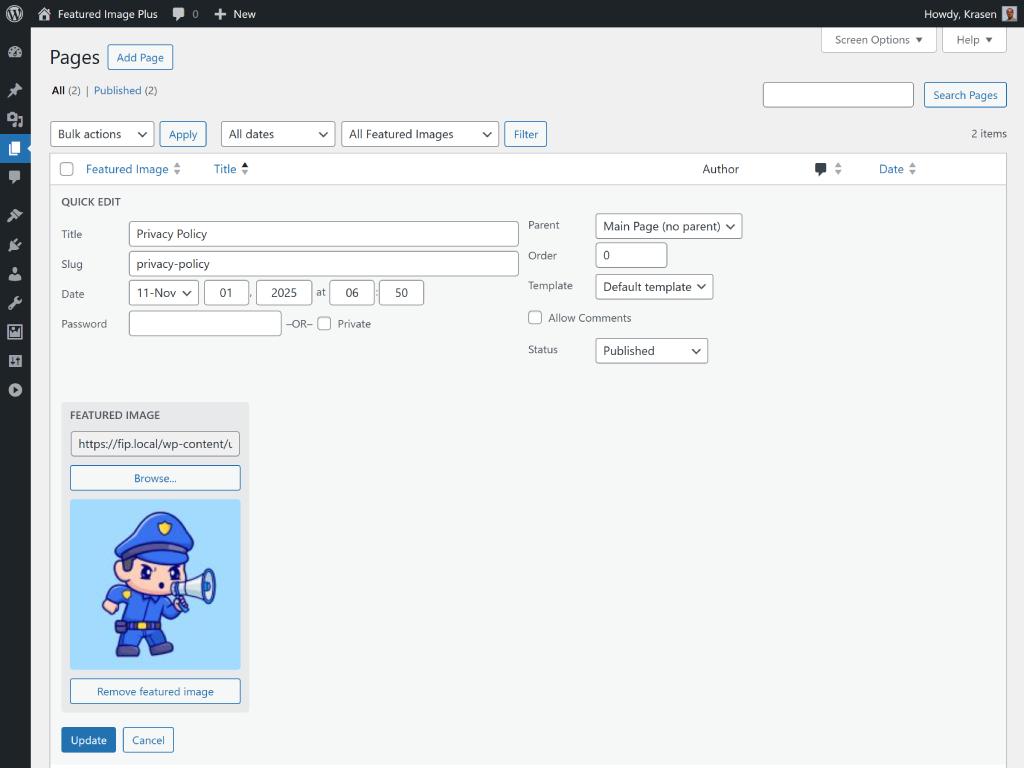
screenshot-1.(png)
Optimize your WordPress workflow with Featured Image Plus, managing featured images easily with bulk edit and Unsplash integration.
Easily manage featured images for WooCommerce Products, Custom Post Types, Pages, and Posts with our Quick & Bulk Edit features.
This plugin streamlines the process, saving you time and minimizing clicks.
Featured Image Plus works seamlessly with WooCommerce, custom post types, and standard WordPress Pages and Posts, fitting perfectly into your workflow.
Note: Third-party plugins, and custom post type features are exclusive to the Pro version.
USAGE
Need to add a default featured image to new WooCommerce Products?
No problem.
Featured Image Plus makes it easy to add a default featured image to new products in just a few clicks:
- Select the pages or posts where you want to add a default featured image.
- Choose
Bulk Action > Editand click Apply. - In the Featured Image field, click Browse and select your image.
- Click Update, and that’s it! The default image is now applied to all selected items.
Want to remove featured images from multiple posts, products, or custom posts?
This can be done in just a few steps:
- Select the posts, products, or custom posts to remove featured images from.
- Choose
Bulk Action > Editand click Apply. - Click the Remove ALL Featured Images button, and you’re all set!
Looking to streamline featured image management for WooCommerce Products, CPTs, pages, or posts?
With Featured Image Plus, you can efficiently add, edit, or remove featured images using Quick Edit:
- Click Quick Edit for the item you want to modify.
- In the Featured Image field, click Browse to select your image.
- Press Update, and you’re done!
Note: Some features are exclusive to the Pro version of the plugin.
FEATURES & LIMITATIONS
The Featured Image Plus plugin lets you:
- Pull and attach featured images for single posts using the Unsplash API with enhanced error handling.
- Test Unsplash API connection directly from settings with real-time validation.
- Manage featured image alt text with bulk editing capabilities and SEO recommendations.
- View dashboard widget with quick stats (posts with/without images, missing alt text).
- Add a default featured image to posts with one click.
- Manage featured images for multiple posts on a single screen.
- Add or remove featured images for multiple Posts or Pages.
- Handle up to 200 images with a single click.
- Navigate with an intuitive tabbed interface for Settings and Alt Text Manager.
DETAILED DOCUMENTATION
Find step-by-step setup guides, usage instructions, demos, videos, and insights on the Featured Image Plus Pro page.
FEATURED IMAGE PLUS PRO
If you’re using the free version of the plugin from WordPress.org and want Pro features, you can purchase the premium version on the Featured Image Plus Pro website.
Here are some features included in the Pro version:
- AI Image Creator with Unsplash and OpenAI DALL-E 2 integration.
- Pull and attach featured images for single posts using the Unsplash and OpenAI APIs.
- WooCommerce and third-party plugin support.
- Manage featured image visibility, position, size, and more.
- Support for all public taxonomies.
- Auto-remove and attach featured images from post content; works seamlessly with Classic, Block, and Elementor editors.
- Priority support and regular updates for one year.