Enlighter – Customizable Syntax Highlighter
by Andi Dittrich on WordPress.org
All-in-one Syntax Highlighting solution. Full Gutenberg and Classic Editor integration. Graphical theme customizer. Based on EnlighterJS.
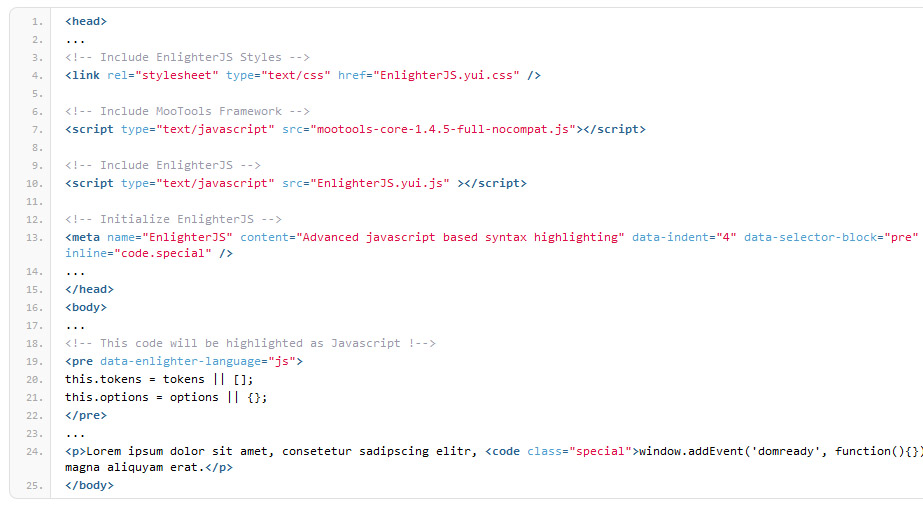
HTML highlighting Example (Enlighter Theme)
Enlighter is a free, easy-to-use, syntax highlighting tool for WordPress. Highlighting is powered by the EnlighterJS javascript library to provide a beautiful code-appearance.
Using it can be as simple as adding a new Enlighter Sourcecode block (Gutenberg) and insert the code which you want to highlight: Enlighter takes care of the rest!
An easy to use Theme-Customizer is included to modify the build-in themes without any css knowlegde!
It also supports the automatic creation of tab-panes to display code-groups together (useful for multi-language examples – e.g. html+css+js)
- Upgrade Guide for Enlighter v4
- Theme Compatibility
- Enlighter WordPress Plugin Docs
Plugin Features
- Full Gutenberg Editor Integration
- Full Classic Editor Integration (TinyMCE)
- Support for all common used languages
- Powerful generic highlighting engine for unknown/unsupported languages
- Theme Customizer
- Inline Syntax Highlighting
- Advanced configuration options are available within the options page.
- Supports code-groups (displays multiple code-blocks within a tab-pane)
- Extensible language and theme engines – add your own one.
- Simple CSS based themes
- Integrated CSS file caching (suitable for high traffic sites)
- Full GDPR compliant – no external resources are required, no data will be aggregated
Gutenberg Editor Integration
- Full Editor Integration via “Enlighter Sourcecode” block
- Inline Syntax Highlighting
- Automatic transformations for classic editor posts (codeblocks converted to Enlighter Sourcecode block)
- Transform legacy codeblocks to Enlighter Gutenberg Blocks (manual transformation)
- Docs and Usage
- Editor plugin repository
Classic Editor (TinyMCE) Integration
- Full Editor Integration via Enlighter buttons in the toolbar
- Inline Syntax Highlighting
- Tab-Indentation mode to align code with the
tabkey (single line and block selection) - Editor formats to highlight existing code
- Docs and Usage
- Editor plugin repository
- Classic Editor Live-Demo
Markdown
- Markdown fenced code blocks
- Inline Syntax Highlighting via backtick code (including language specific addon)
- Docs and Usage
Compatibility/Migration
- Crayon compatibility mode (use EnlighterJS highlighting for legacy Crayon
precodeblocks) - CodeColorer compatibility mode (use EnlighterJS highlighting for legacy CodeColorer shortcodes)
- Jetpack markdown compatibility mode (generic or raw highlighting)
- Gutenberg standard codeblock compatibility mode (no language attributes)
Extensions
- bbPress shortcode + markdown code blocks support
- Dynamic Content via
jQuery Ajax.load - Dynamic Content via
Jetpack.InfiniteScroll
Texteditor/Shortcodes (Legacy)
Shortcodes are deprecated and should be used in text editor mode only – never use them within Gutenberg Editor or Classic Editor!
- Easy to use Text-Editor mode through the use of Shortcodes and QuickTags
- Shortcodes within content, comments and widgets
- Standalone Shortcode-Processor to avoid wpautop filter issues in Text-Editor Mode
Supported Languages (build-in)
In case your language is not available try the Generic Mode which covers a lot of programming languages – or request a new language on GitHub
Related Links
Compatibility
All modern webbrowsers with enabled Javascript and HTML5 capabilities for “data-” attributes are compatible with Enlighter. It’s possible that it may work with earlier/other browsers.
- Chrome 60+
- Firefox 60+
- Safari 11+
- Edge Browser 10+