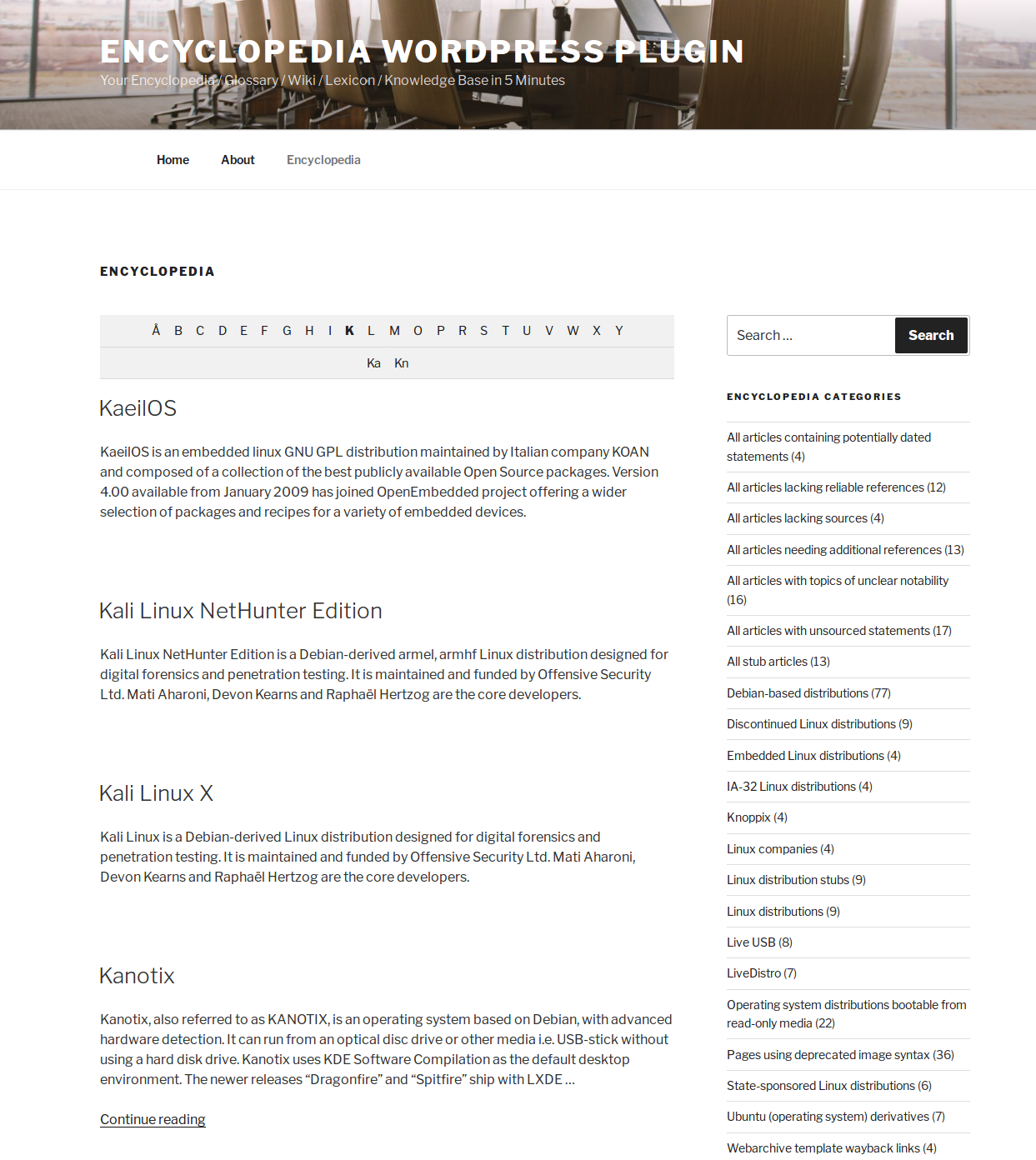
Example archive index page in TwentySeventeen theme
Encyclopedia is the state of the art WordPress Encyclopedia / Lexicon / Glossary / Wiki / Dictionary / Knowledge base / Directory / Vocabulary plugin which enables you to create, manage and present a knowledge base, completely fused in your WordPress and fully compatible with all the cool publishing tools you like. Really!
Enjoy the easy way to manage your contents with WordPress in combination with a whole bunch of smart features like automatically cross linking in your websites contents. Additionally an own glossary gives search engines more content which results in better rankings for you!
Features
- Manage and organize your items as encyclopedia, lexicon, glossary, Wiki, dictionary or knowledge base or whatever you want
- Automatically generated index page with all items, sorted alphabetically, with prefix filter on top (optional)
- Every item has its own page with unique URL
- SEO conform URL structure for all kind of pages
- Tags and categories¹ to classify your items (both tags and categories are disjunct from your post tags and post categories)
- Prefix filter (A|B|C…X|Y|Z) above single view and archive index page which allows a letter-by-letter item filtering
- Works with Latin, Arabian, Russian, Chinese, Turkish, and all other UTF-8 compliant languages!
- Automatic association of related items (based on common tags)
- Automatic linking of all your items appearing in your post and page contents (cross linking)
- You can define the window target of the links of the automatically linked items¹
- Selectable content types (pages, posts, media, custom posts types) in which the items should be linked automatically¹
- Completely translatable – .pot file is included
- Supports WPML flawless and enables you to create a multilingual knowledge base
- Supports the WordPress theme template hierarchy and the parent-child-theme paradigm
- Supports user defined HTML templates
- Supports revisions for your items – perfect if you have multiple authors¹
- Supports item comments¹²
- Supports featured images as item thumbnails¹²
- Supports excerpts for your entered items (the same way you already know from regular posts)
- Supports WordPress user rights and capabilities¹
- Supports the WordPress menus and enables you to add all components of your encyclopedia to any menu
- Supports RSS feeds for the index page and for the comments
- Clean and intuitive user interface
- Flawless integration of audio, video, multimedia elements and shortcodes in the content of your entries
- Search function for exclusive searching in encyclopedia items
- Widget to display the exclusive encyclopedia search in the sidebar
- Auto-complete and item suggestions for search phrases¹
- Automatic redirect of a user to the items page if the user searches for an exact entry title
- Widget to display the items in your sidebar
- Widget to display the tag and categories of your encyclopedia in the sidebar
- Includes a bunch of filters to give you the control of the behavior of this piece of code
- Import and export directly via the official “WordPress Importer” by Automattic Inc.
- Works great with WordPress Multisite
- Personal one-on-one real-time support by the developer¹
- No ads or branding anywhere – perfect white label solution¹
¹ Available in Encyclopedia Pro.
² Your theme needs to support this too.
Use cases
- Dictionary – Create a dictionary of specifically used items on your site.
- Tooltip – Add tooltips with descriptions to your site.
- Knowledge base – Create a knowledge base of useful articles and definitions.
- Encyclopedia – Build an internal encyclopedia for your site.
- Synonyms – Keep and displays synonyms that you are using.
- Lexicon – Build a lexicon.
- Vocabulary – Build a vocabulary of custom words and expressions.
- Explanations – Explain the meanings of words in your posts or pages.
- Translate – Translate items and definitions into any defined language using Google Translate.
- Wikipedia – Add Wikipedia content to your site.
- Videos & Media – Show YouTube / Vimeo videos in your entries.
- Music – Include mp3 voice or music files.
Getting started / First aid
- View Installation guide on WordPress.org
- View Frequently Asked Questions on WordPress.org
- View the Encyclopedia Pro documentation
- Get exclusive personal one-on-one support
Settings
You can find the settings page in your Dashboard -> Settings -> Encyclopedia.
Template files
All plugin outputs can be changed via user defined HTML templates. Just put the templates you want to overwrite inside your theme folder (no matter if parent theme or child theme). You can find the default templates in the plugin folder in “templates/”. You can find a list of the available template files in documentation of the pro version. Please do not modify the original templates! You would lose all your modifications when updating the plugin!
Questions and support requests
Please use the support forum on WordPress.org only for this free lite version of the plugin. For the pro version there is a separate support package available. Please do not use the WordPress.org support forum for questions about the pro version or questions about my services! Of course you can hire me for consulting, support, programming and customizations at any time.
Languages
- This Plugin is available in English.
- Diese Erweiterung ist in Deutsch verfügbar. (Dennis Hoppe)
- 这个插件可用于简体中文。(Robin Pang)
Translate this plugin
This plugin is community translated. You can help translate it or improve existing translations on the official translation platform.
You can find the Translation.pot file in the languages/ folder in the plugin directory. The textdomain of this plugin is “encyclopedia-lexicon-glossary-wiki-dictionary”.
Real life examples
- Wissen und Informationen über Nationalparke in Deutschland
- Junior Ranger by NNL e.V.
- Papiliorama
- BetterHealthKare
- Gründer ABC
- Pflege-Deinen-Schwanz
- BWL Lexikon
- Koenen Bauanwälte – Enzyklopädie für Vergaberecht
- Your Little Professor
- Jagdhose.net
- Kfz.net
- Waldhelden
- Wartenberg & Co
- BitcoinNews.ch
- Puzzle Box Horror
Limitations of the lite version
The most features are available but you cannot select every option. You will find a small notice for each unavailable option on the settings page. The lite version contains advertisements for third-party services and products.