
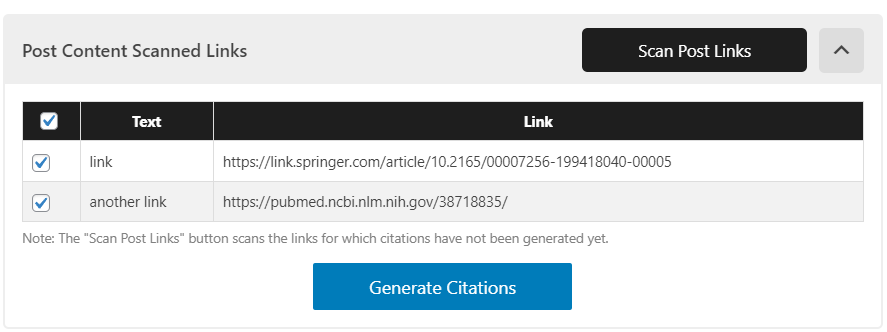
Click "Scan Post Links" to find the links within the content. Deselect any you don't want to include, then click Generate Citations
Showcasing trustworthiness is becoming more and more important for ranking on Google. Improve your SEO by demonstrating E-E-A-T through well-researched content and clear authorship.
Create People-First Content with EEAT WP
EEAT WP is designed to help authors and editors convey trustworthiness within their content, specifically as it relates to Google’s EEAT (Experience, Expertise, Authoritativeness, and Trustworthiness) Quality Rater Guideline. Trustworthiness can be demonstrated through well-researched content by qualified individuals on a given topic. To help with this, EEAT WP can:
- Automatically generate scientific MLA/APA citations based on hyperlinks within the content
- Display author knowledge and experience with custom bylines (before article) and author boxes (after article)
- Integrated author schema tells Google what your Author’s expertise (knows about) and knowledge (alumni) is
EEAT WP Plugin At A Glance
* Auto Citations: Hyperlinks can be added within the WordPress article as normal. Once your article is finalized, click “Scan Post Links” to generate full citations of the referenced hyperlinks using MLA or APA standards. Citations will automatically display at the bottom of the article (or via shortcode). All hyperlinks will be numbered in superscript; clicking the number will scroll the page down to the referenced source. Additional settings allow you to change the references header title, summary, and appearances. The free plugin is limited to 30 generated citations per month; the Pro version is unlimited.
* Author Bylines: The author byline excellently showcases Experience and Expertise. Hovering over the author name or photo displays an occupation title, short bio, skillset, and social profiles, all of which are added in the settings. The job title, skill sets, and social profiles are directly tied into the author schema, giving Google a direct view into who you are.
* Author Boxes: Author Boxes are similar to bylines, also providing author schema on the backend, but are placed at the end of an article. Rather than relying on a user to hover over the author name, Author Boxes display the full bio, title, skills, and social profiles by default. Author boxes are a great way to display your author’s EEAT to readers.
* Full Appearance and Typography Control: Author Bylines and Boxes can both be activated in settings to display on all posts by default, or you can choose to use shortcodes. Font size and colors are available for Bylines, and font size, colors, borders, and background colors are available for Author Boxes and Citations.
EEAT WP Pro Features
- Auto Citations (Unlimited): Same functionality for Auto Citations, but with unlimited use. No monthly caps on the API.
Guest Author:** Avoid the need to create a new user manually; simply add the Guest Author’s content into an article and add their name in the Guest Author box. Provides a simple and straightforward way to properly credit another user’s content who won’t be a frequent contributor. - Co-Author: Assign multiple authors to a single article, complete with Author Byline, Author Box, and Author Schema integration. Author byline will dynamically add multiple authors in a consolidated view. Particularly helpful for large pieces of content that’s thoroughly researched.
- Reviewed By: Having content reviewed by a knowledgeable subject matter expert is an excellent way to show trustworthiness. For the website owner, it’s typically more cost effective to have, let’s say a Registered Nurse, review a medical article, rather than having them write it. This functionality allows you to display who reviewed the content versus who wrote it. In addition to saying “reviewed by”, a checkmark is applied next to the Reviewer’s name and title.
Credits & 3rd Party Services
- api.citeas.org: EEAT WP uses an MIT Licensed API from CiteAs.org to generate citations. CiteAs uses a pattern of web-based searches to try to discover and represent the best way to cite a given scholarly artifact. CiteAs is a small part of a collaborative grant between OurResearch and James Howison at the University of Texas-Austin. API Documentation | Terms of Use, Privacy Policy & More Details
- EEATWP.com: EEAT WP uses its own website as an API to communicate general details like About us section of the plugin, version updates, etc. Terms & Policies
- jQuery: This plugin uses jQuery which is a javascript library to simplify HTML DOM tree traversal and manipulation, as well as event handling, CSS animations, and Ajax.
- Select2: This plugin uses Select2 which is a jQuery based replacement for select boxes.
- CodeMirror: This plugin uses CodeMirror which is a JavaScript component that provides a code editor in the browser.


