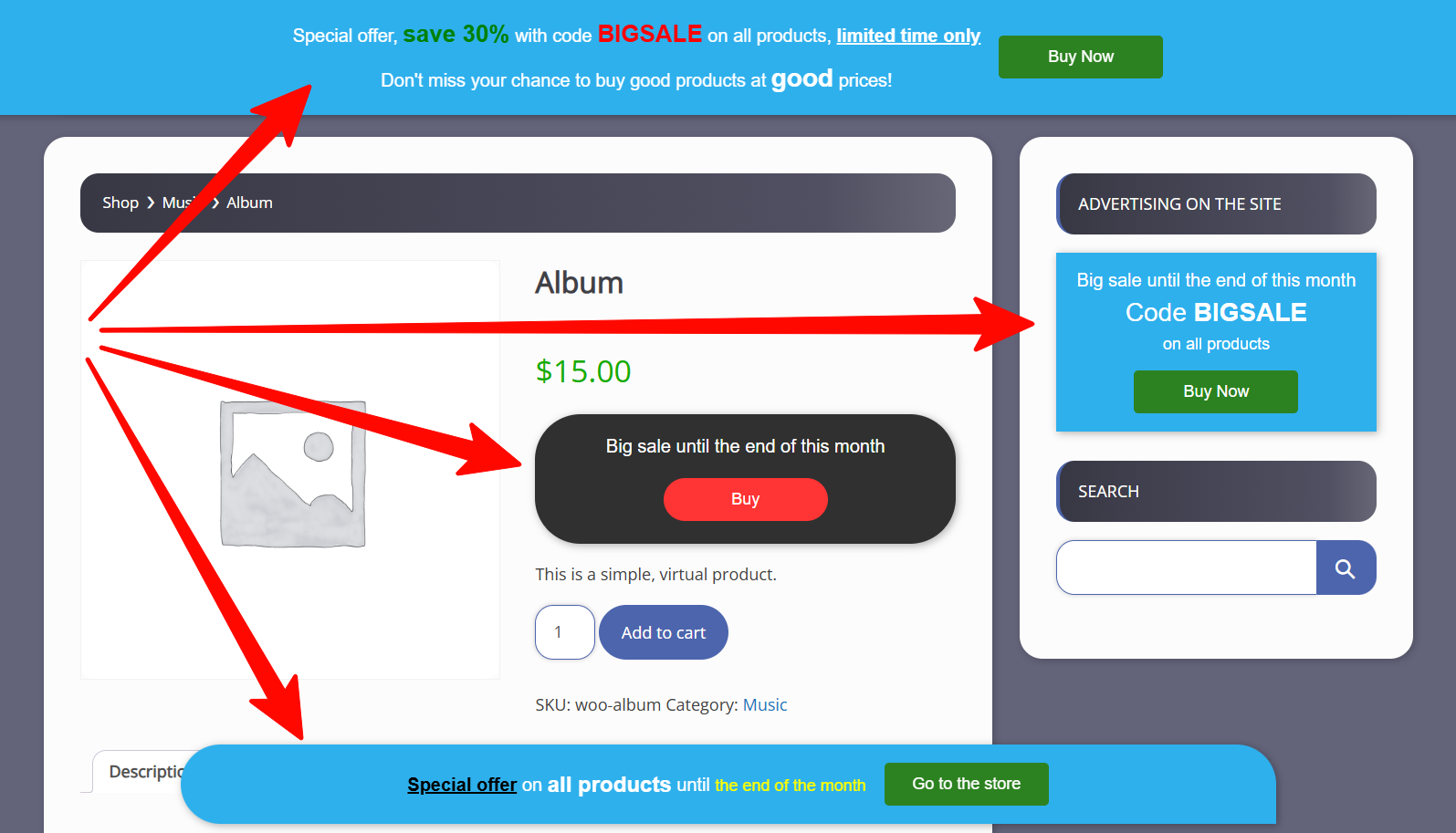
Display banner in bottom bar, top bar, widgets and WooCommerce product page (front view)
Live demo – DMC Promo Banner
DMC Promo Banner is the easiest way to add promotional banners, announcements, messages, informational notices, notifications, advertising promotions, and special offers to your site.
DMC Promo Banner displays eye-catching banners with text and a button. You can place the universal banner in the header or footer, on WooCommerce pages, or insert it via a widget or shortcode. Choose a ready-made banner design, add your text, and customize the action button.
The premium version includes a countdown timer to create a sense of urgency (FOMO). You can also schedule the banner to appear or disappear automatically based on a timer.
DMC Promo Banner is great for boosting sales through discount promotions, special offers, and FOMO marketing.
You can set up 5 separate banners
- Top sticky banner (Top Bar)
- Bottom sticky banner (Bottom Bar)
- Banner via shortcode
- Banner via widget
- Banner for WooCommerce
Top bar is displayed on all pages of the site and can be set as sticky when scrolling.
Bottom bar is also displayed on all pages. It is always sticky and its position can be customized (left, right, center, or full width).
Widget allows you to display a sales or notification banner in your sidebars.
Shortcode lets you insert a sale banner into any text editor — for example, in posts, pages, category descriptions, products, and more.
Special WooCommerce module allows you to choose the placement of the advertising banner on the product page. You can also set its placement on the product list page, cart page, order page, and user account page.
What else can be customized?
- Display options (desktop, mobile, or both)
- Choice of ready-made designs
- Background image
- Rounding banner corners
- Limiting banner width
- Adding margins and padding
- Vertical or horizontal orientation
- Text editor for text (color and size changes included)
- Adding an action button
The premium version includes
- Visual countdown timer
- Turn on and off by timer
- 20 additional designs
- Changing the order of elements
- Selecting fonts (40 handpicked google fonts)
- Changing the banner background color
- Selecting color for timer and button
- Selecting size for timer and button
- Button action on product page
- Flexible selection of pages for banner display
- Flexible selection of WooCommerce pages for banner
Peculiarities
- Easy to use, no coding required
- Translated into 20+ languages
- Flexible and functional settings
- Fully responsive on all mobile devices
- SEO-optimized with proper headings and markup
- Clean code, no frameworks, minimal scripts
- Compatible with WooCommerce and Elementor
Examples of use
- Using the top bar, publish a notification for store visitors – Our store will open soon
- Using the bottom bar, write a message for customers – Big sale starting soon
- Using WooCommerce pages, display a promotion – Get 20% off when purchasing this product
- Using a shortcode, leave a information for users – This section is temporarily closed for moderation
- Using a widget, place an announcement for website visitors – Content manager required for the news section
Support
If you have any difficulties, please contact our technical support for the DMC Promo Banner plugin, and we will definitely help you.