
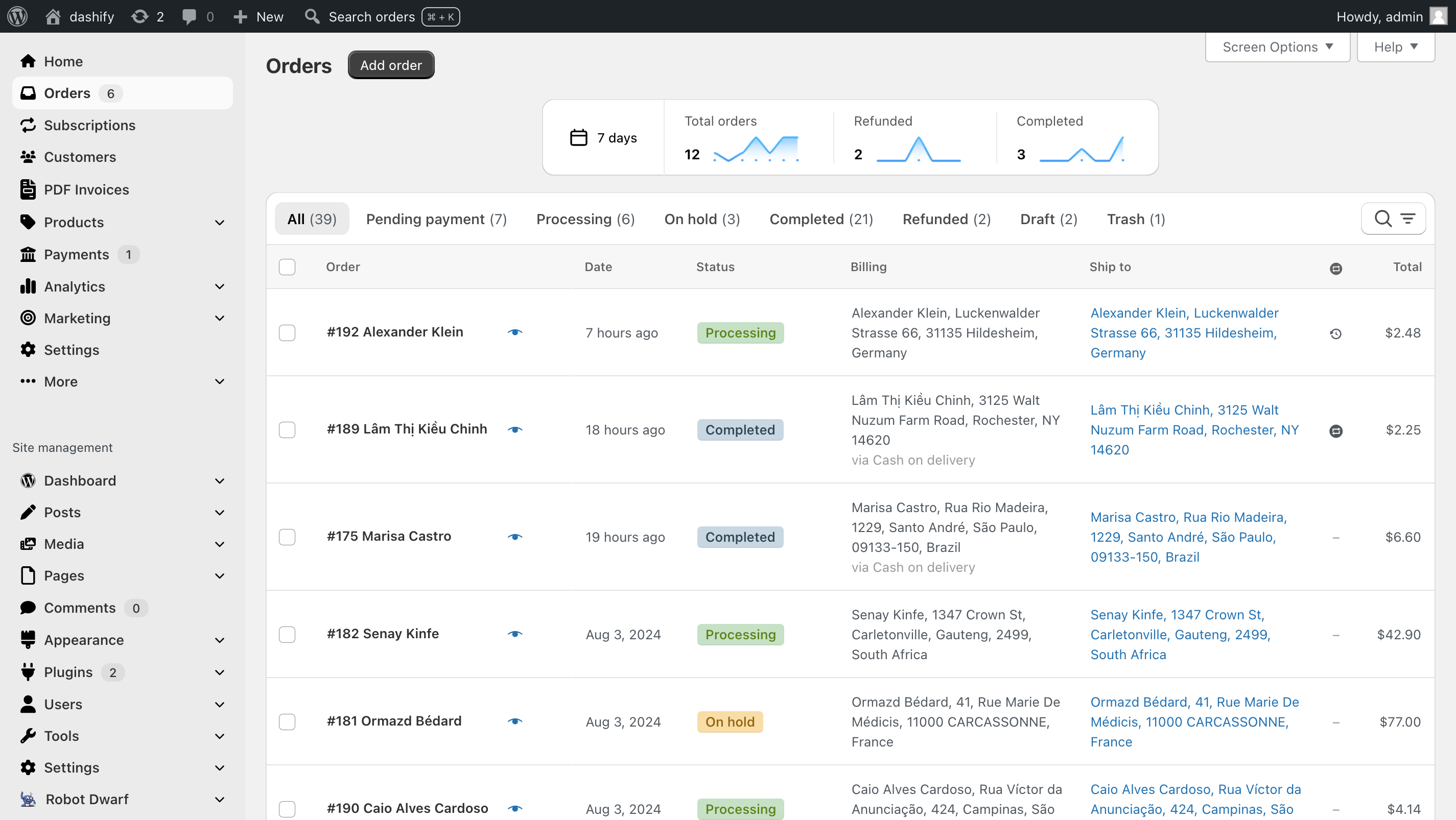
Dashify removes the clutter from the order list, gives it a modern style, and adds order trend graphs. Dashify also replaces the standard WordPress admin navigation with an ecommerce-focused one that makes all the WooCommerce menu items easily visible.
Dashify brings a modern design and UI to the WooCommerce admin. Manage, search, and navigate orders faster.
Just activate Dashify, and you’re all set! Your existing WordPress admin turns into a beautiful, ecommerce-focused admin panel. No configuration necessary.
Features
Dashify doesn’t just give a fresh look to the WooCommerce admin—it also adds new functionality, marked with a star ⭐ below!
WooCommerce-focused admin menu
- Clear separation of WooCommerce from other WordPress menu items.
- “Orders” and other WooCommerce submenu items are moved to the main admin menu, making them easier to find.
- The navigation gets a modern style inspired by other popular apps (Shopify, Notion, Stripe).
- Compatible with Admin Menu Editor.
- If a plugin adds a menu item, you’ll find it in Dashify’s navigation too.
- Doesn’t suit your store? You can turn it off without affecting the rest of Dashify.
⭐ Order trend graphs
- See trends with a graph of total, refunded, and completed orders above the order list.
- For WooCommerce Subscriptions, see subscription revenue, the number of new subscriptions, and the number of cancelled subscriptions.
- Choose between Today, Last 24 hours, 7 and 30 day time periods.
Order list
- Order status filters are big and easy to click.
- Bulk actions appear only when at least one item is selected, and they are sticky as you scroll the order list.
- The search bar and filters are grouped together, only visible when in use, and can be opened with the “F” keyboard shortcut.
- Filters can be cleared all at once, or one at a time.
- Table is fully responsive to screen size and works well on mobile devices.
Order view/edit
- Switching from Shopify to WooCommerce? Manage orders in a Shopify-like UI.
- ⭐ Next and previous order buttons with keyboard shortcuts.
- ⭐ Jump to orders of the same status. Based on the order status selected in the order list, after clicking into an order, the next and previous buttons will go to the next or previous order of the same status.
- ⭐ Date and time formatted according to region.
- ⭐ Back button to get back to the order list.
- Order number, status, and date are moved to the top for visibility.
- Action and update buttons are grouped together at the top.
- Order notes become a Timeline.
- Timeline text box automatically expands as you type more.
Dashify Pro
Dashify Pro brings even more improvements to the WooCommerce admin.
- Get the Dashify theme on more WooCommerce pages. With Dashify Pro, the product list and WooCommerce settings are also styled. More pages coming soon! Check out the roadmap for details.
- ⭐ Find orders quickly with global search. Dashify Pro adds a “Search orders” button to the WordPress admin toolbar, allowing you to find an order by ID, customer name, email, phone, or product SKU within an order. This AJAX search is faster because it doesn’t require a full page reload, unlike the standard WooCommerce order search. It also shows recent orders so you can jump to those quickly.
- ⭐ Hide specific custom fields in orders and subscriptions. You can mark custom fields as hidden, and then they won’t show in any order or subscription edit view.
- ⭐ Sort order line items by SKU. When packing orders with many items, this helps you find items faster if they’re also sorted by SKU in your warehouse or fulfillment center.
- ⭐ Sort order line items by product menu order. The items in a customer’s order can be sorted the same as they appear in the admin product list “Sorting” view and on the Shop page.
Compatibility
Dashify should work with most plugins for the WooCommerce admin.
Here are the plugins we’ve extensively tested and designed Dashify to be compatible with:
- WooCommerce Subscriptions
- Admin Menu Editor — Janis Elsts
- PDF Invoices & Packing Slips for WooCommerce — WP Overnight
- WooCommerce PDF Invoices, Packing Slips, Delivery Notes and Shipping Labels — WebToffee
- Payment Plugins for Stripe WooCommerce — Payment Plugins
- RD Order Modifier for WooCommerce — Robot Dwarf
- Order Tags — 99w
- PW WooCommerce Gift Cards — Pimwick, LLC
- Smash Balloon Social Photo Feed — Smash Balloon
- FiboSearch — FiboSearch Team
- Ultimate Dashboard — David Vongries
If you find a plugin that’s not compatible, leave a message in the WordPress.org support forum or contact us through the Dashify Help Desk, and we’ll gladly add compatibility for it.
You can turn Dashify on and off quickly through the WordPress screen options in case you have occasional plugins or workflows not currently supported by Dashify.
Troubleshooting
- If the order edit layout doesn’t look right, whether Dashify is on or off, turning it on/off again through the screen options will reset the layout.