Dashboard Widgets for LearnDash
by Escape Creative on WordPress.org
Simple, informative, beautifully-designed Dashboard widgets for your LearnDash-powered site. Quick stats at a glance, plus helpful links for faster ad …

The LearnDash Overview widget
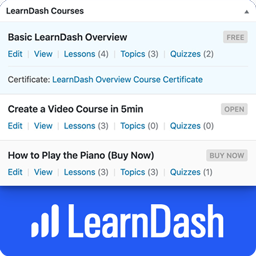
Dashboard Widgets for LearnDash adds 4 widgets to the Dashboard page in your WordPress admin area — Overview, Courses, Links & Recently Modified.
- The LearnDash Overview widget shows you the total number of courses, lessons, topics, certificates, quizzes, questions, assignments, essays & groups.
- The LearnDash Courses widget displays a list of up to 10 courses, with handy stats & quick links to edit content that belongs to that course.
- The Links widget exposes most internal LearnDash pages for quick navigation.
- The Recently Modified widget displays the 3 most recently modified courses, lessons & topics. Links are available to edit content, open the course builder or access the individual course settings page.
NOTE: By default, only Administrators will see the widgets. See the FAQ below about “user/role permissions” to learn how to enable them for additional users.
LearnDash Overview Widget
The Overview widget provides the following information:
- Total Courses
- Total Lessons
- Total Topics
- Total Certificates
- Total Quizzes
- Total Questions
- Total Assignments
- Total Essays
- Total Groups
- Total Group Leaders
Clicking on each total will take you to the admin page that lists out the respective content.
LearnDash Courses Widget
The Courses widget provides a scrollable list of up to 10 courses. The information displayed depends on the user’s capabilities & access to certain admin pages. I’ll explain each piece of information below.
Visible to all:
- Course Title
- Course Status (draft, scheduled, pending review, etc.)
- Course Price Type
- Course Scheduled Date (if course is scheduled for a future date)
- “View” link
Visible if user has BOTH edit_courses AND edit_published_courses capabilities:
- “Edit” link (to edit the course)
Visible if user has edit_courses capability:
- Links to Lesson/Topic/Quiz list pages, along with the total number associated with the course
- Certificate Title, with a link to edit it (if a certificate has been associated with the course)
Visible if user has list_users capability:
- “Students” link that displays the list of users who are enrolled in that course
LearnDash Links Widget
The Links widget contains the following sections, each with their own set of links to different admin pages.
LearnDash Settings
General | Registration | Payments | Emails | Custom Labels | Support
Courses
View All | Add New | Settings | Categories | Tags
Lessons
View All | Add New | Settings | Categories | Tags
Topics
View All | Add New | Settings | Categories | Tags
Quizzes
View All | Add New | Settings | Essays: Graded | Not Graded
Assignments
View All | Approved | Not Approved | Settings
Groups
View All | Add New | Settings | Administration | Group Leaders
Visibility & Permissions
Who sees each section, as well as the links within each section, will depend on a few things. Here are the important things to know:
- LearnDash Settings: Only visible to users with the manage_options capability, which by default, is only Administrators.
- Courses & Lessons: Only visible to users with the edit_courses capability.
- Topics & Quizzes: First, you must have at least one published Topic or Quiz for each section to be displayed. Then, they’re only visible to users with the edit_courses capability.
- Course/Lesson/Topic/Quiz/Assignment Settings: Only visible to users with the manage_options capability.
- Categories & Tags: Only visible to users with the manage_categories capability.
- Essays: At least one essay must exist. Then, only visible to users with the edit_essays capability.
- Assignments: At least one assignment must exist. Then, only visible to users with the edit_assignments capability.
- Groups: At least one group must exist. Then, only visible to users with the edit_groups capability.
- Group Administration: Only visible to Group Leaders.
- Group Leaders: Only visible to users with the list_users capability.
LearnDash Recently Modified Widget
This widget displays the 3 most recently modified courses, lessons, topics, and quizzes.
For Courses, you can navigate directly to “Edit,” “Builder” or “Settings.”
For Lessons, Topics, and Quizzes, each title links directly to the edit page for that piece of content.
It also includes the last modified date/time (i.e. 3 days ago, 5 months ago, etc.).
Other Features
- Just like all Dashboard widgets, they can be hidden by unchecking their respective boxes under “Screen Options”
Tested with LearnDash 3.6.0.3
Roadmap
There is no scheduled roadmap, but if you have any suggestions, please let us know in the support forum.
From within WordPress
- Visit “Plugins > Add New”
- Search for “Dashboard Widgets for LearnDash”
- Click the “Install” button
- Click the “Activate” button


