Conditionally display featured image on singular posts and pages
by cyrillbolliger on WordPress.org
Easily control whether the featured image appears in the single post or page view (doesn't hide it in archive/list view).
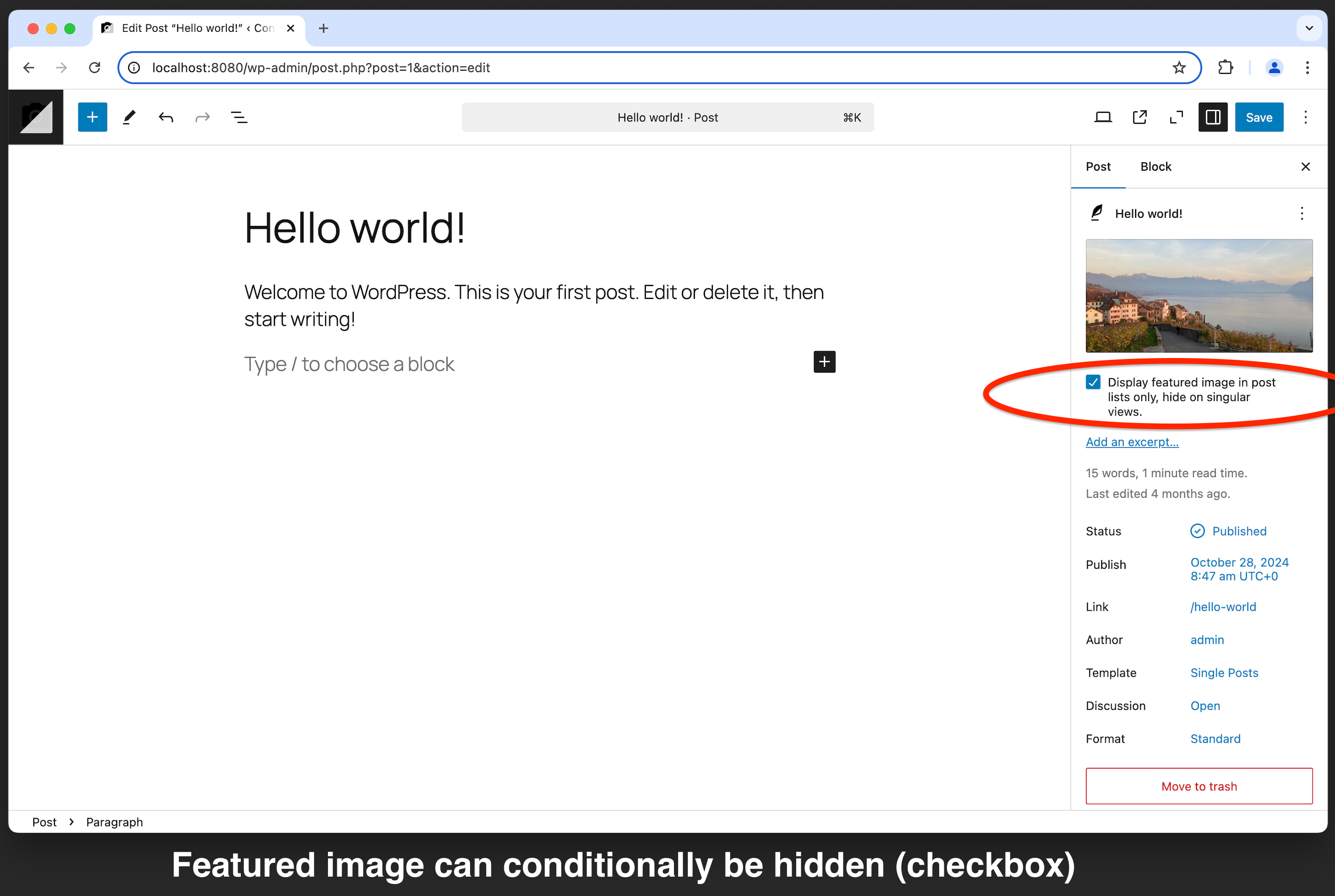
Backend (Block Editor)
Easily control the visibility of the featured image on singular posts and pages–while keeping it visible in archive pages, query loops, and other list views. This plugin provides a simple checkbox option within the post editor, allowing you to enable or disable the display of the featured image on individual posts and pages.
Key Features
- Show or hide the featured image on singular pages and posts.
- Seamlessly integrates with the WordPress post editor.
- Simple checkbox toggle—no technical knowledge needed.
- Compatible with most themes.
- Supports WooCommerce product pages.
- Lightweight and optimized for performance.
- 100% free—no ads, no upsells, no premium versions!
Perfect for bloggers, content creators, and developers who want precise control over the visibility of featured images on a per-post basis.
Important Notice
If your theme uses a custom method to load the featured image (such as the Twenty Seventeen theme), this plugin may not work. To ensure compatibility, use standard WordPress functions like get_the_post_thumbnail(), wp_get_attachment_image(), or the Post Featured Image block.
Additionally, by default, this plugin only hides the featured image when it is loaded inside the loop. If your theme loads it outside the loop check out the first FAQ entry for a solution.